iOS 10 Beta 5 Tidbits: New Lock Screen Sound, Widget Tweaks, and More - MacRumors
Skip to Content

iOS 10 Beta 5 Tidbits: New Lock Screen Sound, Widget Tweaks, and More

Apple today released new versions of iOS 10 to both developers and public beta testers, and as with any major beta update, there are several small changes and tweaks that have been implemented as Apple works to refine the operating system ahead of its release this fall.

Today's update, available as an over-the-air download for those who installed the first four betas or the beta configuration profile, features a new Lock screen sound, tweaks to the Control Center and widgets screen, and more.

We've rounded up some of the biggest changes in beta five in the video below, so make sure to check it out to get a quick look at what's changed. We're also listing all of the changes in the post below.


Smart Battery Case - The iPhone 6 and 6s should now work properly with Apple's Smart Battery Case. According to the iOS 10 release notes, the case will no longer cause devices to panic.

Photos - Apple plans to reprocess facial recognition data in beta 5, so all named, favorited, and merged face data will be reset.

Lock sound - There's a new sound when locking the iPhone. It sounds like a door closing.

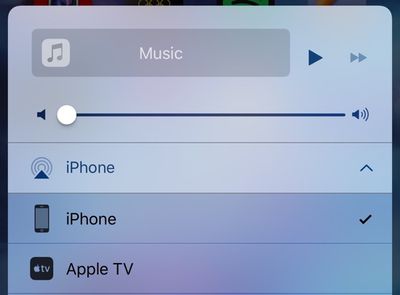
New Output icon - The output icon seen in the Control Center, the Music app, and other locations in iOS has been slightly tweaked. It is no longer represented by headphones and instead resembles a triangle with sound waves.
controlcentericons
Settings - The "Home" section in the Settings app has been removed on the iPhone, as it served no purpose, but it remains available on the iPad.

Widgets - The new widgets panel, accessible by swiping to the right, now displays the date on all devices.


Related Forum: iOS 10

Popular Stories

iOS 26

iOS 26.4 Adds Two New Features to CarPlay

Tuesday March 24, 2026 1:55 pm PDT by
iOS 26.4 was released today, and it includes a couple of new features for CarPlay: an Ambient Music widget and support for voice-based chatbot apps. To update your iPhone 11 or newer to iOS 26.4, open the Settings app and tap on General → Software Update. CarPlay will automatically offer the new features so long as the iPhone connected to your vehicle is running iOS 26.4 or later....
Apple Business hero

Apple Unveils 'Apple Business' All-in-One Platform

Tuesday March 24, 2026 8:53 am PDT by
Apple today announced Apple Business, a new all-in-one platform that unifies device management, productivity tools, and customer outreach features. The service is designed to be a consolidated replacement for several of Apple's existing business-focused offerings, including Apple Business Essentials, Apple Business Manager, and Apple Business Connect. It provides organizations with a single...
AirPods Pro Firmware Feature

Apple Releases New Firmware for AirPods Pro 3, AirPods Pro 2 and AirPods 4

Tuesday March 24, 2026 12:31 pm PDT by
Apple today released new firmware for the AirPods Pro 2, AirPods Pro 3, and the AirPods 4. The firmware has a version number of 8B39, up from 8B34 on the AirPods Pro 3, 8B28 on the AirPods Pro 2, and 8B21 on the AirPods 4. There is no word on what's included in the firmware, but Apple has a support document with limited notes. Most updates are limited to bug fixes and performance...

Top Rated Comments

LoveToMacRumors Avatar
126 months ago
I really hate the fact that there's a separate page for music on the control center...
Score: 26 Votes (Like | Disagree)
126 months ago
Up, Up, Down, Down, Shake iphone Left, Right, Left, Right. Yes! Music successfully paused
Score: 23 Votes (Like | Disagree)
LordQ Avatar
126 months ago
Oh, Apple...


Attachment Image
Score: 17 Votes (Like | Disagree)
Porco Avatar
126 months ago
Up, Up, Down, Down, Shake iphone Left, Right, Left, Right. Yes! Music successfully paused
Hadoken!!

I wish they weren't messing with Control Center so much. It's like when Exposé was perfect in about OS X Leopard, then they started messing about with it and ruined its brilliance, even if you could technically do more things. I'd love to have options for customising it more, but once you start having to scroll and swipe, you might as well be back in settings, so it defeats the object.


New Output icon - The output icon seen in the Control Center, the Music app, and other locations in iOS has been slightly tweaked. It is no longer represented by headphones and instead resembles a triangle with sound waves.
For what possible reason might they want to avoid people's attention being drawn to the subject of headphones?! :confused::rolleyes:;)
Score: 10 Votes (Like | Disagree)
tigres Avatar
126 months ago
Sorry, is it me or is this now awkward the way the dock is displaying the blurs?


Dude
I think someone's trying to reach you. Just sayin
Score: 9 Votes (Like | Disagree)
appleofmy"i" Avatar
126 months ago
Holy cow...I can not stand the amount of complainers on Macrumors anymore. Guys, cheer the heck up.
Score: 8 Votes (Like | Disagree)