Photo Editing App 'Prisma' Now Supports Offline Picture Processing - MacRumors
Skip to Content

Photo Editing App 'Prisma' Now Supports Offline Picture Processing

by

Popular photo manipulation app Prisma has been updated to allow offline processing of images for the first time.

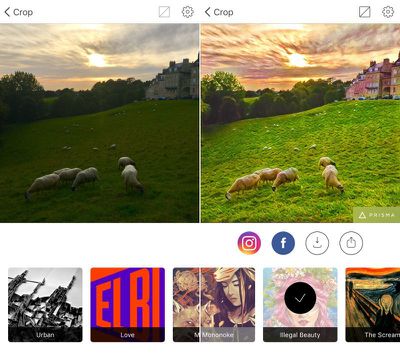
The photo app recreates images in the style of famous artists and gives shots a painterly aesthetic using neural networks, but up until now users needed an internet connection and had to wait for the app's Moscow-based servers to process their pictures.
prisma
The latest update doesn't bring offline mode to the whole collection of Prisma's filters, but the developers say more is to come on that front, and the change means server-side video manipulation is just around the corner.

"Now that we've implemented neural networks right to the smartphones, we have enough server capacity to run full videos on them in the near future," said the Prisma team.

Prisma Labs says "repainting" times have been reduced to five seconds on Apple's latest iPhones and that there should be no increase in handset battery usage.

Prisma is a free download on the App Store for iPhone and iPad. [Direct Link]

Top Rated Comments

Telos101 Avatar
127 months ago
That's pretty neat looking app. What exactly do they mean by neural networks here?
It's similar to what Google did with their DeepDream stuff: https://en.wikipedia.org/wiki/DeepDream


Attachment Image
Score: 5 Votes (Like | Disagree)
rhoydotp Avatar
127 months ago
What exactly do they mean by neural networks here?
It's pretty interesting ... here's a good very basic read

http://www.dummies.com/how-to/content/how-predictive-analysis-neural-networks-work.html

it sounds like that the bulk of the processing can be done directly on the device as supposed to a background task in their servers.

this is my guess ... anybody else can elaborate?
Score: 2 Votes (Like | Disagree)
rhett7660 Avatar
127 months ago
It's a really nice photo filter app. I got it a few weeks ago when I first saw it on here. I just wish you could do photos in native rectangular format instead of only Instagram square. Also, no logo on the finished photo would be nice.
For the logo, open the app, click on the gear icon in the upper right hand corner, and disable the "enable watermarks". No more watermarks.
Score: 1 Votes (Like | Disagree)
127 months ago
It's a really nice photo filter app. I got it a few weeks ago when I first saw it on here. I just wish you could do photos in native rectangular format instead of only Instagram square. Also, no logo on the finished photo would be nice.
Score: 1 Votes (Like | Disagree)
macduke Avatar
127 months ago
This is a pretty neat app, actually. Since it uses neural networks, many of the effects don't look like a typical computer filter as they're much smarter than that. My only gripe is that I wish I could touch it up. There was one area on my chin where it lost contrast from the rest of my beard and made a bunch of hairy brush strokes anyway which really looked out of place. But overall it's great and a lot of fun!
Score: 1 Votes (Like | Disagree)

Popular Stories

Apple Event Logo

Apple's Next Era Begins September 1

Thursday May 7, 2026 10:36 am PDT by
Apple recently announced that Tim Cook will be stepping down as CEO later this year, after 15 years of leading the company. Effective September 1, Apple's hardware engineering chief John Ternus will become the company's next CEO, while Cook will become executive chairman of Apple's board of directors. In his new role, Apple said Cook will assist with "certain aspects" of the company,...
Four iPhone 18 Pro Colors Mock Feature

iPhone 18 Pro Launching in September With These 10 New Features

Saturday May 9, 2026 6:03 am PDT by
While the iPhone 18 Pro and iPhone 18 Pro Max are not launching until September, there are already plenty of rumors about the devices. It was initially reported that the iPhone 18 Pro models would have fully under-screen Face ID, with only a front camera visible in the top-left corner of the screen. However, the latest rumors indicate that only one Face ID component will be moved under the...
MacBook Pro Low Angle Wide Lens

macOS 27: Two More Changes Leaked Ahead of WWDC Next Month

Sunday May 10, 2026 9:45 am PDT by
macOS 27 will have a "slight redesign" compared to macOS Tahoe, along with an option to automatically group tabs in Safari, according to Bloomberg's Mark Gurman. In his Power On newsletter today, Gurman said the design changes will help to address some of the criticism surrounding macOS Tahoe's new Liquid Glass interface. In particular, the changes should improve overall readability....