
With macOS Sierra, Apple is aiming to make it easier to access all of your content across multiple devices, expanding iCloud Drive to encompass the desktop and documents folder of every Mac.

This feature puts all of the files stored either on the desktop or in the documents folder in iCloud, making them available on iOS devices, Macs, and iCloud.com for easy access to your most recent files wherever you are.
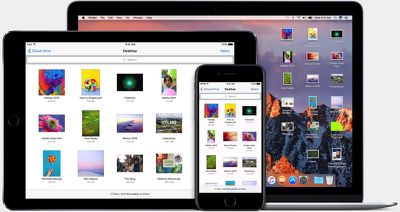
iclouddrivemacosierra
Turning on the new iCloud feature is done when setting up macOS Sierra. When you install the new operating system, Apple will ask if you want to enable iCloud storage for the desktop and documents folder and will let you know how much iCloud storage space it will take up.

If you have a lot of files on your desktop or in the documents folder, it can take up a significant amount of space, so you might need to do some file cleanup before enabling it.

If you want to enable the feature later or turn it off at some point, you can do so by going to System Preferences --> iCloud --> iCloud Drive --> Options ---> and checking or unchecking "Desktop & Documents Folders" in the list of apps allowed to upload data to iCloud Drive.
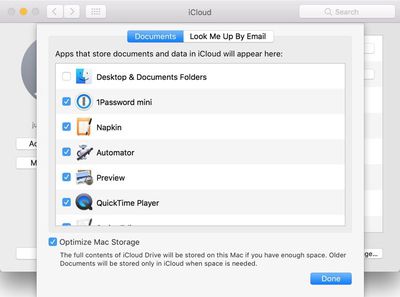
icloudoptions
On Macs and iOS devices, the contents of the desktop and documents folder can be accessed through the iCloud Drive app. On iCloud.com, the files can be accessed through the iCloud Drive folder that's available once you're signed in. If you have a Windows machine, your Mac files will be able to be downloaded through the iCloud for Windows app.
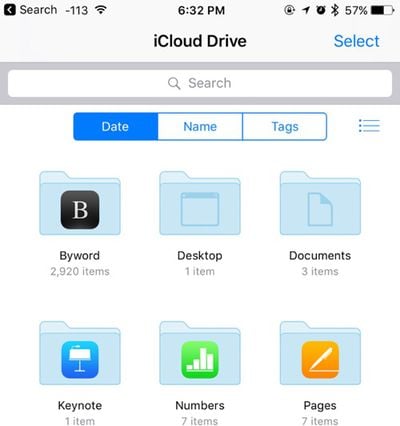
iclouddrive
The new iCloud storage options in Sierra bring Macs more in line with iOS devices, which use iCloud Drive for all file storage purposes. macOS Sierra is available for free starting today.


Related Forum: macOS Sierra

Top Rated Comments

zorinlynx Avatar
123 months ago
I strongly suggest NOT using the optimize storage feature! Not only will this remove the files from your Mac, but it'll keep the files from being backed up with Time Machine.

You will literally be trusting iCloud *completely* to store your important files. Definitely NOT a good idea!

Keep Optimize Storage off. Back up your data. It's only a matter of time before someone gets bitten by this.
Score: 14 Votes (Like | Disagree)
CamiMR Avatar
123 months ago
How about an option to sync Desktop only, and not Documents, does that exist?
Score: 4 Votes (Like | Disagree)
Born Again Avatar
123 months ago
Need more macOS articles
Score: 3 Votes (Like | Disagree)
jpn Avatar
123 months ago
i find it incredibly pushy on apple's part to have Optimization turned on by default (see original post screen shot bottom).
installing macOS Sierra has this on by default.
Score: 3 Votes (Like | Disagree)
4God Avatar
123 months ago
Need more macOS articles
Need more Macs.
Score: 2 Votes (Like | Disagree)
gim Avatar
123 months ago
The darn Developer Beta deleted my local files once they were uploaded though, and then it was a total pain to redownload them. literally took a couple days.. What a pain. hope they fixed that for the public version, but be careful all.
Haha, the release version still does that, so be careful. Thing is, I lost all my files because the iCloud upload wasn't finished when I turned the feature off again. Great.
Score: 2 Votes (Like | Disagree)

Popular Stories

Apple Logo Zoomed

Tim Cook Teases Plans for Apple's Upcoming 50th Anniversary

Thursday February 5, 2026 12:54 pm PST by
Apple turns 50 this year, and its CEO Tim Cook has promised to celebrate the milestone. The big day falls on April 1, 2026. "I've been unusually reflective lately about Apple because we have been working on what do we do to mark this moment," Cook told employees today, according to Bloomberg's Mark Gurman. "When you really stop and pause and think about the last 50 years, it makes your heart ...
Finder Siri Feature

Why Apple's iOS 26.4 Siri Upgrade Will Be Bigger Than Originally Promised

Friday February 6, 2026 3:06 pm PST by
In the iOS 26.4 update that's coming this spring, Apple will introduce a new version of Siri that's going to overhaul how we interact with the personal assistant and what it's able to do. The iOS 26.4 version of Siri won't work like ChatGPT or Claude, but it will rely on large language models (LLMs) and has been updated from the ground up. Upgraded Architecture The next-generation...
wwdc sans text feature

Apple Rumored to Announce New Product on February 19

Thursday February 5, 2026 12:22 pm PST by
Apple plans to announce the iPhone 17e on Thursday, February 19, according to Macwelt, the German equivalent of Macworld. The report, citing industry sources, is available in English on Macworld. Apple announced the iPhone 16e on Wednesday, February 19 last year, so the iPhone 17e would be unveiled exactly one year later if this rumor is accurate. It is quite uncommon for Apple to unveil...
iOS 26

iOS 26.3 and iOS 26.4 Will Add These New Features to Your iPhone

Tuesday February 3, 2026 7:47 am PST by
While the iOS 26.3 Release Candidate is now available ahead of a public release, the first iOS 26.4 beta is likely still at least a week away. Following beta testing, iOS 26.4 will likely be released to the general public in March or April. Below, we have recapped known or rumored iOS 26.3 and iOS 26.4 features so far. iOS 26.3 iPhone to Android Transfer Tool iOS 26.3 makes it easier...
iphone 17 pro dark blue 1

iPhone 18 Pro Max Rumored to Deliver Next-Level Battery Life

Friday February 6, 2026 5:14 am PST by
The iPhone 18 Pro Max will feature a bigger battery for continued best-in-class battery life, according to a known Weibo leaker. Citing supply chain information, the Weibo user known as "Digital Chat Station" said that the iPhone 18 Pro Max will have a battery capacity of 5,100 to 5,200 mAh. Combined with the efficiency improvements of the A20 Pro chip, made with TSMC's 2nm process, the...















