
macOS Sierra and iOS 10: Universal Clipboard for Cross Device Copy/Paste - MacRumors
Skip to Content

macOS Sierra and iOS 10: Universal Clipboard for Cross Device Copy/Paste

by

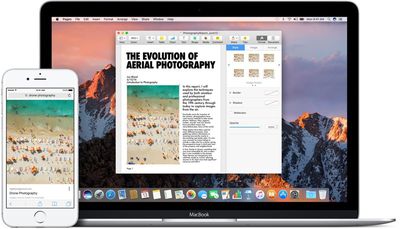
New in macOS Sierra and iOS 10 is a Universal Clipboard feature that makes it much easier to transfer links, text, photos, and more between different devices. With Universal Clipboard, you can copy something on your Mac and paste it on your iPhone, or vice versa.

It's already been possible to open up web pages across multiple devices, but now that functionality has been extended further. With macOS Sierra and iOS 10, when you copy a link on one device, it's uploaded to iCloud and available on all other devices where you're signed in with your Apple ID. You can do things like look up a recipe on your Mac, copy the text, and paste it on your iPhone, or copy a photo from an iPhone to an iPad.

Using the feature is as simple as copying something on one device, switching over to another device, and hitting "Paste." It can sometime takes a second or two for the copy to register, but it works seamlessly. There are no visual indicators for Universal Clipboard -- it's all behind the scenes.
macossierrauniversalclipboard
Apple has implemented an expiration for Universal Clipboard, so you only have a few minutes to paste something to another device once it's been copied. After that expiration time, which appears to be about two minutes, cross-device paste stops working and will need to be reactivated with another copy.

There are limitations on what can be copied where. Text can be copied almost anywhere on a Mac or iOS device, but images are somewhat more limited and will need to be copied into an app, like Pages, so it isn't a solid alternative to AirDrop for photo file transfers.

Universal Clipboard is a Continuity feature, so to get it to work, you will need to be signed into the same Apple ID across all devices. Bluetooth will also need to be turned on for the feature to work, and Bluetooth LE is required. The following Macs work with Universal Clipboard:

- MacBook (Early 2015 or newer)
- MacBook Pro (2012 or newer)
- MacBook Air (2012 or newer)
- Mac mini (2012 or newer)
- iMac (2012 or newer)
- Mac Pro (Late 2013)

Continuity features are sometimes unreliable, and there have been reports about spotty performance with Universal Clipboard during the beta testing period. Sometimes it helps to sign in and out of iCloud to restore functionality, and you'll need to make sure Handoff is activated on your iOS device (Settings --> General --> Handoff).

Aside from a Bluetooth connection and the same Apple ID, there are no other requirements. Wi-Fi is not necessary, as Universal Clipboard will work with cellular data.

Previously introduced Continuity features allow users to do things like make and answer phone calls on their Macs, get SMS messages on the Mac, and transfer tasks from one device to another with Handoff. Other new Continuity features in macOS Sierra include Apple Pay on the web and Auto Unlock with Apple Watch.

macOS Sierra is available as of today and can be downloaded from the Mac App Store.

Related Forum: macOS Sierra

Top Rated Comments

freediverx Avatar
132 months ago
Doesn't work at all for me, and I've grown increasingly unwilling to toggle iCloud off and on every time related features don't work as advertised.
Score: 6 Votes (Like | Disagree)
132 months ago
It's already been possible to open up web pages across multiple devices, but now that functionality has been extended further. With macOS Sierra and iOS 10, when you copy a link on one device, it's uploaded to iCloud [...]
As someone who sometimes uses copy/paste for sensitive information (e.g. to copy passwords from a password manager), this makes me very uneasy if true. Does anyone know if this is documented somewhere? I had assumed that the universal clipboard works similarly as Airdrop, which does not upload anything to iCloud (but rather uses a combination of Bluetooth and peer-to-peer Wifi to transfer the data locally). Unfortunately the iOS Security Guide has not yet been updated to cover the universal clipboard.


Score: 4 Votes (Like | Disagree)
132 months ago
Bluetooth? I though it worked via iCloud. O well, I'm not turning on Bluetooth.
I'm glad it doesn't use iCloud... I don't want everything I copy to be sent over the internet immediately.
Score: 2 Votes (Like | Disagree)
LiE_ Avatar
132 months ago
Doesn't work for me. 5k iMac on ethernet and 6+ on wifi. When I connect the iMac to wifi, I can paste a placeholder image from Evernote (?). restarted each device.
Uses bluetooth.
Score: 1 Votes (Like | Disagree)
LiE_ Avatar
132 months ago
For me it works copying on Mac and pasting on iPhone but not the other way round.

2015 rMBP
iPhone 7+
Score: 1 Votes (Like | Disagree)
132 months ago
As someone who sometimes uses copy/paste for sensitive information (e.g. to copy passwords from a password manager), this makes me very uneasy if true. Does anyone know if this is documented somewhere? I had assumed that the universal clipboard works similarly as Airdrop, which does not upload anything to iCloud (but rather uses a combination of Bluetooth and peer-to-peer Wifi to transfer the data locally). Unfortunately the iOS Security Guide has not yet been updated to cover the universal clipboard.
it seems to work the same as hand-off. no internet connection is needed. only that there is proximity for a BT connection and that the devices are on the same network (wifi or ethernet). this works even if the network the devices are connected to does not have access to the internet.
Score: 1 Votes (Like | Disagree)

Popular Stories

M5 MacBook Pro

RIP, MacBook Ultra

Monday October 19, 2026 9:37 am PDT by
Apple today sent out invites for an experience in Los Angeles on Wednesday, October 28, and the "Pro and tell" tagline on the invitation likely means that the rumored MacBook models with touch-enabled OLED displays will stick with MacBook Pro branding instead of the once-rumored "MacBook Ultra" name. The long-rumored "iPhone Ultra" ended up being named iPhone Duo, so speculation that Apple...
iPhone Duo Trio

Here's What Apple's Apps Look Like on the iPhone Duo

Tuesday October 20, 2026 11:12 am PDT by
With just three days to go until the iPhone Duo is released, Apple is getting ready for the launch. Behind the scenes, the App Store now has screenshots of Apple's built-in apps running on the Duo. We've seen some apps in marketing materials, but images of the ones we haven't seen give us an idea of what it will be like using the iPhone Duo day to day. Many apps are shown in landscape...
apple pro tell logo

Apple Announcing New Products Next Week: 'Pro and Tell'

Monday October 19, 2026 9:05 am PDT by
Apple's Greg Joswiak today hinted at new product announcements coming next week, sharing a social media post that says "Can't wait to pro and tell next week." Rumors suggest Apple is planning to debut the new MacBook Pro with an OLED touchscreen display, an M6 entry-level MacBook Pro, an M6 iMac, an iPad mini with an OLED display. Can't wait to pro and tell next week....
Latest Stories
Giant iPhone Duo Displays Coming to Four Apple Stores
21 minutes ago
Apple Pulls Keynote, Pages and Numbers From App Store
1 hour ago
Apple Updates More Apps With iPhone Duo Support
2 hours ago
Apple Will Label Apps 'Made for iPhone Duo' in App Store
5 hours ago
Amazon Takes $49 Off iPad With Prices Starting at $399.99
5 hours ago
F1 on Apple TV Now Available in Dolby Atmos
6 hours ago
Apple Reveals More Than 50 Apps That Will Be Updated for iPhone Duo
6 hours ago
Apple Blocks Certificates That Could Help Attackers Fake Websites
7 hours ago
Giant iPhone Duo Installations Spotted at Apple Fifth Avenue
8 hours ago
iPhone Duo 2 Prototypes Include Under-Display Face ID
8 hours ago
Tesla App Gains iPad and iPhone Duo Support
12 hours ago
Apple Reportedly Boosts iPhone Duo Orders by 44%
13 hours ago
Fortnite Returning to Australian App Store After Court Ruling
13 hours ago
Apple Ordered to Open iPhone to Rival App Stores in Australia
14 hours ago
Apple Suppliers Face Hurdles Cutting Circuit Board Emissions
14 hours ago
Things Updated for iPhone Duo With Adaptive Layout
14 hours ago
Simplicity and Siri AI Are HomeView's Killer Features, Apple Says
15 hours ago
iPhone Duo Reviewers Really Miss Face ID
20 hours ago
Does the iPhone Duo Run Hot? Here's What Reviews Found
21 hours ago
Apple Music's New Look is Now Live on Apple's Website
22 hours ago
Anthropic Launches Claude Duet, a Proactive AI Agent
22 hours ago
What 32,000 Folds Did to the iPhone Duo's Hinge
23 hours ago
iPhone Duo's Hidden FaceTime Camera Takes 'Trash' Photos
1 day ago
iPhone Duo Has 'Edge Light' Feature That Debuted on Macs Last Year
1 day ago
Apple Support App Updated for iPhone Duo's Larger Display
1 day ago
Amazon Sweetens the Deal on Entry-Level 16-Inch MacBook Pro With $570 Off
1 day ago
iPhone Duo Tips Over on MagSafe Stands When Unfolded
1 day ago
Apple Music's New Look Officially Announced
1 day ago
iPhone Duo Supports Apple Pencil Starting With iOS 27.2
1 day ago
iPhone Duo Accessories Roundup: Cases and Screen Protectors From OtterBox, ZAGG, and More
1 day ago










































