Roundup: Hands-On With Touch Bar on New MacBook Pros

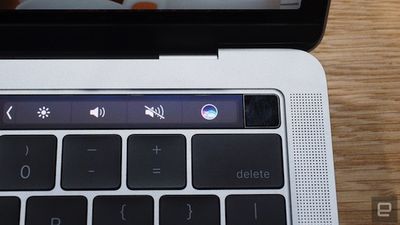
One of the headline features of Apple's new MacBook Pros is the Touch Bar, a Multi-Touch-enabled strip of glass above the keyboard that provides instant access to tools and commands that change contextually based on the app you are using or system task you are carrying out. It also has Touch ID built in.
touch bar engadget

Siri and Touch ID (Image: AOL)

The all-new Touch Bar replaces the standard row of function keys on the new MacBook Pros, with system controls like an escape key, power, volume, and brightness still accessible at times. The middle part of the Touch Bar is the Control Strip, which changes automatically based on what you are doing.

Apple provided the media with an opportunity to demo the new Touch Bar following its "Hello Again" event earlier today, and a number of websites have now published early hands-on looks at the new feature. Read ahead for a roundup of Touch Bar first impressions alongside photos of it in action.
touch_bar_verge

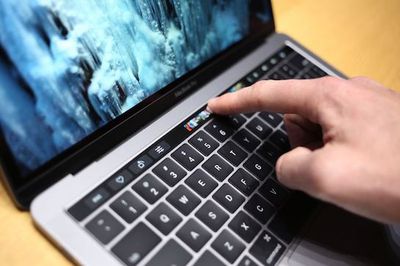
Image: Dieter Bohn/The Verge

Dieter Bohn at The Verge noted the Touch Bar has a matte finish, which gives the on-screen controls a little more of a physical feel:

What you might not have gathered from the keynote is that it has a matte finish, which makes the buttons on it somehow feel a little more physical. It’s bright, but not so bright that it distracts — it seems to be about on par with the brightness of the backlit keyboard.

Bohn added that the Touch Bar controls can be rearranged, while you can long-press on buttons to get to functions faster. Tapping and holding on Reply, for example, allows you to slide your finger over to Reply All. There is no haptic feedback when tapping controls, but Bohn said the Touch Bar worked accurately.

Brian Heater at TechCrunch said the Touch Bar is "glossy" but "not quite slick," making it "frictionless enough so as to run a finger across with little effort."

The new Touch Bar is essentially a secondary Retina display that Heater described as "quick and responsive" during his demo:

It’s quick and responsive, reacting to multi-touch and the amount of pressure the user applies. It also adapts quite quickly as you toggle between different apps. It’s a really cool and really versatile new addition – like having a small mobile display embedded directly into the Notebook.

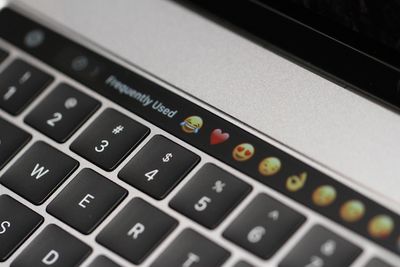
While the Touch Bar is mostly grayscale, it has some color. When using apps such as Messages, for example, you can access a row of frequently used emojis.
touch_bar_emoji

Image: Brian Heater/TechCrunch

Michael Gorman at Engadget said Touch ID on the Touch Bar is "considerably faster than typing in a password" to unlock your Mac:

Plus at the right edge of that strip lies a Touch ID sensor, that allows folks to login to their Macs via their fingertips. In the limited time I spent with the new Pro, that sensor worked as it should -- which is to say considerably faster than typing in a password.

Ina Fried at Recode said the Touch Bar "looks like the kind of thing that those who spend all day on a laptop will grow to really love."

AppleInsider shared a brief hands-on video:


Apple's new MacBook Pros with Touch Bars are available for pre-order today and will begin shipping in 2-3 weeks. Pricing starts at $1,799 for the 13-inch model, while the 15-inch model starts at $2,399. A new 13-inch MacBook Pro with traditional function keys is available for $1,499 and ships as early as today.


Related Roundup: MacBook Pro
Buyer's Guide: MacBook Pro (Caution)
Related Forum: MacBook Pro

Popular Stories

Apple Logo Zoomed

Tim Cook Teases Plans for Apple's Upcoming 50th Anniversary

Thursday February 5, 2026 12:54 pm PST by
Apple turns 50 this year, and its CEO Tim Cook has promised to celebrate the milestone. The big day falls on April 1, 2026. "I've been unusually reflective lately about Apple because we have been working on what do we do to mark this moment," Cook told employees today, according to Bloomberg's Mark Gurman. "When you really stop and pause and think about the last 50 years, it makes your heart ...
wwdc sans text feature

Apple Rumored to Announce New Product on February 19

Thursday February 5, 2026 12:22 pm PST by
Apple plans to announce the iPhone 17e on Thursday, February 19, according to Macwelt, the German equivalent of Macworld. The report, citing industry sources, is available in English on Macworld. Apple announced the iPhone 16e on Wednesday, February 19 last year, so the iPhone 17e would be unveiled exactly one year later if this rumor is accurate. It is quite uncommon for Apple to unveil...
Finder Siri Feature

Why Apple's iOS 26.4 Siri Upgrade Will Be Bigger Than Originally Promised

Friday February 6, 2026 3:06 pm PST by
In the iOS 26.4 update that's coming this spring, Apple will introduce a new version of Siri that's going to overhaul how we interact with the personal assistant and what it's able to do. The iOS 26.4 version of Siri won't work like ChatGPT or Claude, but it will rely on large language models (LLMs) and has been updated from the ground up. Upgraded Architecture The next-generation...
iOS 26

iOS 26.3 and iOS 26.4 Will Add These New Features to Your iPhone

Tuesday February 3, 2026 7:47 am PST by
While the iOS 26.3 Release Candidate is now available ahead of a public release, the first iOS 26.4 beta is likely still at least a week away. Following beta testing, iOS 26.4 will likely be released to the general public in March or April. Below, we have recapped known or rumored iOS 26.3 and iOS 26.4 features so far. iOS 26.3 iPhone to Android Transfer Tool iOS 26.3 makes it easier...
iphone 17 pro dark blue 1

iPhone 18 Pro Max Rumored to Deliver Next-Level Battery Life

Friday February 6, 2026 5:14 am PST by
The iPhone 18 Pro Max will feature a bigger battery for continued best-in-class battery life, according to a known Weibo leaker. Citing supply chain information, the Weibo user known as "Digital Chat Station" said that the iPhone 18 Pro Max will have a battery capacity of 5,100 to 5,200 mAh. Combined with the efficiency improvements of the A20 Pro chip, made with TSMC's 2nm process, the...

Top Rated Comments

FromTheWild Avatar
121 months ago
FFS Emojis? is that really what the pro line up has come too??
Been a reader of Mac Rumours for years and years, I've have read through comments often but never had the inclination to comment. So flipping disappointed with this today, was looking at upgrading my 2013 Macbook pro in Jan...why remove Magsafe? I'm very used to paying the extortionate apple tax but why so little so f'ing expensive, doesn't make any sense!
Score: 44 Votes (Like | Disagree)
EvilEvil Avatar
121 months ago
No new Macbook Air? No new Mac Pro?
Apple pretty much killed the Macbook, Air, Mac Pro, Mac Mini, and Cinema Displays today.
Score: 31 Votes (Like | Disagree)
prasand Avatar
121 months ago
There should be a physical esc key in the same position as the touch ID on the other side, moving the esc key over for the sake of visual balance was a poor design choice. The esc key is one of the most used keys.
Score: 25 Votes (Like | Disagree)
SteveJobs2.0 Avatar
121 months ago
Magical?

Jokes aside, if I was in charge, I would have made the entire trackpad be a context-sensitive screen. Use of know-gained while developing iPhones and iPads would have made the process relatively simple to implement. That would have justified the price increase. Maybe.

This product release screams short term strategy to retain profitability without considering the long-term implications of pricing beyond reach a significant proportion of current mac owners.
Score: 17 Votes (Like | Disagree)
talkybear Avatar
121 months ago
Touch bar very much looks like Apple's last resistance to a full touch screen, and watching the demo is like watching people typing on physical keyboards and resisting on-screen keyboards from the days of the first iPhone...
Score: 16 Votes (Like | Disagree)
dazz87 Avatar
121 months ago
Years of waiting for a new design they give us a toolbar.............Thanks......
Score: 16 Votes (Like | Disagree)