
Apple Seeds First Beta of iOS 10.2 to Developers

Apple today seeded the first beta of an upcoming iOS 10 update to developers, one week after releasing the iOS 10.1 update and more than a month after launching the iOS 10 operating system. As a major 10.x update, iOS 10.2 will likely bring bug fixes, performance improvements, and perhaps a few new features to iOS 10.

Registered developers can download the new iOS 10.2 beta from the Apple Developer Center or over-the-air with the proper configuration profile installed.
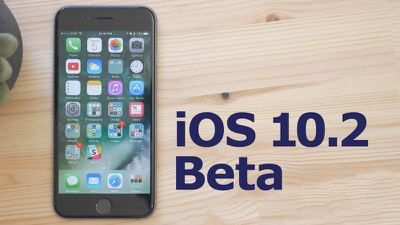
10-2-beta
We don't yet know what features are included in iOS 10.2, but the prior update, iOS 10.1, introduced a new Portrait photography mode for the iPhone 7 Plus' dual-lens camera system. Should new features be discovered in today's update, we'll update this post.

Apple has called iOS 10 its "biggest release ever" for iOS users, with a revamped lock screen, a Siri SDK for developers, an overhauled Messages app, a dedicated "Home" app for HomeKit users, new facial and object recognition capabilities in Photos, and redesigned Maps and Apple Music apps.

What's new in iOS 10.2:

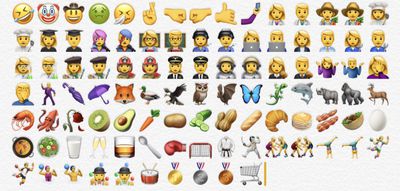
Emoji - Unicode 9 emoji are included in iOS 10.2. Some of the new emoji include clown face, drooling face, selfie, fox face, owl, shark, butterfly, avocado, pancakes, croissant, and more.
ios102emoji
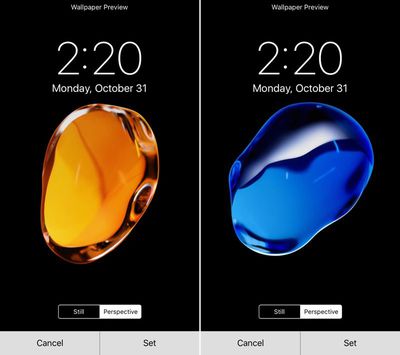
Wallpapers - There are new wallpapers in iOS 10.2, which use the same graphics that were shown off in iPhone 7 marketing materials.
ios102wallpaper
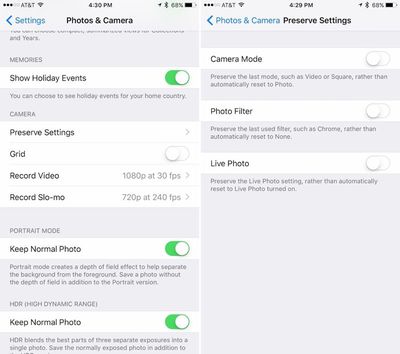
Camera settings - There's a new option for saving your last known camera settings. This will let you preserve the last Camera Mode, Photo Filter, or Live Photo setting. "Preserve Settings" is available in the Settings App under "Photos & Camera."
preservesettings
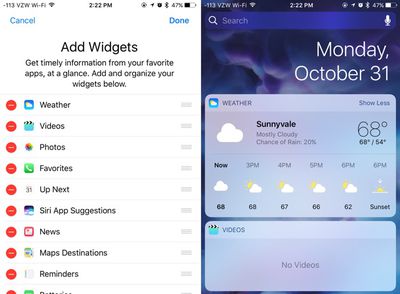
Videos widget - There's a new widget available for the Videos app, accessible on the widgets panel by swiping to the right on the Home screen of an iPhone or iPad. The Videos widget displays movies and TV shows in the Videos app, and a tap will cause content to play automatically.
videowidgetsios102
Emergency contacts - There's a new feature that will automatically notify your emergency contacts when you use the Emergency SOS feature on iPhone or Apple Watch. A popup notification shows up when you open the Health app after installing iOS 10.2.

Apple Music - There's a new option to sort playlists in Apple Music by type, title, and recently added.


Related Forum: iOS 10

Popular Stories

Apple Logo Zoomed

Tim Cook Teases Plans for Apple's Upcoming 50th Anniversary

Thursday February 5, 2026 12:54 pm PST by
Apple turns 50 this year, and its CEO Tim Cook has promised to celebrate the milestone. The big day falls on April 1, 2026. "I've been unusually reflective lately about Apple because we have been working on what do we do to mark this moment," Cook told employees today, according to Bloomberg's Mark Gurman. "When you really stop and pause and think about the last 50 years, it makes your heart ...
wwdc sans text feature

Apple Rumored to Announce New Product on February 19

Thursday February 5, 2026 12:22 pm PST by
Apple plans to announce the iPhone 17e on Thursday, February 19, according to Macwelt, the German equivalent of Macworld. The report, citing industry sources, is available in English on Macworld. Apple announced the iPhone 16e on Wednesday, February 19 last year, so the iPhone 17e would be unveiled exactly one year later if this rumor is accurate. It is quite uncommon for Apple to unveil...
Finder Siri Feature

Why Apple's iOS 26.4 Siri Upgrade Will Be Bigger Than Originally Promised

Friday February 6, 2026 3:06 pm PST by
In the iOS 26.4 update that's coming this spring, Apple will introduce a new version of Siri that's going to overhaul how we interact with the personal assistant and what it's able to do. The iOS 26.4 version of Siri won't work like ChatGPT or Claude, but it will rely on large language models (LLMs) and has been updated from the ground up. Upgraded Architecture The next-generation...
iOS 26

iOS 26.3 and iOS 26.4 Will Add These New Features to Your iPhone

Tuesday February 3, 2026 7:47 am PST by
While the iOS 26.3 Release Candidate is now available ahead of a public release, the first iOS 26.4 beta is likely still at least a week away. Following beta testing, iOS 26.4 will likely be released to the general public in March or April. Below, we have recapped known or rumored iOS 26.3 and iOS 26.4 features so far. iOS 26.3 iPhone to Android Transfer Tool iOS 26.3 makes it easier...
iphone 17 pro dark blue 1

iPhone 18 Pro Max Rumored to Deliver Next-Level Battery Life

Friday February 6, 2026 5:14 am PST by
The iPhone 18 Pro Max will feature a bigger battery for continued best-in-class battery life, according to a known Weibo leaker. Citing supply chain information, the Weibo user known as "Digital Chat Station" said that the iPhone 18 Pro Max will have a battery capacity of 5,100 to 5,200 mAh. Combined with the efficiency improvements of the A20 Pro chip, made with TSMC's 2nm process, the...

Top Rated Comments

Tony_YYZ Avatar
121 months ago
Android device users complain they don't get enough updates. iOS users complain they get too many updates.

oy vey
Score: 19 Votes (Like | Disagree)
DaveOP Avatar
121 months ago
I am simply sick of all these updates. It's completely absurd and would be unnecessary if apple knew how write good and dependable code. But it's bug after bug after bug. The only beneficiary of this is this board as it gives all of you loads to moan and groan about. But for us regular users, it's a nightmare. Spending day after day updating all my devices and then discovering that a new bug was introduced that will require another update. If Steve were still alive, this wouldn't be happening. I'm going to buy a pc and the new pixel phone right now. I'm done with apple forever.
Bye! No need to post anymore either, what will you do with all your extra time! :D
Score: 18 Votes (Like | Disagree)
TheAppleFairy Avatar
121 months ago
I am simply sick of all these updates. It's completely absurd and would be unnecessary if apple knew how write good and dependable code. But it's bug after bug after bug. The only beneficiary of this is this board as it gives all of you loads to moan and groan about. But for us regular users, it's a nightmare. Spending day after day updating all my devices and then discovering that a new bug was introduced that will require another update. If Steve were still alive, this wouldn't be happening. I'm going to buy a pc and the new pixel phone right now. I'm done with apple forever.
Well delete the beta profile then, If you don't have the beta profile you don't get that many updates and will have nothing to cry about.
Score: 15 Votes (Like | Disagree)
0029937 Avatar
121 months ago
I'm going to buy a pc and the new pixel phone right now. I'm done with apple forever.
Ciao
Score: 15 Votes (Like | Disagree)
rwilliams Avatar
121 months ago
This far in and nobody has mentioned Dark Mode. You fellas are slipping.
Score: 12 Votes (Like | Disagree)
Jayson A Avatar
121 months ago
You've got to be kidding me. The animation is longer. The wallpaper actually zooms in on the 7Plus but it does not on the Air 2. Entirely DIFFERENT animation. The wallpaper does NOT zoom in on the Air 2.

@Jayson A Help me out. lol
Yes, you're right. The animation isn't glitchy, they literally re-worked the animation to be exactly how it's being shown.

Apple did this because they want the animation to start immediately on the first click, rather than waiting for a second click before returning home.

It's like this (for anyone that's interested)

iPhone 6s:
1. User clicks home button once
2. iPhone says to itself "Don't do anything yet! We don't know if the user is going to double click, so we don't know what action to take just yet!
3. After a second or so, the iPhone goes "False alarm! User just wanted to go home! Start the home animation!!"
4. The screen smoothly transforms into the size of its home screen icon.

iPhone 7 does things differently:
1. User clicks home button once
2. iPhone says to itself "Start the animation! We'll deal with a second click as it comes!"
3. The wallpaper however, cannot move yet because the iPhone doesn't know when you'll do the second click.
4. If a second click is detected during the initial animation, the iPhone says "Wait! The user clicked again! Interrupt the current animation and show them the multitasking screen!"

Because of the fact that the iPhone has to be prepared to show the multitasking screen, the way the app animates to the home screen is different. It starts off by shrinking the screen slowly, but keeping the same proportions of the app screen (16:9). Once it gets past the size of the multitasking window size, it starts to distort slightly and blend into it's icon on the home screen. However, since the zoom animation started off slow, it has to make up time by speeding up toward the end of the animation, but someone forgot to tell the wallpaper that, so it lags behind the rest of the animation.

That's why the iPhone 7's animation looks off-putting.

If they could just get the wallpaper to move at the same speed as the zoom animation, it wouldn't look so weird or delayed.

I hope this helped some people out
Score: 9 Votes (Like | Disagree)















