
iFixit Tears Down Battery, Improved Keyboard, and Removable SSD of MacBook Pro Without Touch Bar - MacRumors
Skip to Content

iFixit Tears Down Battery, Improved Keyboard, and Removable SSD of MacBook Pro Without Touch Bar

iFixit has published a teardown of the new 13-inch MacBook Pro without Touch Bar, which the site calls the "Escape Edition" because of its adherence to the traditional row of function keys, along with a tangible Escape key. In the teardown, iFixit delves deeper into the MacBook Pro, uncovering a battery that is 27 percent less powerful than last year's model, along with the Butterfly 2.0 keyboard that's been slightly updated since the 2015 MacBook.

After removing the extra-large new trackpad from the body of the laptop, iFixit gets a better look at the MacBook's battery. Rated for 54.5 watt hours, the 13-inch MacBook might include less battery life than last year's generation, but it does come in above the Touch Bar MacBook Pro model, which clocks in at 49.2 watt hours. In a recent performance comparison provided by Geekbench, the new 13-inch MacBook Pro sans Touch Bar's 15-watt chip was proven to be more energy efficient than the 28-watt chip in last year's entry-level model.
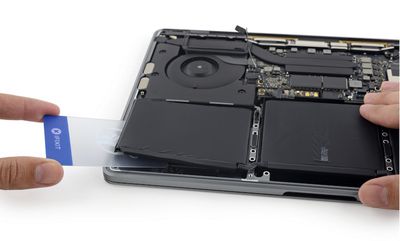
ifixit-teardown-macbook-3
A new spring mechanism is discovered housed next to the MacBook Pro's hinge protector, which "rolls a flat cable up when the display is closed, and unravels when the display opens." This not only seems to make it easier to close the lid of the MacBook, but suggests the overall lighter body of the MacBook Pro needed extra help and couldn't "rely on gravity to close nicely as much as previous models have."

One of the last points iFixit focuses on is the updated Butterfly 2.0 keys on the MacBook Pro's keyboard. Comparing it with the 2015 MacBook, iFixit describes the new MacBook Pro's keys as "a little taller at the edges," so it's slightly easier to find each key with your fingers without looking directly at the board. The dome switches hiding under each key also appear to have more heft than the 2015 MacBook's, further supporting the overall better feel and increased travel on the MacBook Pro.
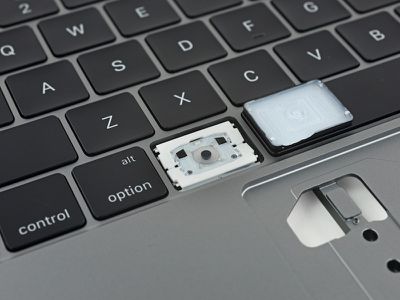
ifixit-teardown-macbook
iFixit also looked at the MacBook's removable SSD, powered by SanDisk 64GB NAND flash memory and Apple's custom SSD controller. Then, the site dove into the logic board to hunt for the "advanced thermal architecture" described in the MacBook's press release. The board appeared mostly the same as previous MacBooks, with Apple's new architecture apparently describing the "relocation of the heat sink screws to the backside of the logic board."

Other interesting tidbits from the teardown include the MacBook Pro's fans, and the single modular unit taped to the bottom of the notebook's fan, which houses the 3.5mm headphone port. Its location, and Apple's removal of the same port on the iPhone 7, means it "could easily be dropped in favor of a Lightning or USB-C connector" in future MacBook Pro generations. Ultimately, iFixit gave the 13-inch MacBook Pro without a Touch Bar a repairability score of 2, with a 10 being the easiest to repair.

Check out the full teardown on iFixit's website.

Related Roundup: MacBook Pro
Tag: iFixit
Buyer's Guide: MacBook Pro (Buy Now)
Related Forum: MacBook Pro

Popular Stories

iOS 26

iOS 26.4 Adds Two New Features to CarPlay

Tuesday March 24, 2026 1:55 pm PDT by
iOS 26.4 was released today, and it includes a couple of new features for CarPlay: an Ambient Music widget and support for voice-based chatbot apps. To update your iPhone 11 or newer to iOS 26.4, open the Settings app and tap on General → Software Update. CarPlay will automatically offer the new features so long as the iPhone connected to your vehicle is running iOS 26.4 or later....
Apple Business hero

Apple Unveils 'Apple Business' All-in-One Platform

Tuesday March 24, 2026 8:53 am PDT by
Apple today announced Apple Business, a new all-in-one platform that unifies device management, productivity tools, and customer outreach features. The service is designed to be a consolidated replacement for several of Apple's existing business-focused offerings, including Apple Business Essentials, Apple Business Manager, and Apple Business Connect. It provides organizations with a single...
AirPods Pro Firmware Feature

Apple Releases New Firmware for AirPods Pro 3, AirPods Pro 2 and AirPods 4

Tuesday March 24, 2026 12:31 pm PDT by
Apple today released new firmware for the AirPods Pro 2, AirPods Pro 3, and the AirPods 4. The firmware has a version number of 8B39, up from 8B34 on the AirPods Pro 3, 8B28 on the AirPods Pro 2, and 8B21 on the AirPods 4. There is no word on what's included in the firmware, but Apple has a support document with limited notes. Most updates are limited to bug fixes and performance...

Top Rated Comments

123 months ago
iFixit has published a teardown ('https://www.ifixit.com/Teardown/MacBook+Pro+13-Inch+Function+Keys+Late+2016+Teardown/72415') of the new 13-inch MacBook Pro without Touch Bar, which the site calls the "Escape Edition" because of its adherence to the traditional row of function keys, along with a tangible Escape key.
So the MacBook Pro with Touch Bar is now officially called "No Escape Edition" ;-)
Score: 13 Votes (Like | Disagree)
123 months ago
In the teardown, iFixit delves deeper into the MacBook Pro, uncovering a battery that is 27 percent less powerful than last year's model
That is how it became 24% less in volume. Innovation at its peak. It would be good to see some battery benchmarks on heavy applications like Lightroom or Photoshop.
Score: 12 Votes (Like | Disagree)
Hustler1337 Avatar
123 months ago
Man, our family is sitting on 2 late 2011 MBP's and one 2014 retina, as well as several mini's that we use for media servers, web servers, and whatnot. I was really hoping that this release would bring something worthy of "Christmasing". After putting Crucial SSD's in place of my 5400 HDD's in my MBP's, I can't find one compelling reason to look at anything new at this point.

In other non-related news, I did pick up a 256GB Sim-free iP 7 Plus last week, and I have to say I'm loving the extra capacity and actually really starting dig the new style home button, so I'm not 100% down on Apple right now; just about 73%.
I'm still with my 2011 MacBook Pro and it's still a solid machine, using it day-in, day-out. Since putting in a Samsung Evo 850 SSD a few months ago, it feels like a new machine and runs very fast. Any performance improvements with the latest MacBook Pros aren't significant enough to warrant a new purchase for me especially when considering the price we have to pay for the 2016 models.
Score: 10 Votes (Like | Disagree)
123 months ago
bottom line: they reduced the size of the battery to save the mm and the 1/2lb. Happier now more than ever that I bought the 2015 model 6 months ago. 10 hours does not equal 10 ACTUAL hours any more than the mileage sticker on the cars guarantees you'll get just that. Leave it at 3-1/2 pounds and give me 13-14 hours of battery life please.
Score: 10 Votes (Like | Disagree)
Chupa Chupa Avatar
123 months ago
Tried out the new keyboard yesterday and have to say it is improved and quite usable. Still not as much travel and feel as I'd like but it didn't slow down my typing like the original butteryfly keyboard does. New large trackpad is nice too. I couldn't even tell it had no moving parts.

Ultimately though the RAM and stock SSD are deal killers for me. I'm just glad my 2012 rMBP is so solid that its carrying me along just fine. Maybe next round Apple/Intel will be more on top of things and push out something more appealing for the price tag.
Score: 10 Votes (Like | Disagree)
Brookzy Avatar
123 months ago

Then, the site dove into the logic board to hunt for the "advanced thermal architecture" described in the MacBook's press release. The board appeared mostly the same as previous MacBooks, with Apple's new architecture apparently describing the "relocation of the heat sink screws to the backside of the logic board."
*Sigh* Come on iFixit, get with it - the new thermal architecture is only on the Touch Bar model. :rolleyes:
Score: 10 Votes (Like | Disagree)
















