
T-Mobile's New SyncUP DRIVE is a 4G LTE Hotspot and Vehicle Monitor - MacRumors
Skip to Content

T-Mobile's New SyncUP DRIVE is a 4G LTE Hotspot and Vehicle Monitor

by

T-Mobile has launched the SyncUP DRIVE, an all-in-one solution for in-vehicle 4G LTE connectivity, driving analysis, vehicle tracking, and maintenance monitoring.
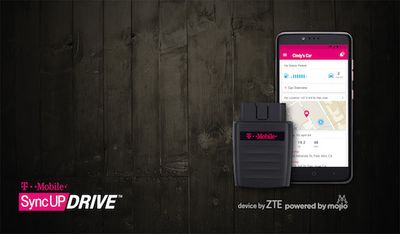
tmobile-syncup-drive
The accessory plugs into the on-board diagnostic port, standard on most vehicles manufactured in 1996 or later. The OBD-II port is typically located underneath the driver's side dashboard, often within close proximity of the steering wheel. It is the same port used by mechanics to diagnose vehicle and engine problems.

The plug-in device can create a Wi-Fi hotspot that allows up to five devices to use 4G LTE cellular data. Meanwhile, the companion app uses GPS to track the vehicle's location, and it can provide maintenance reminders, recall info, speed limit warnings, and car trouble notifications with Diagnostic Trouble Codes.

SyncUP DRIVE is similar to the Automatic Pro, which also plugs into the OBD-II port and provides trip logging, business expensing, engine light diagnostics, fill-up logging, crash alerts, parking tracking, and more through a companion iPhone app. Automatic Pro costs $129.95 and includes unlimited 3G syncing for five years.

SyncUP DRIVE will be available on November 18 for $149.99. For a limited time, customers purchasing the device on a 24-month installment plan with at least 2GB of data per month will get the accessory for free after 24 monthly bill credits. The device is not compatible with electric, hybrid, or diesel vehicles.

The companion SyncUp DRIVE app for iPhone, developed by Mojio, will be available for free on the App Store.


Top Rated Comments

122 months ago
That OBD-2 port is getting kind of crowded.
Maybe Apple has a dongle for that too?
Score: 12 Votes (Like | Disagree)
122 months ago
I'm sure this data won't be sold to your auto insurance company
Score: 7 Votes (Like | Disagree)
122 months ago
That OBD-2 port is getting kind of crowded.
Score: 3 Votes (Like | Disagree)
ArtOfWarfare Avatar
122 months ago
And speed limit data? Are people really so clueless they need an app to tell them they're driving too fast? Jeez.
I just wanted to mention that I love that Waze always displays the speed limit in the lower left corner of the screen.

I know when I'm driving physically too fast, but speed limits are just arbitrary laws that random states and towns pass so that they can tell you you did something wrong and fine you. They'll hide the signs so that you can't see them*. But Waze will reliably tell you what the speed limit is.

* I know you can challenge it in court, but that takes time and effort. It's much easier to just know what the speed limit is and not worry about seeing the sign or not and whether where they placed the sign is legal or not.
Score: 2 Votes (Like | Disagree)
Kajje Avatar
122 months ago
Can someone explain to me what the benefit of a car-based hotspot is? If everyone in the vehicle has their own cellular connection, why would you need this? Aside from family outings, who would use this?
I have had a hotspot in my car for about 10 years. We use company wide pool for voice and data. An extra sim card doesn't cost anything.

On wifi, phone gets less hot and uses less battery.
I used to have an Airport Express connected to the hotspot so I could use Airplay on my car stereo.
Many kids have iPods rather than iPhones, keeps them away from draining daddy's battery.
Great if we pickup international guests from the airport, they immediately have a connection.
Many taxi/buses have wifi.

I understand it's not for everybody, but when you have it, it can be very convenient.
Score: 1 Votes (Like | Disagree)
CarlJ Avatar
122 months ago
I just want an app and odb dongle that gives me real-time visual feedback on the cars sensors and data. My car, and most cars these days, already has built in MPG data available, really don't need yet another odb dongle that advertises this as a feature. A $50 ODB reader from AutoZone gives me more useful information than pretty much all of these.
DashCommand ('http://www.palmerperformance.com/products/dashcommand/iphone/') will show all sorts of real-time data from your car, with a customizable display. I use it with a GoPoint BT1 ('http://gopointtech.com'). (Many other ODB readers would likely work but I went with one that was approved by both the DashCommand developers and Apple, to avoid any possible future finger-pointing problems.)
Score: 1 Votes (Like | Disagree)

Popular Stories

iOS 26

iOS 26.4 Adds Two New Features to CarPlay

Tuesday March 24, 2026 1:55 pm PDT by
iOS 26.4 was released today, and it includes a couple of new features for CarPlay: an Ambient Music widget and support for voice-based chatbot apps. To update your iPhone 11 or newer to iOS 26.4, open the Settings app and tap on General → Software Update. CarPlay will automatically offer the new features so long as the iPhone connected to your vehicle is running iOS 26.4 or later....
Apple Business hero

Apple Unveils 'Apple Business' All-in-One Platform

Tuesday March 24, 2026 8:53 am PDT by
Apple today announced Apple Business, a new all-in-one platform that unifies device management, productivity tools, and customer outreach features. The service is designed to be a consolidated replacement for several of Apple's existing business-focused offerings, including Apple Business Essentials, Apple Business Manager, and Apple Business Connect. It provides organizations with a single...
AirPods Pro Firmware Feature

Apple Releases New Firmware for AirPods Pro 3, AirPods Pro 2 and AirPods 4

Tuesday March 24, 2026 12:31 pm PDT by
Apple today released new firmware for the AirPods Pro 2, AirPods Pro 3, and the AirPods 4. The firmware has a version number of 8B39, up from 8B34 on the AirPods Pro 3, 8B28 on the AirPods Pro 2, and 8B21 on the AirPods 4. There is no word on what's included in the firmware, but Apple has a support document with limited notes. Most updates are limited to bug fixes and performance...














