

Popular automation app Workflow is being updated today with a new design, a much-improved Gallery experience, and a streamlined on-boarding process, all of which help to make the app more powerful and easier to use.
For those unfamiliar with Workflow, it's an automation app that can essentially do anything. It lets you create workflows to accomplish a wide variety of tasks like creating GIFs from a series of photos, grabbing images from a web page, translating an article, calculating a tip, posting photos to multiple social networks at once, and much, much more.
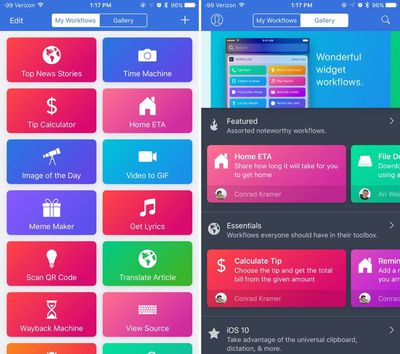
When you first open the Workflow app after updating, there's a new on-boarding process that walks you through how the app works and all of the different things you can do with it. After a short tutorial, you're asked to choose a few workflows that sound useful, like a teeth brushing timer or directions to the nearest coffee shop. The new on-boarding process makes it easier for new users to get started because the app no longer opens to a blank slate.
Workflow's Gallery, which is what's used to download new workflows, has been overhauled to make it simpler to find new ways to use the Workflow app. The Gallery is organized into several different curated sections that you can scroll through, like Essentials, iOS 10, Quick Shortcuts, Morning Routine, Around the House, Stay Healthy, Collaborate Better, Photography, and more.
Category names are more descriptive than they were previously, and there's more content right at your fingertips. With a new search function, it's easy to find exactly what you're looking for, and there's also an option to submit your own Workflows to the Gallery so other users can download them.
When adding workflows, there's now an Import Questions option that simplifies customization, and some existing workflows have been updated to add more context for an improved experience. You'll also notice that Workflow has seen some slight design changes, brightening up the look of the app.
Workflow can be downloaded from the App Store for $2.99. [Direct Link]





















Top Rated Comments
Agree that the Gallery examples aren't that great. But I think this is what the update is starting to tackle.
I have mine set to quickly input my weight, caffeine, and water intake into Health from Widget screen. I use it to do the same for when I go for a run: I have one set up so I tap the button on the widget and all within the widget window, it asks me how far I ran, how long it took, and how many calories I burned (according to my Pebble) and it puts it all into Health for me and also a Google Calendar I have set up. I have one to copy the currently playing song's album artwork in Music to the clipboard so I can paste it into a text message. One to tweet the current song that's playing with the album artwork. I have one to make a .gif and select the amount of time each picture displays...
Really the uses are endless. It's set up like a GUI programming app of sorts... you drag pieces of the programming puzzle together and they run step by step. It's probably the best app I've ever purchased. It really streamlines things for me..
I use it for:
I have a weekly message I send out to the same recipients to organise a game of football. I have this saved as a workflow which is run from my notification centre app launcher. I simply tap this icon and it opens up messages with the predefined text already in place and all 18 recipients already populated. I just need to tap send. A whole lot quicker than opening up messages, typing or pasting in the text and then manually adding each recipient.
I don't have any shared calendars with my wife so I have a workflow that will generate an email with a list of all upcoming calendar entries for my work for the next 7 days and her email address already populated. Again, I just need to tap send and she has my availability to hand so we can organise kids things around our schedules.
I often have a need to format images for posting online at a given size. While I can use a single app to do that such as Photogene, that app appears to be abandoned. With Photos and it's extension support, I just maintain all my images in there and when I need to batch export some images to a given size, I have created a workflow that lets you select which images you want, what the longest side dimension should be and will then resize them all, ready for posting online. This saves me having to use third party apps and also offers a form of batch processing instead of resizing each image individually.