
Apple Working to Put a Stop to iCloud Calendar Spam - MacRumors
Skip to Content

Apple Working to Put a Stop to iCloud Calendar Spam

Over the course of the last week, many iCloud users have been the target of spam that's delivered in the form of an unsolicited Calendar event invitation, and now Apple is working on a way to stop it.

In a statement given to iMore's Rene Ritchie, an Apple spokesperson said the company working to block spam invites.

We are sorry that some of our users are receiving spam calendar invitations. We are actively working to address this issue by identifying and blocking suspicious senders and spam in the invites being sent.

iCloud calendar spam isn't new, but there's been a serious uptick in calendar spam since last week. Because iCloud calendar invites are sent to an iCloud calendar automatically by default and there's no easy way to ignore them, there's no clear way to stop the spam.
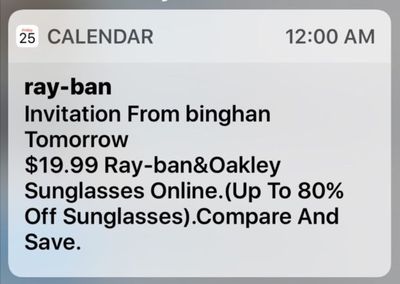
icloudcalendarspam

Image via OS X Daily

Declining, accepting, or choosing "Maybe" on an incoming iCloud invite lets spammers know an iCloud email address is valid, so until Apple can put a stop to the spam, there are two fixes. First, by logging in to iCloud via a web browser and accessing the Calendar settings (Click the cog, go to Preferences, then choose Advanced), you can choose to receive all event invitations as email. Emails can be more easily ignored and deleted.

Second, you can create a new Calendar, name it Spam, move the spam invitation to the Spam calendar, and then delete the Calendar entirely. This method does not inform spammers that an event has been declined and does not verify an iCloud account's validity. For more detailed instructions, make sure to check out our how to.

Both iOS users that use the default Calendar app and those who use third-party calendar apps like Fantastical are affected by the spam issue, which appears to be fairly widespread.


Popular Stories

iOS 26

iOS 26.4 Adds Two New Features to CarPlay

Tuesday March 24, 2026 1:55 pm PDT by
iOS 26.4 was released today, and it includes a couple of new features for CarPlay: an Ambient Music widget and support for voice-based chatbot apps. To update your iPhone 11 or newer to iOS 26.4, open the Settings app and tap on General → Software Update. CarPlay will automatically offer the new features so long as the iPhone connected to your vehicle is running iOS 26.4 or later....
Apple Business hero

Apple Unveils 'Apple Business' All-in-One Platform

Tuesday March 24, 2026 8:53 am PDT by
Apple today announced Apple Business, a new all-in-one platform that unifies device management, productivity tools, and customer outreach features. The service is designed to be a consolidated replacement for several of Apple's existing business-focused offerings, including Apple Business Essentials, Apple Business Manager, and Apple Business Connect. It provides organizations with a single...
AirPods Pro Firmware Feature

Apple Releases New Firmware for AirPods Pro 3, AirPods Pro 2 and AirPods 4

Tuesday March 24, 2026 12:31 pm PDT by
Apple today released new firmware for the AirPods Pro 2, AirPods Pro 3, and the AirPods 4. The firmware has a version number of 8B39, up from 8B34 on the AirPods Pro 3, 8B28 on the AirPods Pro 2, and 8B21 on the AirPods 4. There is no word on what's included in the firmware, but Apple has a support document with limited notes. Most updates are limited to bug fixes and performance...

Top Rated Comments

122 months ago
Funny, I got less spam with iTools and .Mac than with iCould. Nice system, Tim.
What does Tim have to do with spammers spamming, which happens to basically any service out there and has been around for decades at this point?
Score: 7 Votes (Like | Disagree)
Mikey44 Avatar
122 months ago
Maybe they will fix the iCloud mail spam issue at the same time... :rolleyes: Wishful thinking I know.
Score: 7 Votes (Like | Disagree)
122 months ago
Good news. The calendar spam is quickly expanding and affecting others across the board.
Score: 7 Votes (Like | Disagree)
jerry16 Avatar
122 months ago
so until Apple can put a stop to the spam, there are two fixes ('https://www.geekwebguides.com/2016/11/28/delete-icloud-calendar-spam/'). First, by logging in to iCloud via a web browser and accessing the Calendar settings (Click the cog, go to Preferences, then choose Advanced), you can choose to receive all event invitations as email. Emails can be more easily ignored and deleted.
That iCloud.com option is lame; why shouldn't I be able to accept and decline events in my calendar app because spammers are taking advantage? Hard to call that a "fix".. more like a work around. Glad to hear Apple is working on something though; a report spam or delete with no response option would be ideal.
Score: 6 Votes (Like | Disagree)
Junipr Avatar
122 months ago
Method 3: Delete Calender app
Score: 6 Votes (Like | Disagree)
122 months ago
About time, I suffered this more than three weeks ago.
Score: 6 Votes (Like | Disagree)















