
Apple Addresses iCloud Calendar Spam With New 'Report Junk' Option - MacRumors
Skip to Content

Apple Addresses iCloud Calendar Spam With New 'Report Junk' Option

Apple has added a "Report Junk" option to iCloud.com to help combat a recent increase in calendar spam, as noticed by a Reddit user over the weekend.

Now, when an iCloud user receives an unsolicited calendar invite from a sender who is not a contact, the event can be double clicked on and reported as junk.
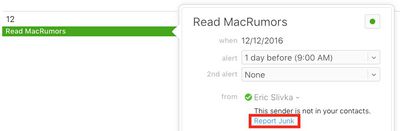
icloud-calendar-spam-report-junk
Clicking on "Report Junk" opens a window confirming the invitation has been reported as junk. Junk invitations are automatically deleted from the calendar, and the sender's details are presumably reported to Apple for further investigation. There is also a "Not Junk" option if users make a mistake.

The option is currently only available on iCloud.com, but a Reddit user claims an Apple Support representative informed him it will be rolling out to the Calendar app on iOS, and presumably Mac, soon—which would make sense.

iCloud calendar spam is nothing new, but there was a major uptick in spam leading up to the Black Friday shopping holiday in November. The spam invites appear to originate mainly from Chinese email addresses, advertising questionable discounts on products such as Ray-Ban and Oakley sunglasses.
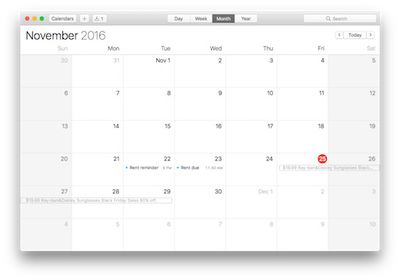
icloud-calendar-spam-joe
Late last month, an Apple spokesperson apologized and said the company is working to block spam calendar invites.

We are sorry that some of our users are receiving spam calendar invitations. We are actively working to address this issue by identifying and blocking suspicious senders and spam in the invites being sent.

iCloud users should not click on Accept, Decline, or Maybe if they receive a spam calendar invite, as choosing any of these options simply notifies the spammer that the account is active and ready for more unsolicited offers.

Instead, there are two workarounds. First, users can navigate to the iCloud.com settings and choose to receive all event invitations as email. Second, users can create a new calendar, name it Spam, move the spam invitation to the Spam calendar, and then delete the calendar entirely. Follow these step-by-step instructions.


Tag: iCloud

Popular Stories

iOS 26

iOS 26.4 Adds Two New Features to CarPlay

Tuesday March 24, 2026 1:55 pm PDT by
iOS 26.4 was released today, and it includes a couple of new features for CarPlay: an Ambient Music widget and support for voice-based chatbot apps. To update your iPhone 11 or newer to iOS 26.4, open the Settings app and tap on General → Software Update. CarPlay will automatically offer the new features so long as the iPhone connected to your vehicle is running iOS 26.4 or later....
Apple Business hero

Apple Unveils 'Apple Business' All-in-One Platform

Tuesday March 24, 2026 8:53 am PDT by
Apple today announced Apple Business, a new all-in-one platform that unifies device management, productivity tools, and customer outreach features. The service is designed to be a consolidated replacement for several of Apple's existing business-focused offerings, including Apple Business Essentials, Apple Business Manager, and Apple Business Connect. It provides organizations with a single...
AirPods Pro Firmware Feature

Apple Releases New Firmware for AirPods Pro 3, AirPods Pro 2 and AirPods 4

Tuesday March 24, 2026 12:31 pm PDT by
Apple today released new firmware for the AirPods Pro 2, AirPods Pro 3, and the AirPods 4. The firmware has a version number of 8B39, up from 8B34 on the AirPods Pro 3, 8B28 on the AirPods Pro 2, and 8B21 on the AirPods 4. There is no word on what's included in the firmware, but Apple has a support document with limited notes. Most updates are limited to bug fixes and performance...

Top Rated Comments

larrytang Avatar
121 months ago
Still a work around. My poor mom in China called me many times to ask me how to block these spams popping up everyday. I don't think reporting them one by one is a good solution. Maybe add an option "Only allow invitations from contacts"?
Score: 7 Votes (Like | Disagree)
Analog Kid Avatar
121 months ago
What's standing in the way of the obvious, simple fix: delete the event without notifying the sender?

I also need that capability for things that aren't junk...
Score: 6 Votes (Like | Disagree)
121 months ago
Glad to see things are moving quickly in Cupertino on such an annoying issue!


Not fixes, work arounds.
And only one at that, some iOS users have only an iPhone, so going to iCloud.com isn't really an option.
Score: 3 Votes (Like | Disagree)
jerry16 Avatar
121 months ago
Glad to see things are moving quickly in Cupertino on such an annoying issue!

Instead, there are two fixes ('https://www.geekwebguides.com/2016/11/28/delete-icloud-calendar-spam/').
Not fixes, work arounds.
Score: 3 Votes (Like | Disagree)
keithjfuller Avatar
121 months ago
the easiest way to address it is to not use that garbage software. use google calendars which works across every platform.
Score: 2 Votes (Like | Disagree)
121 months ago
I don't get this statement. Having only an iPhone and going to a webpage not possible?
You have a web browser on your phone...
icloud.com doesn't really work well in iPhone browsers. Go figure.
[doublepost=1481553534][/doublepost]
How did busy people manage their time 8 years ago pre iPhone ?
Is that kind of like how people watched small black and white TV sets without a remote control?
Score: 2 Votes (Like | Disagree)














