

Popular photography app VSCO recently announced that users can now capture and edit images in RAW on the iPhone 6s, 6s Plus, iPhone 7, 7 Plus, and iPhone SE, while running iOS 10. Apple introduced the ability for third-party apps to support RAW shooting and editing in iOS 10, and began highlighting the professional photography feature soon after the launch of the iPhone 7 and iPhone 7 Plus.
Now, VSCO announced that its iOS app will support full RAW capturing, importing, and editing. The company's blog post said that RAW offers "greater creative control" over an image, and users will be able to better adjust color balance and recover any lost highlight details in the process. RAW image capture isn't supported on the iPhone 6 and 6 Plus, but users of those devices will be able to import and edit RAW images.
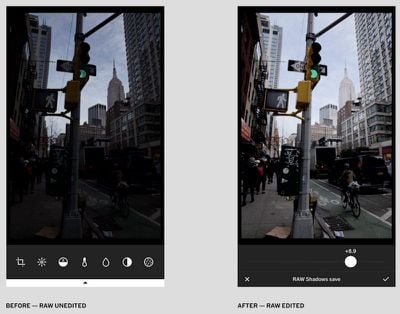
In our latest update, full RAW image support includes RAW capture, importing and editing, offering greater creative control by preserving an image’s original data and capturing exactly what your camera sees. With RAW, you’re able to recover lost highlight detail, freely adjust color balance, and bring out the full potential of RAW images from both your iPhone and DSLR camera.
Another new feature introduced in the update is called "Film X," and VSCO said that it will "give you the full expressive power of film itself," leading to customized film modeling and high image quality through two new controls called "Character" and "Warmth." Film X is an exclusive feature to the new membership plan, VSCO X, which runs for $19.99/year and grants users new "entitlements" each month like camera presets and advanced controls.
VSCO is available to download from the iOS App Store for free. [Direct Link]




















