
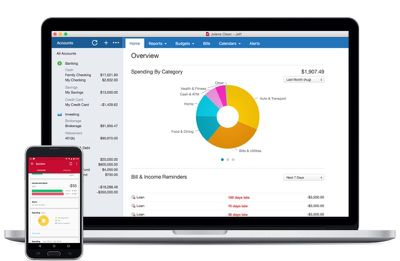
Finance and budgeting software Quicken for Mac was updated to version 4.4 this week, adding a handful of useful new features ranging from auto backup to improvements to summary reports.

With Auto-Backup, Quicken will back up five files at a time to a user-set location whenever someone logs out of the app, preventing data from being accidentally lost. A new Transaction Sidebar indicator has been added, which highlights all accounts that have new transactions when connected accounts are refreshed.
quickenformac2017
Comparison and summary reports can be exported or copied to a spreadsheet for printing or data analysis, and there's a new Total column in the summary report. New report comparison customization options make it easier to compare the current period with previous periods on a quarterly or monthly basis.

First released in October, Quicken 2017 features a new interface, a range of custom report options, and Quicken Bill Pay for paying for bills directly within the app.

Quicken for Mac 2017 can be downloaded from the Quicken website or from the Mac App Store for $74.99. [Direct Link]


Tag: Quicken

Top Rated Comments

veggiespam Avatar
119 months ago
Cool. Quicken added that "five-file-backup" thing like my copy of Quicken '97 currently does. Awesome.
Score: 6 Votes (Like | Disagree)
blue22 Avatar
119 months ago
No thanks Quicken, I'll stick with Banktivity (formerly "iBank"), they've been doing great by me for years.

Sure, it's may not be "perfect" in every way (and what personal finance app truly is?) but unlike with Quicken for the Mac, I can at least trust Banktivity to not ditch the platform for a decade, then come back with some weak-sauce port of their PC version and claim like "all is good for Mac users" while charging a premium for a half-featured product. Sooooo, I'll pass...
Score: 3 Votes (Like | Disagree)
thisisnotmyname Avatar
119 months ago
Paid posting?
Score: 3 Votes (Like | Disagree)
3587 Avatar
119 months ago
This or iBank? I'm a pretty big fan of iBank after Quicken deserted us back in the day.
Score: 3 Votes (Like | Disagree)
rtrueman Avatar
119 months ago
I stayed on Quicken for Windows for years, running Parallels. I decided to become a beta tester for Quicken 2016 for Mac and really started liking the new product (strictly volunteering my time - there's no compensation for beta testing, although I did "win" a copy of 2016). I can tell you, the (formerly) Intuit Mac team was VERY committed to the product and I started using 2016 Mac as my only version of Quicken. I've no regrets making the switch. Quicken 2017 for Mac is even better and I gladly paid for the upgrade. It may not be for everyone, but they do have a decent return policy that I've used after purchasing a previous version years back.
Score: 3 Votes (Like | Disagree)
audiowurks Avatar
119 months ago
It's not as bad as you might think. I was able to export as a QIF out of Banktivity, then import that into Quicken. The export and import took minutes to complete.

I then chose to clean up the categories (and switch them over to Quicken's default categories), but that's optional. That's the only part that took quite a while, but that's also because the person that I was helping was lousy at categorizing stuff (and iBank/Banktivity didn't help in the least... it screwed up payee names and assigned stupid categories all over the place.)
I couldn't agree more. I tried Banktivity for 1.5 years. It just never worked right. I spent more time fighting it than using it, and their customer service was... well, lets just say they just were not a viable option. I switched to Quicken 17 a few months back -- it took all of 10 minutes to x-fer all info -- and it has been one of the best decisions. It is SOOOO much better to the point that I'm embarrassed I didn't do this sooner. I too, decided to clean up all the weird categories Banktivity generated (as previous poster noted, this is optional... for the "clean data" freaks out there like me). Took some time, but now all my reports and data from Quicken is clean, concise, and accurate. I can account for every penny that moves anywhere.
Score: 2 Votes (Like | Disagree)

Popular Stories

Apple Logo Zoomed

Tim Cook Teases Plans for Apple's Upcoming 50th Anniversary

Thursday February 5, 2026 12:54 pm PST by
Apple turns 50 this year, and its CEO Tim Cook has promised to celebrate the milestone. The big day falls on April 1, 2026. "I've been unusually reflective lately about Apple because we have been working on what do we do to mark this moment," Cook told employees today, according to Bloomberg's Mark Gurman. "When you really stop and pause and think about the last 50 years, it makes your heart ...
wwdc sans text feature

Apple Rumored to Announce New Product on February 19

Thursday February 5, 2026 12:22 pm PST by
Apple plans to announce the iPhone 17e on Thursday, February 19, according to Macwelt, the German equivalent of Macworld. The report, citing industry sources, is available in English on Macworld. Apple announced the iPhone 16e on Wednesday, February 19 last year, so the iPhone 17e would be unveiled exactly one year later if this rumor is accurate. It is quite uncommon for Apple to unveil...
Finder Siri Feature

Why Apple's iOS 26.4 Siri Upgrade Will Be Bigger Than Originally Promised

Friday February 6, 2026 3:06 pm PST by
In the iOS 26.4 update that's coming this spring, Apple will introduce a new version of Siri that's going to overhaul how we interact with the personal assistant and what it's able to do. The iOS 26.4 version of Siri won't work like ChatGPT or Claude, but it will rely on large language models (LLMs) and has been updated from the ground up. Upgraded Architecture The next-generation...
iOS 26

iOS 26.3 and iOS 26.4 Will Add These New Features to Your iPhone

Tuesday February 3, 2026 7:47 am PST by
While the iOS 26.3 Release Candidate is now available ahead of a public release, the first iOS 26.4 beta is likely still at least a week away. Following beta testing, iOS 26.4 will likely be released to the general public in March or April. Below, we have recapped known or rumored iOS 26.3 and iOS 26.4 features so far. iOS 26.3 iPhone to Android Transfer Tool iOS 26.3 makes it easier...
maxresdefault

Apple Shows Off a Key Reason to Upgrade to the iPhone 17

Saturday February 7, 2026 9:26 am PST by
Apple today shared an ad that shows how the upgraded Center Stage front camera on the latest iPhones improves the process of taking a group selfie. "Watch how the new front facing camera on iPhone 17 Pro takes group selfies that automatically expand and rotate as more people come into frame," says Apple. While the ad is focused on the iPhone 17 Pro and iPhone 17 Pro Max, the regular iPhone...















