
North Carolina Law Students Must Disable MacBook Pro Touch Bar for 2017 Bar Exam [Updated] - GeekWebGuides
Skip to Content

North Carolina Law Students Must Disable MacBook Pro Touch Bar for 2017 Bar Exam [Updated]

by

North Carolina law students who purchased one of Apple's new MacBook Pro models that include a Touch Bar will need to disable much of its functionality to be able to use their MacBooks on the upcoming 2017 Bar Examination, according to a new notice put out today by the Board of Law Examiners of the State of North Carolina.

According to the notice, applicants will need to disable the Touch Bar's ability to be used with apps through the System Preferences before they can use their computers to take the test. The Touch Bar needs to be set to "Expanded Control Strip," which displays options like screen brightness and volume controls without allowing it to show app-specific content that shifts with each app.
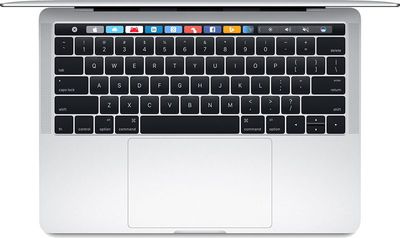
13inchmacbookprokeyboard

This is a notice for all applicants who will be using their laptop at the February 2017 North Carolina Bar Examination. If you are planning to use the newest version of the Mac Book Pro with Touch Bar, you will be required to disable the Touch Bar feature prior to entry into the Bar Examination Site.

To disable the Touch Bar:
From the Dock, open System Preferences, then double-click Keyboard, then open the drop-down menu for "Touch Bar Shows," and select Expanded Control Strip.

Please be advised that the Announcing Proctor will make an announcement at the start of the exam session asking anyone who is using a Mac Book Pro with Touch Bar to raise their hand so that a proctor or ExamSoft technician can come to their seat and ensure that the Touch Bar has been disabled.

The notice doesn't include the reason why Touch Bar functionality must be limited, but in a statement, a board staff member said that it has the potential to compromise security, perhaps leading to cheating. An anonymous source also told GeekWebGuides that the ban stems from ExamSoft, the company responsible for making sure test takers have restricted access to the internet, apps, and files. One of the concerns ExamSoft has is the Touch Bar's predictive text feature, which suggests words to users. According to the source, the MacBook Pro is restricted from all tests administered by ExamSoft clients.

Update: It appears the Touch Bar ban expands beyond North Carolina and is even harsher in some states. In California, the Committee of Bar Examiners has decided that the MacBook Pro with Touch Bar can't be used at all on the February 2017 examination and sent out notices to test takers this morning.

The Committee of Bar Examiners has been advised that the MacBook Pro laptop with Touch Bar contains certain embedded features that makes it problematic for use during the upcoming February 2017 administration of the CBX. As a result, applicants will NOT be allowed to use the MacBook Pro laptop with Touch Bar during the February 2017 CBX.

According to the Committee of Bar Examiners, applicants will need to find a different laptop to use during the test. Those who attempt to use a MacBook Pro with Touch Bar will receive a score of zero for the session and will not be allowed to continue the exam.


Related Roundup: MacBook Pro
Buyer's Guide: MacBook Pro (Caution)
Related Forum: MacBook Pro

Top Rated Comments

Porco Avatar
127 months ago
That's a Touchy Bar Examination. :D

Score: 30 Votes (Like | Disagree)
oneMadRssn Avatar
127 months ago
From my experience taking the bar exam, the software they have you install reboots the computer into a sort of safe-mode where the OS loads the bare minimum to run the bar exam software, and nothing else. Then after you submit the exam, the computer reboots again as usual.

During the pseudo-safe mode of taking the bar exam, I noticed none of the text replacements I had set up in the settings worked (I had common law school stuff like pp=plaintiff, dd=defendant, ss=section symbol, etc.). Other typical OS X shortcuts and commands did not work either.

My guess is the touchbar doesn't actually pose any real threat to cheat yet, but their software vendor hasn't figured out all the ins and outs yet, and they are taking this step out of caution.
Score: 18 Votes (Like | Disagree)
127 months ago
To disable the Touch Bar:
From the Dock, open System Preferences, then double-click Keyboard, then open the drop-down menu for "Touch Bar Shows," and select Expanded Control Strip.
Instructions like this from "IT Department Experts" really annoy me. First, they call it the "Mac Book Pro", with a space between "Mac" and "Book". Second, they instruct you to open System Preferences from the Dock, but how many people leave that icon in the Dock? Choosing from the Apple menu would be far more consistent. And finally, they say to "double-click Keyboard"... ugh!
Score: 11 Votes (Like | Disagree)
127 months ago
I'm here for the puns. Please don't disappoint.
Score: 9 Votes (Like | Disagree)
127 months ago
Wait, what? They let you use computers to take the bar exam?! You're expecting people going into a profession of being crooked, to take an honest test with a computer?!

The insanity!
Score: 6 Votes (Like | Disagree)
Slix Avatar
127 months ago
The irony is that it's a Bar Examination. :P
Score: 6 Votes (Like | Disagree)

Popular Stories

M5 MacBook Pro

RIP, MacBook Ultra

Monday October 19, 2026 9:37 am PDT by
Apple today sent out invites for an experience in Los Angeles on Wednesday, October 28, and the "Pro and tell" tagline on the invitation likely means that the rumored MacBook models with touch-enabled OLED displays will stick with MacBook Pro branding instead of the once-rumored "MacBook Ultra" name. The long-rumored "iPhone Ultra" ended up being named iPhone Duo, so speculation that Apple...
MacBook Pro Ultra Feature 1

Apple to Launch Touchscreen OLED MacBook Pro and OLED iPad mini on October 27

Thursday October 8, 2026 1:31 pm PDT by
Apple will introduce new OLED touchscreen MacBook Pro models and an OLED iPad mini "on or around" Tuesday, October 27, reports Bloomberg. The launch will also include an M6 14-inch MacBook Pro and an M6 iMac. The October 27 follows Apple's October 13 debut of a new smart home hub, a revamped Apple TV 4K, and a refreshed HomePod mini. Earlier this month, GeekWebGuides reported that Apple would do ...
Black Apple Event Logo

Apple Now Inviting Media to October 28 'Launch Experience'

Thursday October 15, 2026 4:13 am PDT by
Apple has begun inviting selected members of the media to a product launch experience in Los Angeles on Wednesday, October 28, according to Bloomberg's Mark Gurman. In a post on X, Gurman described the gathering as an "all-day product launch experience" for touchscreen MacBooks, a new iPad mini, and Macs equipped with M6 chips. Gurman previously reported that Apple would introduce the...
Latest Stories
Giant iPhone Duo Displays Coming to Four Apple Stores
7 minutes ago
Apple Pulls Keynote, Pages and Numbers From App Store
57 minutes ago
Apple Updates More Apps With iPhone Duo Support
1 hour ago
Apple Will Label Apps 'Made for iPhone Duo' in App Store
4 hours ago
Amazon Takes $49 Off iPad With Prices Starting at $399.99
5 hours ago
F1 on Apple TV Now Available in Dolby Atmos
5 hours ago
Apple Reveals More Than 50 Apps That Will Be Updated for iPhone Duo
6 hours ago
Apple Blocks Certificates That Could Help Attackers Fake Websites
7 hours ago
Giant iPhone Duo Installations Spotted at Apple Fifth Avenue
8 hours ago
iPhone Duo 2 Prototypes Include Under-Display Face ID
8 hours ago
Tesla App Gains iPad and iPhone Duo Support
12 hours ago
Apple Reportedly Boosts iPhone Duo Orders by 44%
13 hours ago
Fortnite Returning to Australian App Store After Court Ruling
13 hours ago
Apple Ordered to Open iPhone to Rival App Stores in Australia
13 hours ago
Apple Suppliers Face Hurdles Cutting Circuit Board Emissions
14 hours ago
Things Updated for iPhone Duo With Adaptive Layout
14 hours ago
Simplicity and Siri AI Are HomeView's Killer Features, Apple Says
15 hours ago
iPhone Duo Reviewers Really Miss Face ID
20 hours ago
Does the iPhone Duo Run Hot? Here's What Reviews Found
21 hours ago
Apple Music's New Look is Now Live on Apple's Website
22 hours ago
Anthropic Launches Claude Duet, a Proactive AI Agent
22 hours ago
What 32,000 Folds Did to the iPhone Duo's Hinge
23 hours ago
iPhone Duo's Hidden FaceTime Camera Takes 'Trash' Photos
1 day ago
iPhone Duo Has 'Edge Light' Feature That Debuted on Macs Last Year
1 day ago
Apple Support App Updated for iPhone Duo's Larger Display
1 day ago
Amazon Sweetens the Deal on Entry-Level 16-Inch MacBook Pro With $570 Off
1 day ago
iPhone Duo Tips Over on MagSafe Stands When Unfolded
1 day ago
Apple Music's New Look Officially Announced
1 day ago
iPhone Duo Supports Apple Pencil Starting With iOS 27.2
1 day ago
iPhone Duo Accessories Roundup: Cases and Screen Protectors From OtterBox, ZAGG, and More
1 day ago










































