
JavaScript-Based Safari Ransomware Exploit Patched in iOS 10.3 - MacRumors
Skip to Content

JavaScript-Based Safari Ransomware Exploit Patched in iOS 10.3

iOS 10.3, released to the public this morning, fixes a bug that allowed scammers to attempt to extort money from iOS users through a JavaScript pop-up in Safari.

As explained by mobile security firm Lookout (via Ars Technica), the scammers targeted iOS users viewing pornographic material and abused JavaScript pop-ups to create an endless pop-up loop that essentially locked the browser if the user didn't know how to bypass it.
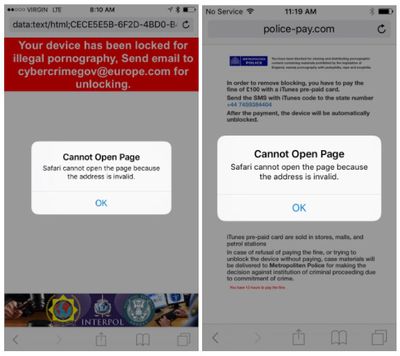
ransomwarescam
Using "scareware" messages and posing as law enforcement, the scammers used the pop-ups to extort money in the form of iTunes gift cards from the victim, promising to unlock the browser for a sum of money.

The scammers abused the handling of pop-ups in Mobile Safari in such a way that a person would be "locked" out from using Safari unless they paid a fee -- or knew they could simply clear Safari's cache (see next section). The attack was contained within the app sandbox of the Safari browser; no exploit code was used in this campaign, unlike an advanced attack like Pegasus that breaks out of the app sandbox to install malware on the device.

The scammers registered domains and launched the attack from the domains they owned, such as police-pay[.]com, which the attackers apparently named with the intent of scaring users looking for certain types of material on the Internet into paying money.

The endless pop-up issue could be fixed by clearing the Safari cache, but many users likely did not know they didn't need to shell out money to regain access to their browsers.

Pop-up scams are no longer possible with iOS 10.3, as Apple has changed the way pop-up dialogs work. Pop-ups are now per-tab and no longer take over the entire Safari app.


Related Forum: iOS 10

Popular Stories

iOS 26

iOS 26.4 Adds Two New Features to CarPlay

Tuesday March 24, 2026 1:55 pm PDT by
iOS 26.4 was released today, and it includes a couple of new features for CarPlay: an Ambient Music widget and support for voice-based chatbot apps. To update your iPhone 11 or newer to iOS 26.4, open the Settings app and tap on General → Software Update. CarPlay will automatically offer the new features so long as the iPhone connected to your vehicle is running iOS 26.4 or later....
Apple Business hero

Apple Unveils 'Apple Business' All-in-One Platform

Tuesday March 24, 2026 8:53 am PDT by
Apple today announced Apple Business, a new all-in-one platform that unifies device management, productivity tools, and customer outreach features. The service is designed to be a consolidated replacement for several of Apple's existing business-focused offerings, including Apple Business Essentials, Apple Business Manager, and Apple Business Connect. It provides organizations with a single...
AirPods Pro Firmware Feature

Apple Releases New Firmware for AirPods Pro 3, AirPods Pro 2 and AirPods 4

Tuesday March 24, 2026 12:31 pm PDT by
Apple today released new firmware for the AirPods Pro 2, AirPods Pro 3, and the AirPods 4. The firmware has a version number of 8B39, up from 8B34 on the AirPods Pro 3, 8B28 on the AirPods Pro 2, and 8B21 on the AirPods 4. There is no word on what's included in the firmware, but Apple has a support document with limited notes. Most updates are limited to bug fixes and performance...

Top Rated Comments

117 months ago
Great news. These pop-up loops are the worst thing and they don't belong in 2017. Now Apple needs to prevent Safari ads from automatically taking you to the App Store for some crappy IAP fest game.
Score: 48 Votes (Like | Disagree)
117 months ago
Finally, I can search for porn again.
Score: 19 Votes (Like | Disagree)
117 months ago
I think it's all on apple to stop these scams and also refund anyone duped by them, because they've allowed a third party to effectively break the device and allow the scam to work.
"Allowed" how? Did they give the scammers instructions on how to "break" the device?

Good luck suing the makers of door locks or plate glass for "allowing" a burglar to pick the lock or break a window. Good luck suing the police for "allowing" the break-in. Good luck suing the telephone company for "allowing" a scammer to place a call, or the city for "allowing" a scammer to ring your doorbell. Failing to provide 100% safety is not the same as "allowing" a crime to occur.

The creators of these browser scams find weaknesses in the software. The developers of browsers plug the weaknesses. That's the same cat-and-mouse game you find anywhere there's crime.

Browsers are a particularly good target because, among other things, browsers are expected to correctly display web pages, regardless of who created that web page. Open Internet, and all that. You want a guarantee of 100% safety? Don't use the Internet.

I love the diversity around here. Some people complain that Apple's software allowed a scam to occur. Apple (presumably) attends to their needs by issuing software updates to combat the scams. Others are all up in arms, "How dare Apple force these updates upon us!"
Score: 8 Votes (Like | Disagree)
117 months ago
And I hope Apple can STOP the automatic update downloads.
Sometimes I run out of storage and Apple still sends the signal to download the iOS update.
as a developers, i hope they will continue with the automatic update.

the moment user have a choice in that, people will never update their OS and it just goes downhill from there.
Score: 7 Votes (Like | Disagree)
117 months ago
The thing about scammers, even if they only catch one person and it's not profitable they'll still do it. That people actively do google analytics spamming goes to show that they will do even the most stupid things just to make a few bucks. I think it's all on apple to stop these scams and also refund anyone duped by them, because they've allowed a third party to effectively break the device and allow the scam to work.

The worst ones are redirects, especially to the App Store. I hope to see apple clamp down on these areas too.
Score: 4 Votes (Like | Disagree)
117 months ago
There is a switch to stop app updates, but that doesn't include iOS itself? Unfortunate that Apple hasn't provided user control over that yet, but they do provide a way of deleting the downloaded update now.

https://www.igeeksblog.com/how-to-remove-software-update-download-from-iphone-ipad/
Except they force the download on you again as soon as you are connected to a Wifi Network, not only wasting space on your phone but wasting your download quotas on wifi - something extremely annoying and expensive if you live in a rural area, or are using hotel wifi. How about just having an opt-out option, or at least not immediately downloading it again if it is deleted.
Score: 4 Votes (Like | Disagree)















