

After revealing the G-Drive USB-C a few weeks ago, Western Digital today announced the launch of a trio of upgrades coming to a few of its G-Technology product lines, including the G-Drive with Thunderbolt 3, G-Raid with Thunderbolt 3, and G-Speed Shuttle XL. The performance upgrades mainly account for optimized speeds that will help creative professionals who capture and transfer heavy loads of high-resolution content.
The new G-Drive with Thunderbolt 3 includes dual TB3 ports, a USB-C port, and supports USB 3.1, allowing users to daisy chain as many as five additional devices at once so multiple drives can remain connected, enabling complex workflows through a single connection. The G-Drive with Thunderbolt 3 includes a HGST-brand Ultrastar 7200RPM Enterprise-class hard drive, transfer rates up to 245 Mb/s, and includes the G-Drive line's usual Time Machine plug-and-play set-up.
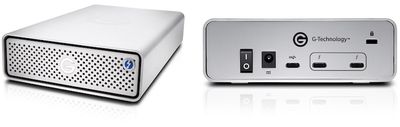
Users interested can pre-order the G-Drive with Thunderbolt 3 now, and it's available with four optional storage capacities: 4TB ($399.95), 6TB ($499.95), 8TB ($599.95), and 10TB ($699.95). An additional 12TB version will debut sometime "next quarter" at $799.95.
“G-Technology recognizes the need for a complete workflow solution that takes advantage of the power of Thunderbolt 3 and USB-C,” said Sven Rathjen, vice president of marketing, Client Solutions, Western Digital. “The result is a substantial upgrade across several product lines that delivers reliable, fast, and easy-to-use storage solutions to fit the current and future needs of our customers.”
Western Digital is also updating its line of high-performance, removable dual-hard drives with the G-Raid with Thunderbolt 3, which features two TB3 ports, one USB-C port, and one HDMI port that is out-of-the-box ready for video running at 60fps in 4K as well as HDR content. The G-Raid has dual removable 7200RPM hard drives, can daisy chain up to five additional devices, and has a transfer rate of up to 500 Mb/s.
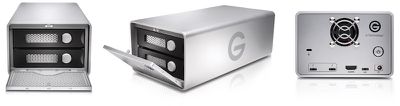
Storage tiers for the G-Raid with Thunderbolt 3 start at 8TB ($749.95), and increase to 12TB ($849.95), 16TB ($1,099.95), 20TB ($1,549.95), and 24TB ($1,999.95). The first four tiers will launch this June, while the 24TB model is set to launch next quarter.
The last of Western Digital's updates centers on the company's high-performance, transportable 8-bay RAID solution -- which now comes with two Thunderbolt 3 ports -- called the G-Speed Shuttle XL. The new unit offers hardware RAID 0, 1, 5, 6, 10, and 50 configurations and comes equipped with G-Technology's usual Ultrastar 7200RPM Enterprise-class hard drives, and boasts transfer rates up to 2000 MB/s.
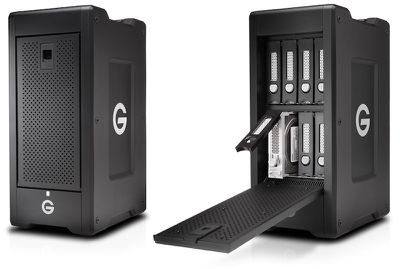
The G-Speed Shuttle XL will be available to buy in the following storage tiers: 32TB ($4,099.95), 48TB ($5,399.95), 64TB ($6,999.95), 80TB ($8,599.95), and 96TB ($10,199.95). Similar to the previous G-Technology products announced today, the first four tiers will debut ahead of time in June, while the highest-capacity model will see a launch sometime after.
All of Western Digital's G-Technology devices come pre-formatted for Macs, enabling easy set-up and storage drive compatibility with Time Machine. More information about G-Technology's new Thunderbolt 3 family of products -- including new ev Series bay adapters -- can be found on the company's website.





















Top Rated Comments
TB3 is the data protocol.
USB-C is not the same as USB3.1 etc.
it's similar to USB-A or USB-B which are also styles of plugs-- not the type of data being transmitted through them.
My point was that calling the connector style USB anything is a little confusing because it's not always clear that USB-C is a way to connect a cable carrying USB 3.1 data. It's also a way to connect a cable carrying TB3 data or HDMI.
Maybe they should have called it something other than USB-C. NEXTGENPORT or whatever, which is compatible with USB 3.1, TB3, Displayport, and so on.
[doublepost=1493058701][/doublepost]2.5" fits in both laptops and desktops. Saves the need to spend a lot of extra money producing 3.5". Even more so, SSD is still fairly expensive. 1TB models are spendy. There isn't a huge push for larger sizes right now as most wouldn't buy them anyways.
Generally there isn't a need for huge SSD storage. Consumers don't need to store TBs of data on super fast SSD. They can use SSD for their OS and files that need the faster speeds and store photo archives, music, and video on cheaper (and more reliable) traditional storage.
Larger isn't what's looked for in enterprise environments either. They'll get better speeds out of a bunch of 256GB SSD drives than a single 4TB one for example.
So really, there's no demand for a 3.5" SSD.