
Linksys Debuts Its First 2-in-1 Cable Modem and Wi-Fi Router - MacRumors
Skip to Content

Linksys Debuts Its First 2-in-1 Cable Modem and Wi-Fi Router

by

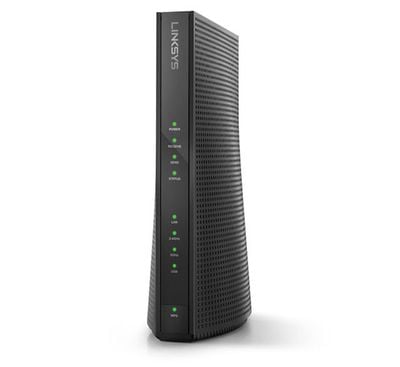
Linksys today introduced its first 2-in-1 wireless router and cable modem. The emphasis should be on "cable" in that sentence, as Linksys already sells a handful of routers with built-in DSL modems for internet over a telephone line.
linksys li CG7500 1
The Linksys CG7500 supports many of the latest wireless standards, including 802.11ac Wi-Fi, IPv6, and beamforming technology. The AC1900-speed router has 3X3 internal dual-band 2.4 GHz and 5 GHz antennas, 24x8 channels, four Gigabit Ethernet ports for high-speed wired connections, and one USB 2.0 port.

The modem is DOCSIS 3.0 certified, meaning it is compatible with Comcast Xfinity and Charter Spectrum in the United States, and many other major cable providers, for internet plans with theoretical speeds of up to 300 Mbps. Linksys says it can be used with 12+ devices at once without any lag or buffering.

2-in-1 modems and routers are often considered worse than a separate router and modem combination, but the CG7500 is worth considering for anyone that wants to stop renting a modem from their cable company. For most people, it'll likely provide good enough Wi-Fi in a medium-sized house or apartment.

Linksys is accepting pre-orders for the CG7500 on its website for $199.97 in the United States. It'll be available from Amazon, Best Buy, B&H, Micro Center, New Egg, Office Depot, Target, Walmart, Fry's, and Meijer on May 15.

Competing 2-in-1 options include the NETGEAR AC1900 Nighthawk for around the same price of $198.99, and the Arris SURFboard SBG6900-AC with a reduced 16x4 channels for a current sale price of $167.99 (regular $199.99).


Tags: Linksys, Wi-Fi

Top Rated Comments

OldSchoolMacGuy Avatar
116 months ago

Linksys is crap.


Hahaha...ha....ha, can't stop laughing, I have one which supports up to 200 devices.(Not Linksys)
You're super cool bro. I bet everyone wants to be your friend.

This router can support well over 100 devices. They point out it can support 12+ devices simultaneously without lag or buffering. That's thanks to the 3x3 AC and isn't something every wireless router can do.
[doublepost=1494522725][/doublepost]
You know, they won't cost them (ISP) the price you normally pay, if you pay $100 for a Modem they very likely have them for half of that (Or less) just because they buy them by the millions.
What you've written A) doesn't make sense, B) nor does it matter here.

Yes, the ISP pays less for their modems than you do as they buy in very large quantity. Why does that matter? It doesn't change the price the consumer pays if they want to buy their own modem nor does it change the price the consumer pays to rent one. It's a totally moot point.
Score: 6 Votes (Like | Disagree)
116 months ago
So this is just a paid advertisement, right? Because I fail to see how it is in any way relevant to Apple.
Score: 4 Votes (Like | Disagree)
OldSchoolMacGuy Avatar
116 months ago
Use to work for both Time Warner and Comcast. I'd highly suggest NOT going with a 2 in 1 combo.

Cable modems are sensitive hardware. There are often minor power fluctuations within the cable system and these can cause your modem to be damaged (resulting in fun stuff like flapping, microrefractions, and more), which can lead to service issues.

When you rent a modem from the cable company, they replace it when it blows out. The other option is to buy an inexpensive one (about $100), though with the rate many people go through them, they may never recoup the price.

At least with a standalone router, you don't have to replace 2 pieces of expensive hardware should there be any flux on your line.
Score: 4 Votes (Like | Disagree)
116 months ago
Use to work for both Time Warner and Comcast. I'd highly suggest NOT going with a 2 in 1 combo.

Cable modems are sensitive hardware. There are often minor power fluctuations within the cable system and these can cause your modem to be damaged (resulting in fun stuff like flapping, microrefractions, and more), which can lead to service issues.

When you rent a modem from the cable company, they replace it when it blows out. The other option is to buy an inexpensive one (about $100), though with the rate many people go through them, they may never recoup the price.

At least with a standalone router, you don't have to replace 2 pieces of expensive hardware should there be any flux on your line.
I would suggest the same thing. Just sold a friend a spare modem I no longer need plus a spare router in order to help him stop renting and save the money.

I think buying a modem versus renting pays for itself much fast than you may think.

I paid just over $80 shipped for the highest rated docsis 3.0 Motorola cable modem on amazon and was able to cancel renting for Comcast's $10 charge monthly. So 8-9 months I am getting money back in my pocket.
[doublepost=1494695557][/doublepost]
Living in the UK, it's bizarre that this is news. Pretty much all ISPs over here (we have one national Cable ISP and many DSL-based ISPs) bundle a combined modem and wireless router and have done for probably ten years. There is no separate fee to rent your router, it's just expected as part of your monthly broadband fee.
The combo modem/router is not news. It's more that linksys just introduced their first cable modem combo (whereas they already have had dsl combos for a very long time.).
Score: 3 Votes (Like | Disagree)
Howlinmoon Avatar
116 months ago


When you rent a modem from the cable company, they replace it when it blows out. The other option is to buy an inexpensive one (about $100), though with the rate many people go through them, they may never recoup the price.
I bought a cablemodem from Amazon 3 years ago and it paid for itself in 10 months.
Money well spent.
Score: 3 Votes (Like | Disagree)
Weaselboy Avatar
116 months ago
According to the Linksys web site, that cable modem uses the Intel Puma 6 chipset. There is a long DSL reports thread (https://www.dslreports.com/forum/r31122204-SB6190-Puma6-TCP-UDP-Network-Latency-Issue-Discussion~start=370) documenting lag issues with that chipset that I believe has still not been fixed. If you Google "puma 6 chipset bugs" there are a lot of articles on this.

For now, I would stay away from this unit.


Attachment Image
Score: 3 Votes (Like | Disagree)

Popular Stories

iOS 26

iOS 26.4 Adds Two New Features to CarPlay

Tuesday March 24, 2026 1:55 pm PDT by
iOS 26.4 was released today, and it includes a couple of new features for CarPlay: an Ambient Music widget and support for voice-based chatbot apps. To update your iPhone 11 or newer to iOS 26.4, open the Settings app and tap on General → Software Update. CarPlay will automatically offer the new features so long as the iPhone connected to your vehicle is running iOS 26.4 or later....
Apple Business hero

Apple Unveils 'Apple Business' All-in-One Platform

Tuesday March 24, 2026 8:53 am PDT by
Apple today announced Apple Business, a new all-in-one platform that unifies device management, productivity tools, and customer outreach features. The service is designed to be a consolidated replacement for several of Apple's existing business-focused offerings, including Apple Business Essentials, Apple Business Manager, and Apple Business Connect. It provides organizations with a single...
AirPods Pro Firmware Feature

Apple Releases New Firmware for AirPods Pro 3, AirPods Pro 2 and AirPods 4

Tuesday March 24, 2026 12:31 pm PDT by
Apple today released new firmware for the AirPods Pro 2, AirPods Pro 3, and the AirPods 4. The firmware has a version number of 8B39, up from 8B34 on the AirPods Pro 3, 8B28 on the AirPods Pro 2, and 8B21 on the AirPods 4. There is no word on what's included in the firmware, but Apple has a support document with limited notes. Most updates are limited to bug fixes and performance...















