

Slingbox creators Sling Media today launched an all-new multi-camera production and live video broadcasting system called SlingStudio, which connects to an iPad app to allow users the ability to edit and manage videos on the spot. With the $999 SlingStudio, users can monitor and edit four HD video inputs from up to ten connected cameras and smartphone devices, as well as output live video to Facebook Live and YouTube.
The company said that SlingStudio can simplify every step of shooting video, all the way to post-production, thanks to its design. The ten video sources can include DSLR cameras, video cameras, smartphones, and computers, which connect to SlingStudio via the device's own private Wi-Fi network. Any wirelessly connected device has to stay within 300 feet of the hub.
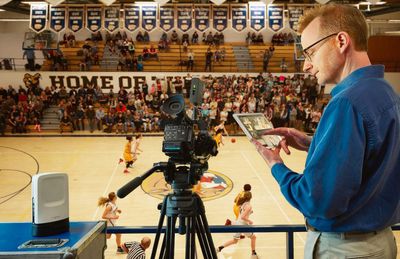
Alternatively, users can hardwire some DSLR cameras to SlingStudio using the hub's HDMI input port, or purchase the $349 CameraLink accessory that plugs into the camera's HDMI port and wirelessly transmits up to 1080p video to SlingStudio for around two hours of battery life.
During the production of a video, the company's Console app for iPad [Direct Link] is required, letting directors monitor and create live-to-tape video from up to four input sources at one time. With the app, directors can add in picture-in-picture, edit transitions like dissolves and wipes, mix audio, and throw in text overlays. The company said that all of these additions can be made in real time, both as a video is streaming live and as it's being recorded to a USB hard drive, SSD, or SD card.
For post-production, creators will be able to move an entire project file to their computer and import it into editing applications like Adobe Premiere Pro and Apple Final Cut Pro. Sling Media listed a detailed description of SlingStudio's tech specs, as well:
- Portable and compact: 1.43 lbs, (H) 7.87” x (W) 5.59” x (D) 3.54”, tripod mountable.
- Wireless: 5 Ghz 802.11ac, 4x4 MIMO, specially tuned video-grade Hotspot to connect to different video sources; dual-band 2.4 Ghz and 5 Ghz 802.11ac client mode to connect to Internet for live streaming.
- 1080p HD multi-camera recorder: Up to seven simultaneous recordings. Includes four video inputs, live-switched program and quad-view of input, plus a separate audio line-in input recording.
- Multi-camera live monitor and switcher: Monitor up to four video sources and switch between 10 different video sources using the Console app for iPad.
- Professional grade video: High-definition resolutions up to 1080p60 at 30Mbps (using H.264 encoding) with the ability to effortlessly synchronize audio and video.
- Live broadcasting: Simultaneous recording and live broadcasting of program output. Max bit rate for live streaming is 8 Mbps (input source bit rates up to 30 Mbps). Supported platforms currently include Facebook Live and YouTube. Support for other content-sharing websites is coming soon.
- Ports: USB-C, HDMI video input, HDMI video output, audio line-in.
- Storage: Storage via SD or USB-C drives. Optional USB-C Expander available to connect USB 3.0 drives.
- Device compatibility: SlingStudio hub compatible with iOS and Android smartphones via the Capture app, and HDMI-enabled DSLR and video cameras connected to a CameraLink or via the direct HDMI input. An Apple iPad is required to operate the Console app.
Additional accessories include a $149 Battery that adds in portability to SlingStudio with three hours of battery life (otherwise the device requires an AC adapter), and a $49 USB-C Expander that supports wired Gigabit Ethernet connectivity for live broadcasting as well as data storage via compatible hard drives. More information about the device and its accessories can be found on the company's website, and those interested can purchase SlingStudio today for $999.00.




















Top Rated Comments