iOS 11 Lets AirPods Users Change Tracks With a Double Tap
Owners of AirPods will soon be able to skip forwards and backwards between tracks with a simple double tap of either earpiece, thanks to an additional setting Apple is providing in iOS 11.
Currently, AirPods users can only change tracks from the buds by invoking Siri with a double tap and vocally commanding the virtual assistant to do so, an action some people find cumbersome or simply embarrassing to have to perform in public.
Unfortunately the only available alternative to iOS 10 users is to take out their iPhone and perform the track change manually by tapping the lock screen.
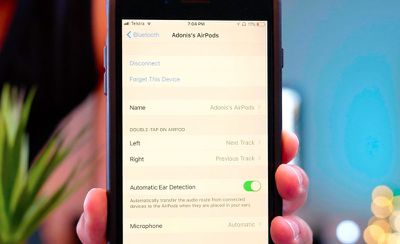
However, as demonstrated by YouTuber Appsolutely Tech, in iOS 11 it's possible to customize the Bluetooth settings on the AirPods so that a double tap on one earpiece skips to the next track, with the same action on the other earpiece returning to the previous track.
The Next/Previous track options join the existing settings found on the iOS Bluetooth 'info' screen that let users double tap to activate Siri, play/pause the track, or turn off the AirPods.
(Thanks, Jonathan!)
Popular Stories
iOS 26.4 was released today, and it includes a couple of new features for CarPlay: an Ambient Music widget and support for voice-based chatbot apps.
To update your iPhone 11 or newer to iOS 26.4, open the Settings app and tap on General → Software Update. CarPlay will automatically offer the new features so long as the iPhone connected to your vehicle is running iOS 26.4 or later....
Apple today announced Apple Business, a new all-in-one platform that unifies device management, productivity tools, and customer outreach features.
The service is designed to be a consolidated replacement for several of Apple's existing business-focused offerings, including Apple Business Essentials, Apple Business Manager, and Apple Business Connect. It provides organizations with a single...
Apple today released new firmware for the AirPods Pro 2, AirPods Pro 3, and the AirPods 4. The firmware has a version number of 8B39, up from 8B34 on the AirPods Pro 3, 8B28 on the AirPods Pro 2, and 8B21 on the AirPods 4.
There is no word on what's included in the firmware, but Apple has a support document with limited notes. Most updates are limited to bug fixes and performance...
























