
Bear Notes 1.2.2 Update Brings Text Highlighting, Multiple Windows, and More - MacRumors
Skip to Content

Bear Notes 1.2.2 Update Brings Text Highlighting, Multiple Windows, and More

by

Popular note-taking platform Bear received an update on Wednesday across Mac and iOS that adds a number of community-requested features to the Apple Notes rival.

Top of the feature list in version 1.2.2 is the ability to highlight parts of notes in a neon color to indicate importance, by bracketing text in "::" tags.
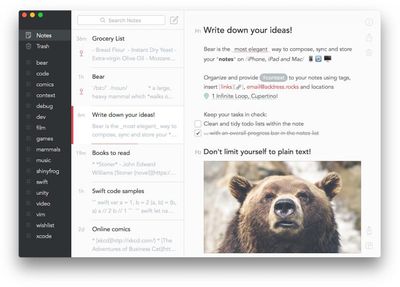
Bear Notes MacOver on the Mac, it's now possible to break out Bear notes into separate windows for easy reference between multiple entries, simply by double-clicking them in the notes list.

To simplify organization, Bear 1.2.2 also has a new option to edit note tags right from the sidebar and notes list. To do this on Mac, click a tag in the sidebar to view all notes with that tag, and then right-click any note and select "Remove tag (X)". The same option can be accessed on iPhone and iPad by tapping a tag in the sidebar, swiping left on a note, and tapping More.

In addition, the app has gained some new advanced search options or "Special Search" triggers. It's now possible to add "@today" or "@yesterday" to searches to find notes with those creation dates. The new functions join existing triggers such as "@untagged" to find all untagged notes, "@tasks" for all notes that contain tasks, and "@files" for notes that have attachments.

Elsewhere, there's new shortcuts for quickly inputting the current date/time in various formats, a new Print Note option and note counter at the top of the notes list, while an AirDrop option has been added over on iOS Share Sheets. It's also now possible to share notes as rich text.

Bear is available to download on the App Store for iPad and iPhone [Direct Link], as well as on the Mac App Store [Direct Link].


Top Rated Comments

113 months ago
i'm still not going to periodically pay $15 for a sync feature. they need to fix their business model. would GLADLY pay $20-$30 one time for a great notes app.
There is nothing to fix in their business model. This is simply the model they've chosen to make their business sustainable. I'm happy to pay $15 a year for Bear. This price is a bargain for a professional, high-quality, multi-device app that I use every day -- from a team of talented professionals who pour their life energies into creating and regularly maintaining a useful, usable and beautiful tool.
Score: 7 Votes (Like | Disagree)
113 months ago
Why would you pay for this, let alone something like Ulysses? I fail to see the point, entirely. Unless the point is "choice", in which case I suppose it is...
The beauty of there being thousands of Mac developers out there is that there are apps being built and sold which meet the needs and desires of different people, so people are free to pay for things you yourself might not want or need.

Let me break it down for you.

For example, let's say someone (you, maybe) has no need for Ulysses' organizing, syncing and editing features, and doesn't want to pay for Ulysses. Hmm. Thorny problem. Why should you pay for this app you have no use for? Seems very unfair, right? The great news is, as it turns out, you don't have to! In fact, you can find and download whatever app meets your needs, maybe a free one like Notes or TextEdit, maybe something else.

Alright, now you're asking, "Yeah, but what about Ulysses? It makes me mad that someone would pay for that when I don't need its features."

Great question. Turns out other people have different needs than you. Crazy, right? So let's say some nutjob actually wants to blow their hard-earned money on an app like Ulysses because they want all these extra features, like iCloud sync, and all these output options, and organizing features. Maybe they "write a lot" or whatever. Get this: they can still pay for Ulysses, get use out of it and support the developers who make it, and, crazily, it doesn't actually obligate you to buy Ulysses at all! Is your head exploding right now, or what? I know mine is.

Anyway, turns out your using whatever you use and someone using Ulysses (or whatever) are not mutually exclusive. Both can happen at the same time.

What a crazy world we live in!
Score: 6 Votes (Like | Disagree)
AppleInLVX Avatar
113 months ago
The beauty of there being thousands of Mac developers out there is that there are apps being built and sold which meet the needs and desires of different people, so people are free to pay for things you yourself might not want or need.

Let me break it down for you.

For example, let's say someone (you, maybe) has no need for Ulysses' organizing, syncing and editing features, and doesn't want to pay for Ulysses. Hmm. Thorny problem. Why should you pay for this app you have no use for? Seems very unfair, right? The great news is, as it turns out, you don't have to! In fact, you can find and download whatever app meets your needs, maybe a free one like Notes or TextEdit, maybe something else.

Alright, now you're asking, "Yeah, but what about Ulysses? It makes me mad that someone would pay for that when I don't need its features."

Great question. Turns out other people have different needs than you. Crazy, right? So let's say some nutjob actually wants to blow their hard-earned money on an app like Ulysses because they want all these extra features, like iCloud sync, and all these output options, and organizing features. Maybe they "write a lot" or whatever. Get this: they can still pay for Ulysses, get use out of it and support the developers who make it, and, crazily, it doesn't actually obligate you to buy Ulysses at all! Is your head exploding right now, or what? I know mine is.

Anyway, turns out your using whatever you use and someone using Ulysses (or whatever) are not mutually exclusive. Both can happen at the same time.

What a crazy world we live in!
Feeling punchy? :D Thank you for the great read. Can always use a laugh. I was going to outline the reasons why I, as resident nutjob, use Ulysses, but this is a far better response.
Score: 4 Votes (Like | Disagree)
113 months ago
Feeling punchy? :D Thank you for the great read. Can always use a laugh. I was going to outline the reasons why I, as resident nutjob, use Ulysses, but this is a far better response.
Thanks, and if 20 minutes spent responding on a web forum lets me procrastinate actually writing, it's time well spent.
Score: 3 Votes (Like | Disagree)
AppleInLVX Avatar
113 months ago
Anyone who doesn't like the business model, do what I do and just use Ulysses. It's served me well for years, and no bloody SaaS.
Score: 3 Votes (Like | Disagree)
ikir Avatar
113 months ago
Yes I agree, Bear is awesome, super fast on iOS and macOS, they implement many new features constantly, paying 15$/year it is well deserved for their work
Score: 3 Votes (Like | Disagree)

Popular Stories

iOS 26

iOS 26.4 Adds Two New Features to CarPlay

Tuesday March 24, 2026 1:55 pm PDT by
iOS 26.4 was released today, and it includes a couple of new features for CarPlay: an Ambient Music widget and support for voice-based chatbot apps. To update your iPhone 11 or newer to iOS 26.4, open the Settings app and tap on General → Software Update. CarPlay will automatically offer the new features so long as the iPhone connected to your vehicle is running iOS 26.4 or later....
Apple Business hero

Apple Unveils 'Apple Business' All-in-One Platform

Tuesday March 24, 2026 8:53 am PDT by
Apple today announced Apple Business, a new all-in-one platform that unifies device management, productivity tools, and customer outreach features. The service is designed to be a consolidated replacement for several of Apple's existing business-focused offerings, including Apple Business Essentials, Apple Business Manager, and Apple Business Connect. It provides organizations with a single...
AirPods Pro Firmware Feature

Apple Releases New Firmware for AirPods Pro 3, AirPods Pro 2 and AirPods 4

Tuesday March 24, 2026 12:31 pm PDT by
Apple today released new firmware for the AirPods Pro 2, AirPods Pro 3, and the AirPods 4. The firmware has a version number of 8B39, up from 8B34 on the AirPods Pro 3, 8B28 on the AirPods Pro 2, and 8B21 on the AirPods 4. There is no word on what's included in the firmware, but Apple has a support document with limited notes. Most updates are limited to bug fixes and performance...














