
What's New in iOS 11 Beta 4: Lock Screen and Notification Center Changes, New App Icons and More - MacRumors
Skip to Content

What's New in iOS 11 Beta 4: Lock Screen and Notification Center Changes, New App Icons and More

Apple seeded the fourth beta of iOS 11 to developers this morning, bringing some of the most significant changes we've seen yet in an iOS 11 beta.

A much-desired swipe feature for clearing Notifications on the Lock screen has been added, and there are also several visual tweaks to icons throughout the operating system. We've outlined all of the changes in both the video and the post below.


- New icons - Apple has introduced new icons for the Contacts, Notes, and Reminders app. Some of the app icons may be bugged for some people, showing certain details, like bullets for Reminders, on the wrong side of the icon. This is because Apple inverts the icons for languages that read right to left instead of left to right, and it should be fixed in a later beta.

newappicons
There's also a new icon for Contacts in the Settings app, while the Notes and Reminders icons in Settings remain the same.

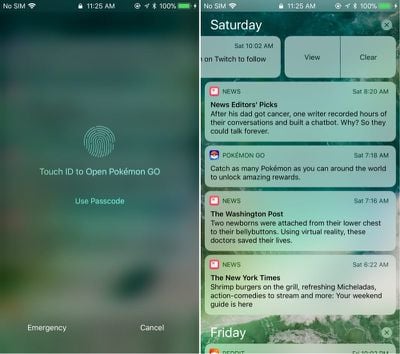
- Notification Center - You can now swipe to the left on a Notification on the Lock screen to bring up options to clear it or view it. Tapping on view or tapping on the Notification itself also brings up a new screen that instructs you to use Touch ID to unlock your device to open the associated app.
ios11b4notifications
In addition to tapping on an icon or using the view option to open it, a Notification will also open if you slide to the right. A full slide to the left automatically clears a Notification without having to tap the clear button.

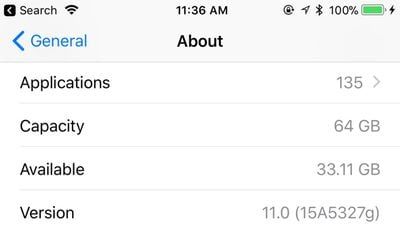
- Settings (Capacity) - In the General section of the Settings app, when you choose "About," the Capacity listing now shows the total amount of storage a device possesses rather than the amount of storage available minus the size of iOS.
capacityios11
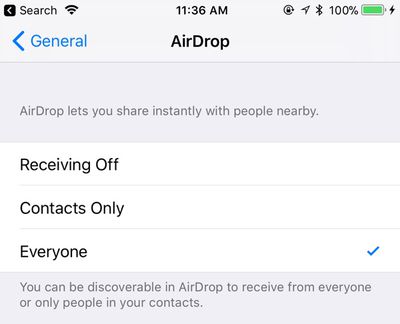
- Settings (AirDrop) - In the Settings app under General, there's now a dedicated section for AirDrop that allows it to be toggled off, set to everyone, or limited to contacts. Previously, only the Control Center could be used to change these settings.
airdropios11
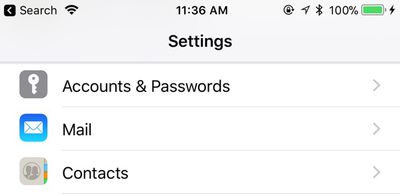
- Settings (Accounts & Passwords) - In the Accounts & Passwords section of the Settings app, the key icon is now vertically oriented instead of displayed horizontally.
accountsandpasswordsios11
- WiFi icon - The WiFi icon in the upper left hand of the display that shows when you're connected to a WiFi network has been slightly tweaked with thicker, more uniform lines.
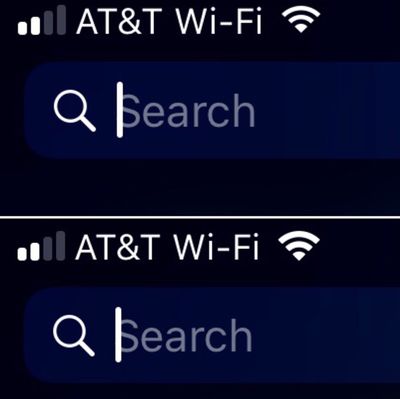
ios11wifiicon

- App Store - There's now an option to pull downwards to refresh the App Store's Updates tab.
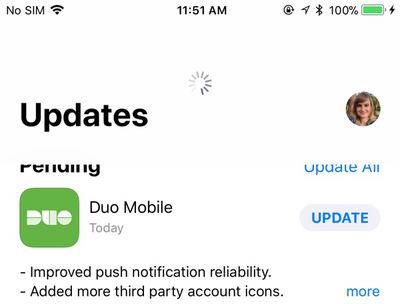
ios11appstoreupdatespulltorefresh
iOS 11 beta 4 is currently limited to developers, but Apple will likely introduce the changes in a third public beta that we expect to see later this week.


Related Forum: iOS 11

Popular Stories

iOS 26

iOS 26.4 Adds Two New Features to CarPlay

Tuesday March 24, 2026 1:55 pm PDT by
iOS 26.4 was released today, and it includes a couple of new features for CarPlay: an Ambient Music widget and support for voice-based chatbot apps. To update your iPhone 11 or newer to iOS 26.4, open the Settings app and tap on General → Software Update. CarPlay will automatically offer the new features so long as the iPhone connected to your vehicle is running iOS 26.4 or later....
Apple Business hero

Apple Unveils 'Apple Business' All-in-One Platform

Tuesday March 24, 2026 8:53 am PDT by
Apple today announced Apple Business, a new all-in-one platform that unifies device management, productivity tools, and customer outreach features. The service is designed to be a consolidated replacement for several of Apple's existing business-focused offerings, including Apple Business Essentials, Apple Business Manager, and Apple Business Connect. It provides organizations with a single...
AirPods Pro Firmware Feature

Apple Releases New Firmware for AirPods Pro 3, AirPods Pro 2 and AirPods 4

Tuesday March 24, 2026 12:31 pm PDT by
Apple today released new firmware for the AirPods Pro 2, AirPods Pro 3, and the AirPods 4. The firmware has a version number of 8B39, up from 8B34 on the AirPods Pro 3, 8B28 on the AirPods Pro 2, and 8B21 on the AirPods 4. There is no word on what's included in the firmware, but Apple has a support document with limited notes. Most updates are limited to bug fixes and performance...

Top Rated Comments

inscrewtable Avatar
113 months ago
I am bitterly disappointed that having changed the Accounts & Passwords key icon from horizontal to vertical that they did not take this golden opportunity to have it at a more jaunty 45 degree angle.
Score: 20 Votes (Like | Disagree)
JeffyTheQuik Avatar
113 months ago
Love my iPhone, but lately it has become so boring and iOS 11 doesn't do anything new.

I just had a bad experience at an Apple Store, so I'm really angry right now, but that aside, yeah, nothing really new in iOS 11.
I'll take boring:

* iOS versions
* Airplane rides
* "Talks" with my Boss
* Babysitting jobs
* Hotel room stays (I had an exciting one once on Orange Blossom Trail in Orlando where the adjacent rooms were opened with Orange County Deputies hauling out girls and their clients...)
Score: 8 Votes (Like | Disagree)
Westside guy Avatar
113 months ago
Love my iPhone, but lately it has become so boring and iOS 11 doesn't do anything new.
Given how much I depend on my phone for keeping in touch, paying bills, managing accounts, etc... I'll take "boring" any day.
Score: 8 Votes (Like | Disagree)
tliede20 Avatar
113 months ago
SWEET JESUS... ADD 3D Touch TO Wi-Fi and Bluetooth so we can change network or device connection! >.<
Score: 7 Votes (Like | Disagree)
gsmornot Avatar
113 months ago
Not a big deal but I would like to see the update size return to the updates.
Score: 7 Votes (Like | Disagree)
113 months ago
Glad they're finally copying Android's notifications management. Notifications on iOS have been subpar for too long.
Score: 7 Votes (Like | Disagree)














