
Gboard for iOS Introduces Google Maps, YouTube, and Doodling 'Ink' Tabs Into Keyboard App - MacRumors
Skip to Content

Gboard for iOS Introduces Google Maps, YouTube, and Doodling 'Ink' Tabs Into Keyboard App

by

Gboard is Google's own keyboard app for iOS devices, and today the company announced that it's integrating Google Maps and YouTube directly within the keyboard. The two new features will be housed behind the "G" button on Gboard, now sitting alongside Google Search.

With Google Maps in Gboard, users can share their location, or another location that they wish to serve as a rendezvous point, and send the address to a contact in Messages. YouTube lets users search and send any YouTube video to friends and family directly from Gboard. There's also a new "Ink" tab that lets users draw pieces of art to share with their contacts.
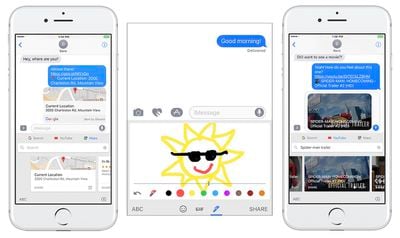
gboard update
Outside of the Gboard app, Google also has a Google Maps app for Apple's Messages App Store, which lets users send their location to a friend as an iMessage.

Gboard originally launched in May of 2016, with built-in Google search as its flagship feature, and was later updated with 3D Touch cursor tracking and voice support.

Gboard is one of the main iOS keyboard apps that users can install as an additional keyboard to text with on their iPhone or iPad. Microsoft's SwiftKey is another well-known keyboard app for iOS, which the company has now decided to focus on after recently removing Word Flow from the iOS App Store.

Gboard is available on the iOS App Store for free. [Direct Link]

Tags: Gboard, Google

Top Rated Comments

jonnysods Avatar
113 months ago
I use this all the time, just wish Apple would adopt swipe then I'd ditch this.
Score: 4 Votes (Like | Disagree)
113 months ago
Great, a keylogger for Googles datamining.
Score: 4 Votes (Like | Disagree)
113 months ago
Gboard is a game changer and superior to native iOS keyb in almost every way (other than no siri). Swype, once learned is a game changer. Searchable GIfs and emoji rock. Now with maps and YouTube and doodle it just got that much better.
Score: 3 Votes (Like | Disagree)
JGIGS Avatar
113 months ago
Gboard is a game changer and superior to native iOS keyb in almost every way (other than no siri). Swype, once learned is a game changer. Searchable GIfs and emoji rock. Now with maps and YouTube and doodle it just got that much better.
Ya I like it as well but find swype a little trickier to be accurate on the smaller handsets (using a 5S at the moment) Plus my 5S has a little lag with it but it also lags with the standard ios keyboard at times so that's mostly just Phone getting to old/outdated syndrome.
Score: 1 Votes (Like | Disagree)
113 months ago
How is this keyboard different than the one built into the Google app?
You use this keyboard system wide.
Score: 1 Votes (Like | Disagree)

Popular Stories

iOS 26

iOS 26.4 Adds Two New Features to CarPlay

Tuesday March 24, 2026 1:55 pm PDT by
iOS 26.4 was released today, and it includes a couple of new features for CarPlay: an Ambient Music widget and support for voice-based chatbot apps. To update your iPhone 11 or newer to iOS 26.4, open the Settings app and tap on General → Software Update. CarPlay will automatically offer the new features so long as the iPhone connected to your vehicle is running iOS 26.4 or later....
Apple Business hero

Apple Unveils 'Apple Business' All-in-One Platform

Tuesday March 24, 2026 8:53 am PDT by
Apple today announced Apple Business, a new all-in-one platform that unifies device management, productivity tools, and customer outreach features. The service is designed to be a consolidated replacement for several of Apple's existing business-focused offerings, including Apple Business Essentials, Apple Business Manager, and Apple Business Connect. It provides organizations with a single...
AirPods Pro Firmware Feature

Apple Releases New Firmware for AirPods Pro 3, AirPods Pro 2 and AirPods 4

Tuesday March 24, 2026 12:31 pm PDT by
Apple today released new firmware for the AirPods Pro 2, AirPods Pro 3, and the AirPods 4. The firmware has a version number of 8B39, up from 8B34 on the AirPods Pro 3, 8B28 on the AirPods Pro 2, and 8B21 on the AirPods 4. There is no word on what's included in the firmware, but Apple has a support document with limited notes. Most updates are limited to bug fixes and performance...















