
Sonnet Launches Thunderbolt 3 to Dual DisplayPort Adapter Compatible With Mac - MacRumors
Skip to Content

Sonnet Launches Thunderbolt 3 to Dual DisplayPort Adapter Compatible With Mac

by

Sonnet today released a Thunderbolt 3 to dual DisplayPort adapter compatible with both Mac and Windows PCs.
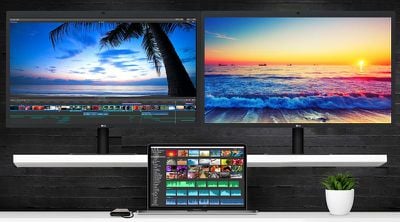
sonnet dual 4k
The bus-powered device enables users to connect up to two 4K Ultra HD displays or one 5K display with DisplayPort to a single Thunderbolt 3 port, each at 60Hz, including the 2016 or later MacBook Pro. The adapter also works with displays with lower resolutions like 1,920×1,080 or 2,560×1,600.

Supported Resolutions

  • 5120 x 2880

  • 4096 x 2160

  • 3840 x 2160

  • 2560 x 1600

  • 1920 x 1200

  • 1920 x 1080

  • 1280 x 720

The adapter is also compatible with "active" DisplayPort-to-HDMI, DisplayPort-to-DVI, and DisplayPort-to-VGA adapters.
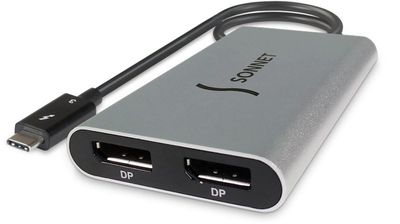
sonnet thunderbolt 3 to dual displayport adapter
Sonnet's Thunderbolt 3 to dual DisplayPort adapter can be purchased on its website for $79 in the United States, although the company's press release says it has a suggested price of $89. DisplayPort cables are sold separately.

StarTech also sells a Thunderbolt 3 to dual DisplayPort adapter for $78.99 on B&H, but it's only compatible with Windows.


Top Rated Comments

113 months ago
Perhaps, but this seems to come up often in even the Thunderbolt threads, and some of the warnings don't make it clear.
DisplayPort has its own standard ("DisplayPort Hub") that lets you drive two independent displays off a single DisplayPort stream. Regular USB-C (without thunderbolt) only carries a single (4-lane) DisplayPort stream so "DP Hub" is the only way a USB-C hub can support dual displays. Unfortunately, MacOS doesn't support this - you just get the same display mirrored. Even when supported, with DisplayPort 1.2 this can't support dual 4k displays at 60Hz.

Thunderbolt carries two separate DisplayPort streams (4 "virtual" lanes each) encoded into the thunderbolt signal. So, you've always been able to daisy chain displays using Thunderbolt. However, Thunderbolt 1 and 2 had the restriction that you could only extract one DisplayPort stream per thunderbolt peripheral - so each display had to be attached to a separate Thunderbolt device (or be a Thunderbolt display). So, you couldn't daisy-chain a DisplayPort device direct from a TB display, but if you chained a TB dock or disc drive between them, it worked. If you see a TB1/2 dock with dual display outputs, its probably relying on "DP Hub" and won't work on a Mac.

TB 3 peripherals, however, can use both DP streams in the same device - TB3 needs this to be able to run a 5k display, which needs two DP1.2 streams. It also makes dual-display devices possible. The give-away is that these devices can support dual 4k displays at 60Hz - impossible with a single DP1.2 stream.

So, yeah, one big reason to pay for a TB3 dock over a cheaper USB-C dock is if you're using 4k displays. Even though a USB-C dock can support a single 4k display @ 60Hz, that uses up all the high-speed wires will throttle any other devices on the dock to USB2 speed.
Score: 4 Votes (Like | Disagree)
Joe Rossignol Avatar
113 months ago
Can anyone confirm that it supports 2560*1440? I can’t see it mentioned on their website.
I meant to write 2560x1600. It's not listed, but I've reached out to Sonnet to see if 2560x1440 is supported too.
Score: 2 Votes (Like | Disagree)
113 months ago
Perhaps, but this seems to come up often in even the Thunderbolt threads, and some of the warnings don't make it clear.

http://caldigit.com/usb-3-1-usb-c-dock/faq.asp#Video


(I have a Thunderbolt 3 dock I use with Windows at my desk, and a 12" rMB for personal use, so it's not like I'm completely in the dark here regarding the differences). :D

It does look like even Caldigit's TB3 dock does allow for extended displays so, carry on...

http://www.caldigit.com/thunderbolt-3-dock/Dual-Monitor/
Yup, it's always worth warning people in TB threads NOT to purchase a very similar but much less capable USB-C dock instead (because of the much lower price)
[doublepost=1502311110][/doublepost]
What no 480p for svideo?
actually. not a single TB3 dock, not even even 300-400 USD ones, support analogue SD video out. Get a decent converter (it won't be cheap...)
Score: 1 Votes (Like | Disagree)
pat500000 Avatar
113 months ago
I need a mac pro.
Score: 1 Votes (Like | Disagree)
113 months ago
that it does support 5120 x 28830…
it's just that portrait-mode29K is not that commonly used in apps these days :rolleyes:
Score: 1 Votes (Like | Disagree)

Popular Stories

iOS 26

iOS 26.4 Adds Two New Features to CarPlay

Tuesday March 24, 2026 1:55 pm PDT by
iOS 26.4 was released today, and it includes a couple of new features for CarPlay: an Ambient Music widget and support for voice-based chatbot apps. To update your iPhone 11 or newer to iOS 26.4, open the Settings app and tap on General → Software Update. CarPlay will automatically offer the new features so long as the iPhone connected to your vehicle is running iOS 26.4 or later....
Apple Business hero

Apple Unveils 'Apple Business' All-in-One Platform

Tuesday March 24, 2026 8:53 am PDT by
Apple today announced Apple Business, a new all-in-one platform that unifies device management, productivity tools, and customer outreach features. The service is designed to be a consolidated replacement for several of Apple's existing business-focused offerings, including Apple Business Essentials, Apple Business Manager, and Apple Business Connect. It provides organizations with a single...
AirPods Pro Firmware Feature

Apple Releases New Firmware for AirPods Pro 3, AirPods Pro 2 and AirPods 4

Tuesday March 24, 2026 12:31 pm PDT by
Apple today released new firmware for the AirPods Pro 2, AirPods Pro 3, and the AirPods 4. The firmware has a version number of 8B39, up from 8B34 on the AirPods Pro 3, 8B28 on the AirPods Pro 2, and 8B21 on the AirPods 4. There is no word on what's included in the firmware, but Apple has a support document with limited notes. Most updates are limited to bug fixes and performance...














