
Western Digital Announces 20TB My Book Duo RAID Desktop Storage System - MacRumors
Skip to Content

Western Digital Announces 20TB My Book Duo RAID Desktop Storage System

by

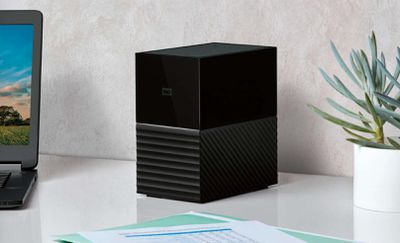
Western Digital has announced the 20TB My Book Duo, the company's highest-capacity desktop hard drive ever. The storage system comes with proprietary RAID 0/1 support offering speeds of up to 360MB per second sequential reads, as well as auto management of drive operations to help ensure read/write cycle data integrity.
Screen Shot 2 1
The My Book Duo also comes with a USB Type-C port with all cables included for universal compatibility (USB 3.1 Gen 1/3.0/2.0), and two additional USB Type-A hub ports to allow for additional accessories, including drones, action cameras, card readers, keyboards, mice, USB drives or phone syncing and charging.

Available in 20TB, 16TB, 12TB, 8TB, 6TB and 4TB capacities, the storage system also comes with password protection and 256-bit AES hardware encryption with WD Security software built in.

The drive is Formatted NTFS for out-of-the-box compatibility with Windows 10, Windows 8.1/8.0 or Windows 7, and therefore requires reformatting to work on OS X and macOS.

The My Book Duo includes a three-year limited warranty and is available now from wd.com and at select retailers and distributors, retailing at $799.99 (20TB), $599.99 (16TB), $419.99 (12TB), $329.99 (8TB), $289.99 (6TB) and $259.99 (4TB).


Top Rated Comments

beanbaguk Avatar
112 months ago
SPINNING RUST IS DEAD
for my residential and or office needs really looking for a network-able appliance to support common none SATA solid state memory (SSD). No need for RAID or SATA.

the Western Digital box is too little too late.
Another person who hasn't got the foggiest what he's talking about. Let's do some basic math.

We're going to use US Amazon prices for the best comparison.

10TB WD Pro RED NAS drive = $455.99

For the purposes of this comparison we'll make it realistic so RAID 0 will be used, therefore two drives are needed.

US$911.98

Keep in mind this storage is at best, limited to 1Gbps when accesses by an end user, so 125MB/s.

Now lets try your SSD option.

Since 2TB options are not yet available until later this year, we'll use the 1TB option. WD Blue 1TB from WD.

1TB Blue SSD = $299.99

OK, so we need 20 of these fellas, bringing us to a total of US$5,999.80!

Not to mention the ridiculous rig you would need to hold all 20 drives in place, and the bus needed to plug it all in. I would estimate that would be at very least another US$1k but we'll ignore that for the purposes of this exercise.

Using "spinning rust" as you eloquently put it, works out at US$45.60 per terabyte at absolutely zero performance loss against the SSD's in a real-world scenario.

Your SSD set-up would cost 657% more than "spinning rust", and that doesn't even take into account the infrastructure needed for your great idea.

Short of the long. You have absolutely no idea as to what you're talking about.

When do schools start again?
[doublepost=1503587801][/doublepost]
Just get a Synology
Or you plug this into a Synology NAS.... :rolleyes:
Score: 17 Votes (Like | Disagree)
112 months ago
Bring SSD. Once you try it, you do not want mechanical rotational disks, even for free!
This is rather short sighted, HHD is so much cheaper. Show me a 8TB SSD for $230 bucks. It's easier just to build a good Raid (preferably RaidZ) solution and if a disk goes bad pop it out and pop in a new one. Sure if all you need is 1-2 TB of storage SSD is fine if you direct attach the storage but most people will be good with a good NAS for backing up and doing work off of.
Score: 6 Votes (Like | Disagree)
112 months ago
I Don't see the point of this things. Too bad for a enterprise use and too much for a home use.
Plenty of home use. Great system that could back-up my existing 20 TB RAID 5 array.
Score: 6 Votes (Like | Disagree)
112 months ago
No GB LAN, No TB3 = Not a viable shared access storage solution for most applications.
Score: 6 Votes (Like | Disagree)
digitalrampage Avatar
112 months ago
Bring SSD. Once you try it, you do not want mechanical rotational disks, even for free!
LOL. 20TB SSD, only $999**

** a month for 2 years on our easy payment plan.
Score: 5 Votes (Like | Disagree)
cyberlocke Avatar
112 months ago


Backup of a Raid 5, seriously ??
Redundancy and backup are two different things. You need both. Check this out for more info . . . ('https://www.cnet.com/how-to/digital-storage-basics-part-3-backup-vs-redundancy/')
Score: 5 Votes (Like | Disagree)

Popular Stories

iOS 26

iOS 26.4 Adds Two New Features to CarPlay

Tuesday March 24, 2026 1:55 pm PDT by
iOS 26.4 was released today, and it includes a couple of new features for CarPlay: an Ambient Music widget and support for voice-based chatbot apps. To update your iPhone 11 or newer to iOS 26.4, open the Settings app and tap on General → Software Update. CarPlay will automatically offer the new features so long as the iPhone connected to your vehicle is running iOS 26.4 or later....
Apple Business hero

Apple Unveils 'Apple Business' All-in-One Platform

Tuesday March 24, 2026 8:53 am PDT by
Apple today announced Apple Business, a new all-in-one platform that unifies device management, productivity tools, and customer outreach features. The service is designed to be a consolidated replacement for several of Apple's existing business-focused offerings, including Apple Business Essentials, Apple Business Manager, and Apple Business Connect. It provides organizations with a single...
AirPods Pro Firmware Feature

Apple Releases New Firmware for AirPods Pro 3, AirPods Pro 2 and AirPods 4

Tuesday March 24, 2026 12:31 pm PDT by
Apple today released new firmware for the AirPods Pro 2, AirPods Pro 3, and the AirPods 4. The firmware has a version number of 8B39, up from 8B34 on the AirPods Pro 3, 8B28 on the AirPods Pro 2, and 8B21 on the AirPods 4. There is no word on what's included in the firmware, but Apple has a support document with limited notes. Most updates are limited to bug fixes and performance...














