Google Launches 'Tez' Mobile Payments Service in India for Android and iOS - MacRumors
Skip to Content

Google Launches 'Tez' Mobile Payments Service in India for Android and iOS

by

Google today launched a new mobile payment app in India that allows users to connect their bank accounts directly to the service and employs ultrasound technology in lieu of an NFC chip to transfer money between devices.

Called Tez (Hindi for "fast"), Google's new payment platform links customers' bank accounts to Android and iOS via the Unified Payment Interface (UPI), a state-backed payments system. Google has partnered with State Bank of India, the country's biggest lender, HDFC Bank, ICICI Bank, and Axis Bank, with 55 banks in total said to be supporting the service across India.
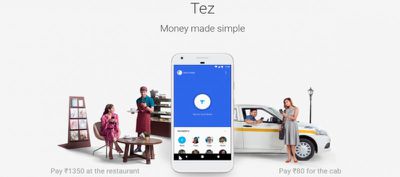
Screen Shot 2 1
Tez uses a technology called audio QR that allows mobile users to transfer cash between devices using an inaudible ultrasonic frequency to identify the payer and payee. The system works with any mobile device with a mic and speaker and the Tez app installed, and therefore doesn't require an NFC chip.

India is home to 300 million smartphone users, but most handsets in the country don't feature NFC, so Google's audio QR solution is being marketed as a secure mainstream alternative. Apart from typical mobile transactions to pay for everyday items, Google says small businesses can also use the app to accept payments into their bank accounts, with payments from mobile merchants supported, too.


According to Bloomberg, digital transactions have surged after the Indian Government banned high-value cash notes in 2016. Tez is available on both Android and iOS, and Google plans to release the app in other emerging countries including Vietnam, Indonesia, and Thailand. Apple has yet to launch Apple Pay in any of the aforementioned countries and is still negotiating with the Indian government about bringing its own mobile payment system to the country. Apple Pay Cash, Apple's peer-to-peer mobile payment feature, is set to launch in the U.S. with the official release iOS 11 this month.


Tags: Google, India, Tez

Top Rated Comments

fairuz Avatar
111 months ago
So it sends out audio and this is received by mic... yeah, seems very secure. "Hey, my bank account is XYZ, password ABC".
Open wifi has the same problem, but it's a solved issue. There are ways to make this cryptographically secure. You do a public key exchange then encrypt everything afterwards.
[doublepost=1505754844][/doublepost]The ultrasound thing sounds cool, but IDK why they use it instead of NFC.
[doublepost=1505754918][/doublepost]
How many? Google Wallet>Android Pay & now Tez

That way, there would be one for China, one for North Korea, one in Russia, Bangladesh, Pakistan and eventually Mars. This will fuel the government's arrogance at abysmal levels. Google just aided a WeChat environment in India.


Google knows no self-esteem. Just hate Google.
I also avoid Google because they never focus on anything, but to be fair, payment systems are a case where you really just have to try repeatedly until something sticks.
Score: 2 Votes (Like | Disagree)
Sedulous Avatar
111 months ago
So it sends out audio and this is received by mic... yeah, seems very secure. "Hey, my bank account is XYZ, password ABC".
Score: 2 Votes (Like | Disagree)
d5aqoëp Avatar
111 months ago
How many wallet/pay apps in India?

Chillr/BHIM/Tez/PayTM/PhonePe/Airtel money/Jio Money plus each bank also has their own mobile wallet. LMAO seriously!
Score: 2 Votes (Like | Disagree)
fairuz Avatar
111 months ago
There is a huge difference between sniffing packets on the same network and openly audibly broadcasting banking information.
What's the difference? On wifi, you openly broadcast banking information, just with light instead of sound. Any legitimate banking site will use SSL encryption.
Score: 1 Votes (Like | Disagree)
Sedulous Avatar
111 months ago
Open wifi has the same problem, but it's a solved issue. There are ways to make this cryptographically secure. You do a public key exchange then encrypt everything afterwards.
[doublepost=1505754844][/doublepost]The ultrasound thing sounds cool, but IDK why they use it instead of NFC.
[doublepost=1505754918][/doublepost]
I also avoid Google because they never focus on anything, but to be fair, payment systems are a case where you really just have to try repeatedly until something sticks.
There is a huge difference between sniffing packets on the same network and openly audibly broadcasting banking information.
Score: 1 Votes (Like | Disagree)
Avieshek Avatar
111 months ago
How many wallet/pay apps in India?

Chillr/BHIM/Tez/PayTM/PhonePe/Airtel money/Jio Money plus each bank also has their own mobile wallet. LMAO seriously!
Hail! dictator Modi
Score: 1 Votes (Like | Disagree)

Popular Stories

iOS 26

iOS 26.4 Adds Two New Features to CarPlay

Tuesday March 24, 2026 1:55 pm PDT by
iOS 26.4 was released today, and it includes a couple of new features for CarPlay: an Ambient Music widget and support for voice-based chatbot apps. To update your iPhone 11 or newer to iOS 26.4, open the Settings app and tap on General → Software Update. CarPlay will automatically offer the new features so long as the iPhone connected to your vehicle is running iOS 26.4 or later....
AirPods Pro Firmware Feature

Apple Releases New Firmware for AirPods Pro 3, AirPods Pro 2 and AirPods 4

Tuesday March 24, 2026 12:31 pm PDT by
Apple today released new firmware for the AirPods Pro 2, AirPods Pro 3, and the AirPods 4. The firmware has a version number of 8B39, up from 8B34 on the AirPods Pro 3, 8B28 on the AirPods Pro 2, and 8B21 on the AirPods 4. There is no word on what's included in the firmware, but Apple has a support document with limited notes. Most updates are limited to bug fixes and performance...
apple tv 4k new orange

tvOS 26.4 Adds These New Features to Your Apple TV

Wednesday March 25, 2026 3:33 pm PDT by
Apple this week released tvOS 26.4, and the software update includes a handful of new features and changes for the Apple TV. tvOS 26.4 is compatible with all Apple TV 4K and Apple TV HD models released since 2015. To update your Apple TV, open the Settings app on the device, navigate to System → Software Updates, and select Update Software. Below, we have recapped what is new in tvOS...