Reminder: How to Pre-Sign for Your Delivery of New Apple Products Tomorrow - MacRumors
Skip to Content

Reminder: How to Pre-Sign for Your Delivery of New Apple Products Tomorrow

by

If you have an iPhone 8, Apple Watch Series 3, or Apple TV 4K scheduled for delivery tomorrow, be aware that Apple requires its courier partners like UPS and FedEx to collect a signature upon delivery since they are valuable items.
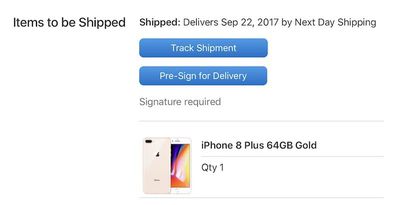
iphone 8 presign
Fortunately, if you won't be home during the day, Apple offers the option of printing, filling out, and affixing a pre-signed notice to your door, allowing the courier to leave the package without someone being there to sign for it.

How to Pre-Sign for Delivery

  1. Open your shipment notification email from Apple.
    iPhone 8 delivery 800

  2. Click on the blue Pre-Sign for Delivery button.

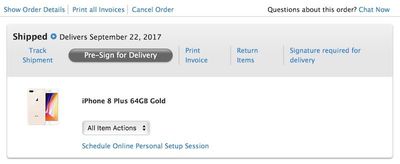
  3. Click on the gray Pre-Sign for Delivery button on Apple's order status page.
    iphone 8 order status 800

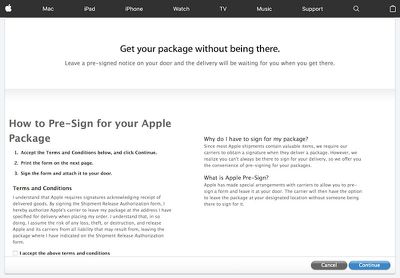
  4. Check the "I accept the above terms and conditions" box and click the blue "Continue" button.
    iphone 8 release

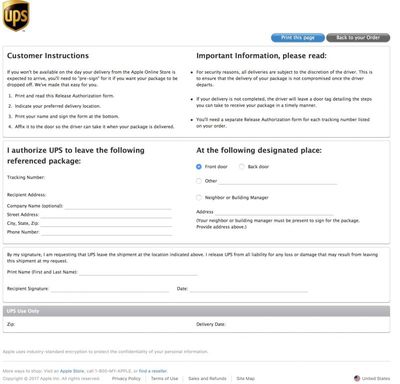
  5. Click the blue "Print this page" button on the Release Authorization page.
    iphone 8 tracking

  6. Fill out the form with your complete address information and phone number.

  7. Indicate whether you would like the delivery at the front door, back door, or somewhere else.

  8. Print your first and last name, sign, and date the form.

  9. Affix the form somewhere near the designated place of delivery.
There is also the option to authorize delivery to a neighbor or building manager, but the person must be present to sign for the package. If you prefer this option, make sure to include the person's address on the form.

To ensure that packages are not stolen once the courier leaves, all deliveries are subject to the discretion of the driver. If a delivery is not completed, the driver will leave a door tag detailing the steps you can take to receive your package.

As a point of emphasis, be aware that your shiny new products could be stolen before you get home, and Apple would not be responsible. For this reason, delivery to a back door or other obscure location, or to a neighbor, is the best option.

If you opt not to pre-sign at all, and the package arrives while you are away from home, the driver may attempt delivery again later or, as mentioned, leave a door tag detailing the steps you can take to receive your package.


Top Rated Comments

111 months ago
so people can steal your box
Score: 9 Votes (Like | Disagree)
ahunt01 Avatar
111 months ago
What's to stop the UPS driver from walking away with it?
Score: 4 Votes (Like | Disagree)
DogHouseDub Avatar
111 months ago
Pre-sign? I thought tomorrow was a holiday? At least that's what I'll tell the boss on Monday...
Score: 3 Votes (Like | Disagree)
111 months ago
If you have UPS MyChoice you can have your package held at a UPS Store near you for free.
Score: 3 Votes (Like | Disagree)
Apple_Robert Avatar
111 months ago
so people can steal your box
Definitely a bad idea to pre-sign for your phone. You give up protection once you do that.
[doublepost=1506025418][/doublepost]
How about just asking them to keep the package at their customer service center?
You can arrange for that to occur.
Score: 2 Votes (Like | Disagree)
111 months ago
How about just asking them to keep the package at their customer service center?
Score: 2 Votes (Like | Disagree)

Popular Stories

iOS 26

iOS 26.4 Adds Two New Features to CarPlay

Tuesday March 24, 2026 1:55 pm PDT by
iOS 26.4 was released today, and it includes a couple of new features for CarPlay: an Ambient Music widget and support for voice-based chatbot apps. To update your iPhone 11 or newer to iOS 26.4, open the Settings app and tap on General → Software Update. CarPlay will automatically offer the new features so long as the iPhone connected to your vehicle is running iOS 26.4 or later....
Apple Business hero

Apple Unveils 'Apple Business' All-in-One Platform

Tuesday March 24, 2026 8:53 am PDT by
Apple today announced Apple Business, a new all-in-one platform that unifies device management, productivity tools, and customer outreach features. The service is designed to be a consolidated replacement for several of Apple's existing business-focused offerings, including Apple Business Essentials, Apple Business Manager, and Apple Business Connect. It provides organizations with a single...
AirPods Pro Firmware Feature

Apple Releases New Firmware for AirPods Pro 3, AirPods Pro 2 and AirPods 4

Tuesday March 24, 2026 12:31 pm PDT by
Apple today released new firmware for the AirPods Pro 2, AirPods Pro 3, and the AirPods 4. The firmware has a version number of 8B39, up from 8B34 on the AirPods Pro 3, 8B28 on the AirPods Pro 2, and 8B21 on the AirPods 4. There is no word on what's included in the firmware, but Apple has a support document with limited notes. Most updates are limited to bug fixes and performance...