
D-Link's HomeKit-enabled Omna 180 Cam HD home security camera today gained new functionality through a major app update that brings important new features to the device.

The user interface of the app has been improved and it's no longer quite as slow when you open it up, which is a major plus.

There's a new pinch-to-zoom feature that allows you to zoom in on the video feed from the camera, a new toggle lets the night vision feature to be turned off if desired, and there's now support for event notifications when motion is detected. It's also possible to turn off the LED indicator light on the camera following the update.
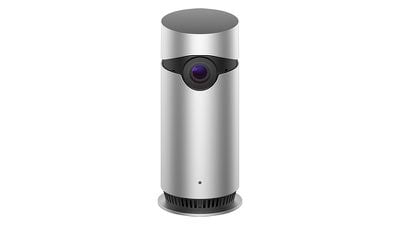
d link omna camera
Both video clips and snapshots taken with the camera can be saved to a local album from the microSD card from the playback menu, and for users who don't have an Apple TV or an iPad to enable remote viewing, there's now a built-in remote live streaming feature.

Customers who own the Omna 180 Cam HD can download the new update in the iOS App Store. Following the update, new firmware will need to be downloaded to the camera through the Settings section of the Omna app. Along with today's iOS update, D-Link released a new app for Android, enabling Android compatibility.

The Omna, one of the first cameras to support HomeKit, is an in-home security camera with a wide-angle lens, night vision support, and a two-way microphone, among other features. It records all data to a microSD card and does not offer a cloud upload feature.

We reviewed the Omna when it first launched earlier this year and some of the features that were implemented today were among our chief complaints with the device.

D-Link recently lowered the price of the Omna, and it is now available for purchase from the Apple Store for $149.95.

Top Rated Comments

schmidt65 Avatar
106 months ago
Schmidt65, it’s been a few months on from this comment, what is your long term view of the Omna versus the Circle 2?

Im also curious as to which device is easier/better at accessing footage say a few hours old? Say if there has been an incident of damage in the night of my car and I need to retrieve footage. Same with notifications, if my car is being damaged does one appear better/faster at sending movement notifications? Final question, does cloud or local storage matter in daily use?

I’m torn between both devices, Spec wise they seem extremely similar!
They both have their pro's/cons.

For homekit integration, the OMNA wins hands down. The video feeds load instantly, nightvision mode is instant, and the motion sensor zones (and motion-notification delay periods) carry over from the OMNA app straight into the Home app. However the SD card has never worked for me so I can't view older recordings. This is on both cameras.

The Circle 2 cameras however are much better cameras, and the Logitech Circle app is really good. They are waterproof, have free 24 cloud access of all motion alerts, and can be positioned in virtually any angle. However although they do appear in the home app, they are slow to load, nightvision takes 15-20 seconds each time to refocus each time you click to view the feed, and there are no motion zones or wait-period settings that carry over from the Logitech app.

I've set mine up with 2 OMNA's inside for baby/toddler monitors as I can set the exact motion zones I want to be alerted about (not the whole room, just the cots), and nightvision is instant when I click the video (which is essential as I mainly sue them at night!).

I use the 3 circle cameras outside as security cameras as they are waterproof and are positioned exactly as I want them. I just have to set the notifications to only alert me when I am not at home, as otherwise I get bombarded every time anything happens (as I am unable to set a motion sensor-zone or time-delay between each notification that carries over to the Home app), and you have to pay in Logitech app. I also only use the Logitech app at night as the Home-app takes forever to re-focus nightvision, but the circle app is instant. Additionally I get 24 hours of free cloud storage for motion alerts, which is great for outside security cameras.

Both the OMNA and Circle work perfectly with HomeKit automations - I have the circle cameras set to turn on Hue lights in certain rooms if they detect motion at night.
[doublepost=1515585277][/doublepost]
Schmidt65, it’s been a few months on from this comment, what is your long term view of the Omna versus the Circle 2?

Im also curious as to which device is easier/better at accessing footage say a few hours old? Say if there has been an incident of damage in the night of my car and I need to retrieve footage. Same with notifications, if my car is being damaged does one appear better/faster at sending movement notifications? Final question, does cloud or local storage matter in daily use?

I’m torn between both devices, Spec wise they seem extremely similar!
For your scenario, I would definitely say the Circle 2 wired cameras. I have mine set over the driveway and they are great and providing instant notifications if they sense any motion. They are also waterproof, can be positioned exactly as you want them, and provide free 24 hours of motion footage.

It's just if you want to view the video feed at night, use the Logitech app and not the Home app.

OMNA cameras are really only good inside.
Score: 3 Votes (Like | Disagree)
Mizio Avatar
109 months ago
Can anyone with an Omna tell me if you can turn *off* the camera from the Home app?
Not that I am aware of. I am using a iDevice switch to turn it on/off via Geofence. I was hopeful this feature was added to the recent update but no such luck. Disappointing as this is a must have for a HomeKit enabled device!
Score: 1 Votes (Like | Disagree)
schmidt65 Avatar
109 months ago
Hi Schmidt,

I am also thinking about the omna as a baby-monitor. What's your setup!? I am planing on using the apple watch for my wife with hearing problems. The Watch will use the taptic engine to allert her during the night. Do you think this will work!?

How about the setting of the camera!? the circle or even the home from Nokia are easier to be placed and adjusted. The Omna looks like "it is as it is" and it can not be tilted or altered...

Thanks and have a great day!
Daniel
Hi,

Yes the motion alerts tap on the watch pretty well with a small image of the motion captures, works really well with our 2 year old.

It is annoying that the omna can’t be tilted, but has a 180 degree angle so captures everything really well, and you can set the zones you want to be alerted to movement on which ties into the home app.
Score: 1 Votes (Like | Disagree)
schmidt65 Avatar
109 months ago
I’ve got 2 of these as indoor baby/toddler cameras, and 3 of the new HomeKit Logitech Circle 2 cameras outside as security cameras.

The Omna’s are much better at night vision and far more granular at motion detection - you can mark zones on them for HomeKit notifications.

The circle 2’s only allow zone marking for notifications within its own app - which aren’t anywhere near as good.

Overall both are pretty good though
Score: 1 Votes (Like | Disagree)
Smeaton1724 Avatar
106 months ago
They both have their pro's/cons.

For homekit integration, the OMNA wins hands down. The video feeds load instantly, nightvision mode is instant, and the motion sensor zones (and motion-notification delay periods) carry over from the OMNA app straight into the Home app. However the SD card has never worked for me so I can't view older recordings. This is on both cameras.

The Circle 2 cameras however are much better cameras, and the Logitech Circle app is really good. They are waterproof, have free 24 cloud access of all motion alerts, and can be positioned in virtually any angle. However although they do appear in the home app, they are slow to load, nightvision takes 15-20 seconds each time to refocus each time you click to view the feed, and there are no motion zones or wait-period settings that carry over from the Logitech app.

I've set mine up with 2 OMNA's inside for baby/toddler monitors as I can set the exact motion zones I want to be alerted about (not the whole room, just the cots), and nightvision is instant when I click the video (which is essential as I mainly sue them at night!).

I use the 3 circle cameras outside as security cameras as they are waterproof and are positioned exactly as I want them. I just have to set the notifications to only alert me when I am not at home, as otherwise I get bombarded every time anything happens (as I am unable to set a motion sensor-zone or time-delay between each notification that carries over to the Home app), and you have to pay in Logitech app. I also only use the Logitech app at night as the Home-app takes forever to re-focus nightvision, but the circle app is instant. Additionally I get 24 hours of free cloud storage for motion alerts, which is great for outside security cameras.

Both the OMNA and Circle work perfectly with HomeKit automations - I have the circle cameras set to turn on Hue lights in certain rooms if they detect motion at night.
[doublepost=1515585277][/doublepost]
For your scenario, I would definitely say the Circle 2 wired cameras. I have mine set over the driveway and they are great and providing instant notifications if they sense any motion. They are also waterproof, can be positioned exactly as you want them, and provide free 24 hours of motion footage.

It's just if you want to view the video feed at night, use the Logitech app and not the Home app.

OMNA cameras are really only good inside.
Thank you for taking the time to reply. A lot to consider, the indoor vs outdoor discussion is something for me to consider. I had been thinking the Omna could be placed on the window ledge facing the drive. I think I'll go for the Omna first, use it indoors, then maybe expand to the garden/garage with Circle 2's in the summer. Looking at both systems they actually complement each other really well.
Score: 1 Votes (Like | Disagree)
Smeaton1724 Avatar
106 months ago
I’ve got 2 of these as indoor baby/toddler cameras, and 3 of the new HomeKit Logitech Circle 2 cameras outside as security cameras.

The Omna’s are much better at night vision and far more granular at motion detection - you can mark zones on them for HomeKit notifications.

The circle 2’s only allow zone marking for notifications within its own app - which aren’t anywhere near as good.

Overall both are pretty good though

Schmidt65, it’s been a few months on from this comment, what is your long term view of the Omna versus the Circle 2?

Im also curious as to which device is easier/better at accessing footage say a few hours old? Say if there has been an incident of damage in the night of my car and I need to retrieve footage. Same with notifications, if my car is being damaged does one appear better/faster at sending movement notifications? Final question, does cloud or local storage matter in daily use?

I’m torn between both devices, Spec wise they seem extremely similar!
Score: 1 Votes (Like | Disagree)

Popular Stories

maxresdefault

Apple Shows Off a Key Reason to Upgrade to the iPhone 17

Saturday February 7, 2026 9:26 am PST by
Apple today shared an ad that shows how the upgraded Center Stage front camera on the latest iPhones improves the process of taking a group selfie. "Watch how the new front facing camera on iPhone 17 Pro takes group selfies that automatically expand and rotate as more people come into frame," says Apple. While the ad is focused on the iPhone 17 Pro and iPhone 17 Pro Max, the regular iPhone...
Finder Siri Feature

Why Apple's iOS 26.4 Siri Upgrade Will Be Bigger Than Originally Promised

Friday February 6, 2026 3:06 pm PST by
In the iOS 26.4 update that's coming this spring, Apple will introduce a new version of Siri that's going to overhaul how we interact with the personal assistant and what it's able to do. The iOS 26.4 version of Siri won't work like ChatGPT or Claude, but it will rely on large language models (LLMs) and has been updated from the ground up. Upgraded Architecture The next-generation...
wwdc sans text feature

Apple Rumored to Announce New Product on February 19

Thursday February 5, 2026 12:22 pm PST by
Apple plans to announce the iPhone 17e on Thursday, February 19, according to Macwelt, the German equivalent of Macworld. The report, citing industry sources, is available in English on Macworld. Apple announced the iPhone 16e on Wednesday, February 19 last year, so the iPhone 17e would be unveiled exactly one year later if this rumor is accurate. It is quite uncommon for Apple to unveil...
apple wallet drivers license feature iPhone 15 pro

Apple Says These 7 U.S. States Plan to Offer iPhone Driver's Licenses

Monday February 9, 2026 6:24 am PST by
In select U.S. states, residents can add their driver's license or state ID to the Apple Wallet app on the iPhone and Apple Watch, and then use it to display proof of identity or age at select airports and businesses, and in select apps. The feature is currently available in 13 U.S. states and Puerto Rico, and it is expected to launch in at least seven more in the future. To set up the...
14 inch MacBook Pro Keyboard

New MacBook Pros Could Now Arrive in March

Sunday February 8, 2026 6:02 am PST by
New MacBook Pro models with the M5 Pro and M5 Max chips could arrive as soon as Monday, March 2, according to Bloomberg's Mark Gurman. In today's "Power On" newsletter, Gurman said that the release of new MacBook Pro models is tied to the release of macOS Tahoe 26.3. The launch is said to be slated for as early as the week of March 2. He added that the M4 Pro and M4 Max models on sale today...















