

The HomeKit ecosystem may seem daunting and confusing if you're unfamiliar with smart home products, their functionality, and their benefits, but getting started is actually simple and straightforward. Learning the ins and outs of HomeKit after setup does take a bit of effort, but it's not a difficult process and having interlinked electronics that can interact with each other and be automated can save time and really streamline your life.
What is HomeKit?
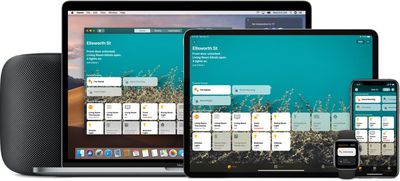
HomeKit is Apple's smart home platform, which is designed to let you control various internet-connected home devices -- ranging from thermostats and plugs to window blinds, light bulbs, and more -- with Apple devices.
These days, more and more products are internet connected, which is why you've heard the phrase "Internet of Things." The Internet of Things is a confusing mix of "smart" products that connect to the internet and can be controlled by a range of different platforms, from Amazon's Alexa to Google Home to Samsung SmartThings.
HomeKit is Apple's "Internet of Things" solution that connects HomeKit-enabled smart accessories together in a way that lets you operate them using your Apple products.
What You Can Do With HomeKit
HomeKit isn't a product or software; it's a framework that links smart home products together and adds new capabilities to devices like lights, locks, cameras, thermostats, plugs, and more. HomeKit lets you control smart home products using apps on your iPhone, iPad, or Mac, or simple Siri voice commands.
While controlling smart home products with Siri or with an iPhone is convenient, the real magic of HomeKit comes when you have multiple HomeKit-enabled products because you can control them all at once using scenes or set up automations so that they activate automatically.
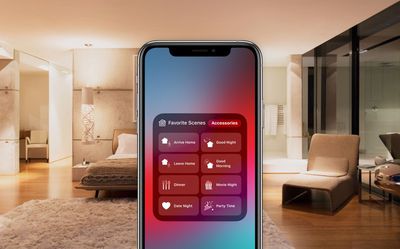
You can, for example, create a "Good night" scene that makes sure the doors are locked, closes the garage, turns off the lights, lowers the thermostat, and then activates a night light whenever motion is detected. With automation, you can set individual HomeKit devices to come on or off at specific times, or you can set entire scenes, like the aforementioned "Good night" scene to come on at a set time.
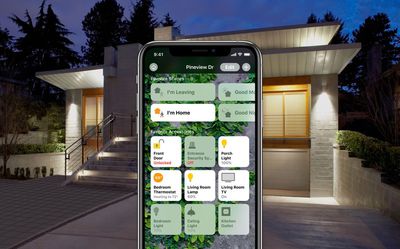
HomeKit setups, scenes, and automations can be as complex or as simple as you like, and now that HomeKit is in its fifth year of availability, there are all kinds of HomeKit products you can purchase. With a bit of time and some money, you can have a whole smart home ecosystem that's streamlined, automated, and easy to control.
Setting It Up
Getting started with HomeKit is as simple as purchasing any HomeKit-enabled device, whether it be a smart plug, light bulb, AirPlay 2 speaker, Apple TV, HomePod, HomePod mini, thermostat, or something else.
From there, open up the "Home" app, which comes pre-installed on all iOS devices. Tap on the "Add Accessory" button that's on the main screen of the Home app, and then follow the steps after it opens up to the rear camera.
All HomeKit products come with a HomeKit QR code on them, which you need to scan with the camera. Scanning the HomeKit code adds a device to the HomeKit framework, and then you can follow a few additional steps to assign it to a room, a necessary step for organizing your HomeKit devices.
How HomeKit Devices Connect
HomeKit devices connect to your HomeKit setup through Bluetooth, Wi-Fi, Thread, or a hub that connects to Wi-Fi. Many HomeKit devices in the United States use WiFi or connect to a hub over WiFi. Hue light bulbs, for example, use a hub, while smart lights from other brands like LIFX use WiFi.
There are some devices that connect over Bluetooth, and with Bluetooth devices, it's worth noting that you're going to need home hubs to extend connectivity, otherwise connection range can be rather limited. Home hubs include the Apple TV, HomePod, and HomePod mini. There's also the new "Thread" protocol that's emerging that more seamlessly connects your devices without the need for the delays of WiFi or Bluetooth.
Types of HomeKit Devices
There are all kinds of HomeKit devices on the market, some that are more capable than others. The following HomeKit categories are available:
- Lights
- Switches
- Outlets
- Thermostats
- Window Blinds
- Fans
- Air Conditioners
- Humidifiers
- Air Purifiers
- Sensors
- Locks
- Cameras
- Doorbells
- Garage Doors
- Sprinklers
- Speakers
- Routers
- TVs
Apple maintains a full list of HomeKit-compatible devices on its website, complete with links, so this is the best place to get an overview of all of the different HomeKit devices that you can put in your home.

Smart home devices that are compatible with HomeKit will have "Works with Apple Homekit" labeling on the packaging to make it clear that they support HomeKit.
Basic HomeKit Setup Tutorials
- How to Add a Device to Your HomeKit Setup
- How to Delete a Device From HomeKit
- How to Give Others Access to Your HomeKit Setup
- How to Add Rooms and Zones to HomeKit
- How to Create HomeKit Scenes
- How to Automate HomeKit Products
- How to Add a Second Home to HomeKit
- How to Use Siri to Control Your HomeKit Devices
- How to Use HomePod to Control Your HomeKit Devices
Using the Home App
- How to Use the Home App to Control HomeKit Devices
- How to Customize Your Home App
- How to Change the Wallpaper in the Home App
- How to Set HomeKit Favorites
Setting Up Remote Access
- How to Control Your HomeKit Devices When Away From Home
- How to Set Up HomePod as a Home Hub for HomeKit Devices
- How to Set Up an iPad as a Home Hub for HomeKit Devices
- How to Set Up an Apple TV as a Home Hub for HomeKit Devices
HomePod and AirPlay 2
HomeKit Requirements
Using HomeKit requires an iPhone, iPad, or iPod touch running the latest version of iOS, along with at least one HomeKit-enabled device.
Using the Home app on the Mac requires macOS Mojave or later, and to control devices when away from home, an Apple TV, HomePod, or HomePod mini is required to serve as a Home Hub.
Ways to Control Your HomeKit Devices
The great thing about HomeKit is the myriad ways that you can control your HomeKit compatible devices.
You can use Siri voice commands on the iPhone, iPad, iPod touch, Mac, Apple Watch, HomePod, or Apple TV to ask Siri to complete HomeKit tasks.
Devices can be controlled manually in the Home app, or in the app that comes with the device. Each HomeKit device will have an app downloadable from the iOS App Store that offers a way to control it.
You can also purchase HomeKit-enabled button-type devices that serve as remotes to activate HomeKit scenes physically, and there are switches for controlling HomeKit products such as lights.
HomeKit Secure Video
Apple in iOS 13 introduced HomeKit Secure Video, an API that uses the iPad, Apple TV, or HomePod to analyze video captured by compatible smart home cameras right in your home.
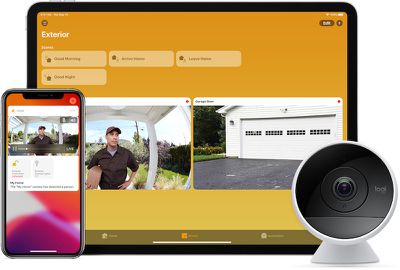
Video feeds are encrypted end-to-end and uploaded to iCloud, which means you alone can see the video footage without the risk of hackers accessing it. Multiple camera manufacturers, including Eufy, Eve, and Logitech have debuted HomeKit Secure Video cameras.
Using HomeKit Secure Video requires a paid iCloud plan, priced starting at $0.99 per month. The 50GB $0.99 plan allows you to connect one HomeKit Secure Video camera, while the $2.99 per month plan allows for up to five cameras. With the $9.99 per month plan, you can connect an unlimited number of HomeKit Secure Video Cameras, and with all of these plans, none of the stored video footage counts against your iCloud storage.
Reviews of HomeKit Accessories
Lights
- Nanoleaf's $200 HomeKit-Enabled Hexagons Paint Your Walls With Color
- Review: Nanoleaf's HomeKit-Enabled Lines Offer Futuristic Accent Lighting
- Review: Nanoleaf's Wood-Style Hexagons Add Attractive Accent Lighting to Any Room
- Review: Nanoleaf's HomeKit-Connected Triangle and Mini Triangle Light Panels Offer New Design Possibilities
- LIFX's HomeKit-Enabled Candle Bulb Offers Multi-Colored Lighting
- Philips Hue Vintage-Style Filament Bulbs Are Perfect for Accent Lighting
- The Philips Hue Outdoor Lightstrip With HomeKit Integration Lights Up Your Backyard
- Lutron's Caséta Lamp Dimmers and Serena Shades Bring HomeKit Convenience to Your Lights and Windows
- Nanoleaf's Touch-Enabled Canvas Offers Up Fun, Interactive Mood Lighting
- LIFX's HomeKit-Enabled LIFX Z Light Strip Adds Smart Multi-Color Accent Lighting to Your Home
- Nanoleaf's 'Aurora Smarter Kit' Offers Awesome HomeKit-Enabled Mood Lighting for $200
- Philips Hue Play Adds Bright Bias Lighting to Your Entertainment Center
- Eve’s New Light Strip is a Great HomeKit-Enabled Hub-Free Accent Lighting Option
- Eve’s HomeKit-Enabled ‘Eve Flare’ Offers Awesome Mood Lighting, Long Battery Life, and Water Resistance
Sensors
- Review: Aqara's Roller Shade Driver E1, TVOC Air Quality Monitor, and Hub M1S Are Reliable and Well-Designed HomeKit Accessories
- Review: Aqara's HomeKit H1 Switches, Temperature Sensor, and Hub M2 Expand Any Smart Home With Easy Setup
- Review: HomeKit-Compatible Eve Weather Monitors the Temperature in Your Backyard
- The HomeKit-Connected Eve Room Keeps Track of Temperature, Humidity and Air Quality in Your Home
- Koogeek's Light Strip and Door & Window Sensor Offer Solid Low-Cost HomeKit Options
- Eve Aqua Brings HomeKit Automation to Your Irrigation Sprinklers
- Elgato's HomeKit-Connected Eve Degree is a Sleek, Palm-Sized Temperature Monitor
- Weatherproof Hue Outdoor Motion Sensor Lets You Automate Your Indoor or Outdoor Lights
- Fibaro’s HomeKit-Connected Flood Sensor Notifies You When Leaks Are Detected
Buttons/Remotes/Switches
- Nanoleaf's New Dodecahedron-Shaped Remote Gives You Access to 12 HomeKit Scenes
- Fibaro's 'The Button' Adds Physical Control Options to Your HomeKit Setup
- iDevices' Instant Switch Expands Manual Control of Your Other iDevices HomeKit Accessories
- Eve Button Offers Quick Physical Controls for Activating Your Favorite HomeKit Scenes
- Elgato Eve Light Switch and Eve Motion Add Versatility to Your HomeKit Setup
Locks
- Schlage Sense Remains a Top Option Among HomeKit-Enabled Smart Locks
- Yale's $220 Assure Lock SL is a Sleek, Keyless HomeKit Deadbolt
Cameras
- Logitech's Circle 2 Brings HomeKit Compatibility and a New Design
- D-Link's Omna 180 Cam HD Offers HomeKit, But Could Use Improvement
- Logitech's Circle View Offers Privacy-Focused HomeKit-Compatible Video Recording
- Eve Cam Offers Privacy and Security With HomeKit Secure Video Integration
Thermostats
- Emerson's $200 Sensi Touch HomeKit Thermostat Offers a Large Color Display and Easy Setup
- Honeywell's $199 Lyric Round Thermostat Features a Nest-Like Design With HomeKit Support
Plugs and Outlets
- iDevices' Switches and Outlets Bring HomeKit to Your Existing Lights and Home Appliances
- ConnectSense Smart Outlet Offers Two HomeKit-Enabled Sockets and a USB Port
- Satechi's Dual Smart Outlet Offers HomeKit Compatibility and Power Monitoring
- Eve's Energy Strip Gives You Three HomeKit-Compatible Outlets
Miscellaneous
- Vocolinc Offers the First HomeKit Supported Essential Oil Diffuser With the 'FlowerBud'
- Chamberlain's MyQ Garage and Home Bridge Add HomeKit Support to Your Garage Door
- Eve Extend Adds Wi-Fi Connectivity and Longer Range to Your Eve Bluetooth HomeKit Devices
Security and Privacy
Security and privacy are topics that Apple takes seriously, and thus every manufacturer that creates a HomeKit-compatible device has to follow Apple's security guidelines, better ensuring your devices are safe from hackers.
Apple's commitment to privacy and demand that HomeKit products be secure is reassuring at a time when our homes are filled with smart devices that can hear us and see us.
For a long time, Apple required all HomeKit products to include a hardware-based HomeKit authentication coprocessor for HomeKit certification, and many HomeKit devices continue to offer this. In 2017, Apple began allowing manufacturers to obtain HomeKit certification with software-based authentication, but HomeKit is no less secure as a result.
All HomeKit devices use the same security features, including end-to-end encryption, non-reusable encryption keys, and two-way authentication (Apple verifies your HomeKit device and your HomeKit device verifies your Apple device) when connecting to a HomeKit setup.
A HomeKit camera, for example, sends video and audio streams directly to an iOS device and those streams are encrypted using randomly generated keys to prevent someone from intercepting your video feed.
All HomeKit data stored on your devices is fully encrypted, and HomeKit syncing between devices is done via iCloud and iCloud Keychain, both of which have their own security. Apple also must approve each and every device that gets the HomeKit labeling. In a nutshell, Apple has worked to make HomeKit a secure smart home platform that people can trust.
HomeKit is not without its bugs, though, and there have been some security snafus. In December 2017, there was a bug that left HomeKit accessories vulnerable to unauthorized access, but Apple was quick to fix it.
For those interested, the nitty gritty details about HomeKit security are available in Apple's iOS Security Guide and are well worth checking out if you have security concerns about using smart home devices. [PDF]
Solving HomeKit Connectivity Problems
When using HomeKit devices, you might sometimes see an error that a device is unreachable in the Home app or have other problems connecting to a HomeKit product.
The Home app, and most HomeKit apps that accompany HomeKit products, provide very little info on why a HomeKit product isn't working properly or connecting to your network, which can make troubleshooting HomeKit issues frustrating.
There are a few basic steps you can follow that will sometimes solve connectivity issues.
- Make sure the HomeKit device has power, is turned on, and is in range of your router if it's a Wi-Fi device.
- Turn the HomeKit device off, wait a good 10 seconds, and turn it back on. Do the same thing with your iPhone or other device you're attempting to use with HomeKit.
- Check the Wi-Fi connection and reset your router. Make sure your iOS device is up to date, connected to the internet, and that you're signed into iCloud.
- Make sure your HomeKit device is on the right Wi-Fi band. There are a lot of HomeKit devices that are 2.4GHz while most devices connect to 5GHz networks, and that can sometimes cause problems. If you have a 2.4GHz accessory, make sure it's on the 2.4GHz network. Steps for this will vary based on your setup.
- Remove the device from HomeKit in the Home app and then re-add it by scanning it. For some HomeKit products, this is probably a last resort step because it eliminates scenes and automations.
- Remove the device from HomeKit and reset it. This is a step that's necessary when removing some HomeKit devices from a HomeKit setup. You're going to need to consult the manual of your device because resetting is different on every product.
If none of these steps work, you're going to want to contact the support staff for whichever product you're having problems with to get further information on what to do for troubleshooting purposes.
Many HomeKit manufacturers have online troubleshooting databases, so in some cases, you can just Google for a solution.
There are more drastic steps to take, such as logging in and out of iCloud or resetting your entire HomeKit setup, but we recommend contacting a manufacturer before trying these last resort options just because of the hassle involved.
Discuss HomeKit
Have a setup question or a HomeKit issue you just can't figure out? You might want to check out the HomeKit forums on the MacRumors site for additional help. There are quite a few HomeKit users on the forums, and most people are happy to help.
Guide Feedback
Want to offer feedback on this guide, ask for feature additions, or point out an error? Send us an email here.






















![Apple Pulls Keynote, Pages and Numbers From App Store [Update: Back]](https://images.macrumors.com/t/Okb7kitB_gNr6qe5Pex9nQIysD8=/112x112/article-new/2026/01/Apple-Creator-Studio-iWork-suite.jpg)





















