

Last month, popular smart home accessory manufacturer iDevices launched Instant Switch, a Bluetooth switch that pairs with other iDevices products like outlets and switches to provide an additional point of manual control.
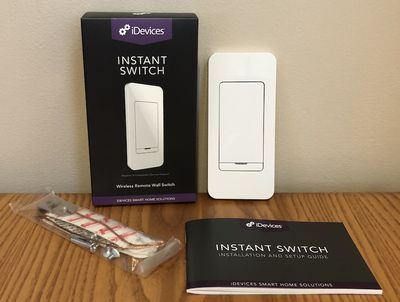
For example, it can be paired with a hard-wired Wall Switch to provide control at another convenient place in the room without the need for wiring a second switch. Alternatively, it can be paired with a Switch or Outdoor Switch to provide convenient control of a switched outlet located in a hard to reach place behind furniture or outside.
While the Instant Switch itself doesn't directly support HomeKit, it is indirectly compatible as it pairs with other iDevices products that are part of the HomeKit ecosystem.
The Instant Switch runs on a CR2032 coin cell battery that lasts up to two years, and it can be mounted in a variety of configurations, including stuck anywhere you wish with an included 3M Command Strip, screwed into empty space in an existing electrical gang box, or even stuck stuck next to an existing gang box to make it look like an integral part of a multi-gang setup.
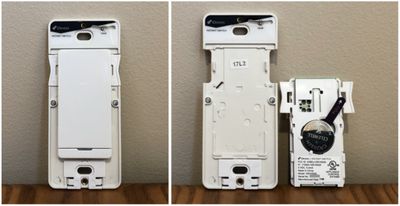
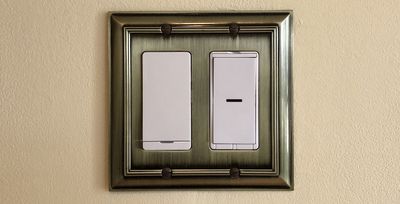
The Instant Switch comes with a narrow white magnetic faceplate for a clean look, or you can use your own single or multiple rocker faceplate for a customized look. A built-in level in the Instant Switch makes it easy to ensure you're mounting it correctly.
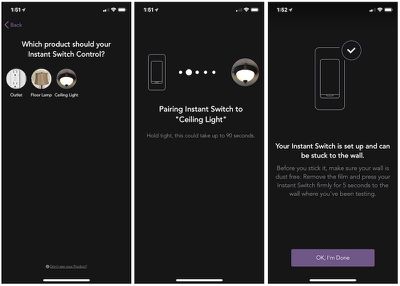
Installation is simple, and iDevices includes several parts to help with the process. An included manual walks you through the steps, which include removing the battery pull tab to power up the switch, using the iDevices Connected app to pair the Instant Switch to an existing iDevices product (which may require a firmware update if you haven't kept up to date), and mounting the Instant Switch in your preferred location.
App setup is dead simple, as the Instant Switch automatically enters a pairing mode for 30 minutes after you activate the battery and the app will automatically spot the Instant Switch as an available device to add. The app asks you to place the Instant Switch in the location where you want to mount it in order to ensure a good wireless connection to the paired switch, and then it takes about a minute to complete the pairing process.
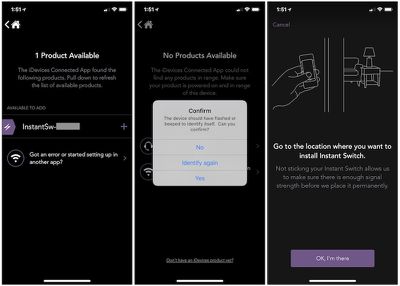
At that point, you can mount the Instant Switch and you should be ready to go. My Instant Switch did go through a software update as soon as I was done setting it up, but a status light on the Instant Switch that can flash or shine solid in a variety of colors lets you know what it's doing and whether there are any problems.
The most complicated installation scenario involves installing into an existing gang box within the wall. The Instant Switch is a standard size, so it will fit easily mount into the box, but you will have to attach an included ground wire assembly and connect it to the existing ground within the box.
If you're not installing in a gang box, things are even easier, and iDevices includes two 3M Command Strips to allow you to stick the Instant Switch securely to any surface. If you want to install it next to an existing gang box, just get a faceplate cover that's one switch larger than the box, and you can easily attach the Instant Switch in the extra faceplate slot for a cohesive look. iDevices recommends against using metal faceplates, as they can interfere with the wireless signals, but I've never experienced any problems with the metal ones I use throughout my house.
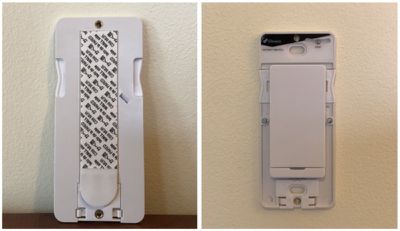
The clever design of the Instant Switch makes it easy to mount and use, with an outline on the back of the switch making it easy to see where to stick the Command Strip, a ball level to ensure the switch is in proper position before sticking it to the wall, and a breakaway tab at the bottom of the switch that lets you get to the Command Strip for removal. The rocker switch itself can also be removed by squeezing a pair of tabs on the switch, letting you access the battery for replacement.
I've spent a couple of weeks using the Instant Switch paired alternately with a Wall Switch and a Switch, and while this is a fairly straightforward product that performs one simple switching task, it can be a handy addition to your smart home — if you're already part of the iDevices ecosystem. Unlike other some switches and buttons like the Logitech POP that are directly compatible with HomeKit and can be used to control any other HomeKit devices including entire scenes, the iDevices Instant Switch is limited to extending a single iDevices switch or outlet at a time.

In one of my testing scenarios, I mounted the Instant Switch at an entry to my living room to create a 3-way setup. The room has a ceiling light controlled by an iDevices Wall Switch at one entry, so it's nice to have a second point of control at the other entry without needing any dedicated wiring. The Instant Switch operates similarly to the company's Wall Switch in that you have to press the top portion of the switch to turn on the light and the bottom portion to turn it off, with the switch returning to its neutral position once you release the switch. There is a very brief delay upon activating the switch as it communicates with the paired device, but it's barely noticeable.
The Instant Switch also offers dimming capabilities when paired with a supported product like the iDevices Dimmer Switch. A single press on the Instant Switch turns the paired switch on or off, while pressing and holding will increase or decrease brightness. A double press quickly adjusts brightness to maximum or minimum.
I also tested the Instant Switch paired with a Switch tucked behind a couch that controls a table lamp in my living room. Without the Instant Switch, I'd have to use Siri, the Home app, or the iDevices app on one of my iOS devices to control the lamp, as the button on the Switch is inaccessible due to its location. With the Instant Switch, I can give that switch manual control from any location I choose within the room.
I'm looking forward to using an Instant Switch during the Christmas season to pair with the iDevices Outdoor Switch I use to control my exterior Christmas lights. I typically keep the lights on a schedule in the iDevices app, but if I need to manually turn them on or off, I currently have to pull out one of my iOS devices or venture out onto the cold front porch to hit the button on the switch. With the Instant Switch, I'll be able to mount it right by my front door to easily turn the Christmas lights on and off while staying warm.
The Instant Switch proved easy to set up and it was fast and reliable in controlling paired accessories. At $34.95 through Amazon and other retailers, pricing is fairly competitive with similar products, and this is a well thought-out accessory, although it would be nice if it could work outside of the iDevices ecosystem. If you're already invested in iDevices products, this is a great way to expand manual control of these smart home devices.
Note: iDevices provided the Instant Switch and a Switch to GeekWebGuides free of charge for the purposes of this review. No other compensation was received. GeekWebGuides is an affiliate partner with Amazon and may earn commissions on purchases made through links in this article.





























![Apple Pulls Keynote, Pages and Numbers From App Store [Update: Back]](https://images.macrumors.com/t/Okb7kitB_gNr6qe5Pex9nQIysD8=/112x112/article-new/2026/01/Apple-Creator-Studio-iWork-suite.jpg)















Top Rated Comments
Someone claiming to be a tech journalist should earn their pay. Articles like this one are an embarrassment to MR and a disservice to readers.
Barely noticeable? How about some real numbers for the delay instead of platitudes. Latency of more than ~300 msec is unacceptable for lighting controls.