
iDevices Launches HomeKit-Compatible Wireless 'Instant Switch' - MacRumors
Skip to Content

iDevices Launches HomeKit-Compatible Wireless 'Instant Switch'

by

iDevices today announced the launch of the latest product in its smart home lineup, the iDevices Instant Switch. The Instant Switch is a simple wireless wall switch that's designed to attach to a surface using adhesive, so there's no tricky installation required.

The Instant Switch, which was first announced at CES 2017, is designed to work with existing iDevices HomeKit products using a Bluetooth connection, providing an additional method of control. According to iDevices, the Instant Switch can be paired to a hard-wired iDevices Wall or Dimmer Switch to create a three or four-way control configuration, for example.
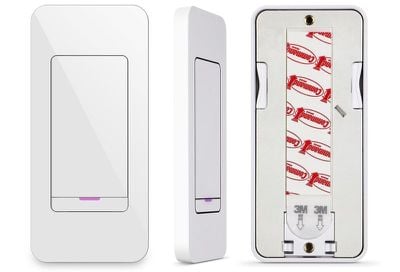
idevicesinstantswitch2
You can attach the Instant Switch to a wall or another surface using a 3M Command Strip, and it can be placed anywhere in the home. iDevices recommends using it in hard-to-reach locations, because no drilling or rewiring is required. A built-in user-replaceable battery is included, so power isn't needed.
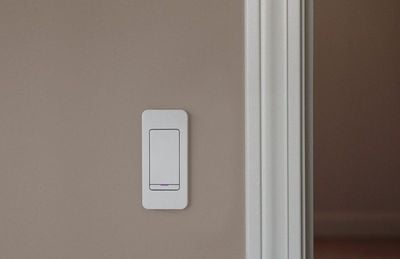
idevicesinstantswitch
If you don't want to use adhesive, the Instant Switch can also be fitted to any standard rocker faceplate because it's been designed to mimic a permanently installed light switch.

The new iDevices Instant Switch can be purchased from the iDevices website or Amazon.com for $34.95 starting today.

Top Rated Comments

VforVelveta Avatar
107 months ago
I think this article needs to be clarified that the switch itself is not Homekit compatible. All it can do is control other iDevices stuff, e.g. it can't be used in Homekit automations to control other things and won't appear in the Home app.

If you want something like this that actually is HK compatible, I think the Logitech pop buttons are the closest thing to it.
Score: 5 Votes (Like | Disagree)
107 months ago
I think it's a stretch to say it's Homekit compatible. It only works with other iDevice homekit devices over BT.
Score: 5 Votes (Like | Disagree)
bmustaf Avatar
107 months ago
As mentioned above, this *ISN'T* HomeKit compatible, actually. Maybe, on a technicality.


But this, again (after the Twelve South iPhone case "total protection" on a case that has plenty of cutouts thing earlier this week) is an example of the practice of trying to pass off totally unvetted press releases from advertisers or companies in the ecosystem as actual "content" or "news".

It hurts MR's credibility. Please reconsider this practice, or at least label this as "THIS COMES STRAIGHT FROM THE MARKETING/PR AGENCY OF THIS COMPANY, AND IS ESSENTIALLY AN AD!" or something. This isn't actual content from MR, it's a repost of a press release/product release sheet. Gross.
Score: 4 Votes (Like | Disagree)
wesley96 Avatar
107 months ago
And while my Lutron switches, the iDevices switch, and the ‘dumb’ rocker switch all look different on the face, they all have one thing in common. They can all be installed in a gang box. Unlike the Hue Tap.
Well, not in his country’s standard gang box. So all those switches you mentioned are no-go as far as he is concerned and Tap is actually better in this aspect that it can be installed on any surface. Different needs and situations.

...anyways, so I understand that the switch shown in the article controls iDevices stuff which are HK compatible, but the switch itself is NOT compatible with HK? That’s disappointing. I liked the pricing, but then this limitation makes it a deal breaker.
Score: 1 Votes (Like | Disagree)
vipergts2207 Avatar
107 months ago
The iDevice Switch clocks like this:

Tap looks like this:


Neither look like this:


Like I said, parochial.
And while my Lutron switches, the iDevices switch, and the ‘dumb’ rocker switch all look different on the face, they all have one thing in common. They can all be installed in a gang box. Unlike the Hue Tap.
Score: 1 Votes (Like | Disagree)
danmart Avatar
107 months ago
The Tap doesn’t physically replace a light switch, which I’m pretty sure is what he was getting at.
It does? We use the Tap as our only light switch in our lounge.
Score: 1 Votes (Like | Disagree)

Popular Stories

Apple Event Logo

Apple's Next Era Begins September 1

Thursday May 7, 2026 10:36 am PDT by
Apple recently announced that Tim Cook will be stepping down as CEO later this year, after 15 years of leading the company. Effective September 1, Apple's hardware engineering chief John Ternus will become the company's next CEO, while Cook will become executive chairman of Apple's board of directors. In his new role, Apple said Cook will assist with "certain aspects" of the company,...
Instagram Feature 2

PSA: Instagram Encrypted Messaging Ends on Friday, May 8

Tuesday May 5, 2026 8:24 am PDT by
Instagram will remove end-to-end encryption for direct messages between users from May 8, 2026. When the date comes around, Meta will potentially be able to see the contents of all messages between users on the social media platform. Encrypting messages has been an optional feature in Instagram since 2023, but in March of this year the social media platform quietly updated a help page to say ...
macbook neo launch day

Apple May Drop Base $599 MacBook Neo as Chip, DRAM Costs Climb

Thursday May 7, 2026 4:55 am PDT by
Apple is considering dropping the cheapest MacBook Neo configuration as one possible response to the rising cost of building the popular laptop, according to Taiwan-based tech columnist and former Bloomberg reporter Tim Culpan. The Neo currently starts at $599 for a 256GB model, with a 512GB version at $699. Writing in his latest Culpium newsletter, Culpan says cutting the entry-level...







































