
Fibaro The Button Review - GeekWebGuides
Skip to Content

Review: Fibaro's 'The Button' Adds Physical Control Options to Your HomeKit Setup

by

"The Button" from Fibaro is the latest HomeKit accessory that's designed to add physical control options to your HomeKit setup, making it easier to access HomeKit devices without an iOS device or HomePod.

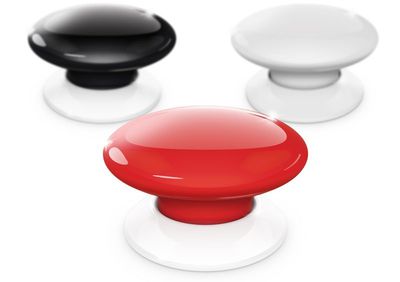
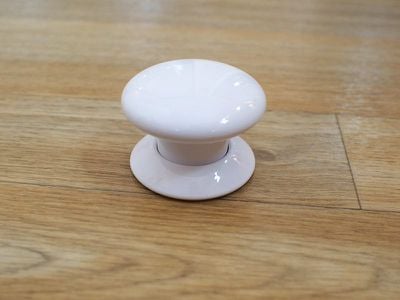
Design wise, The Button looks like you might expect something called "The Button" to look. Made of smooth plastic, it has a small round base that holds a slightly larger button that depresses to activate HomeKit commands.
fibarothebutton
I like the look of the button, and it offers a satisfying button-like press that's better than some of the other competing button and tap-style devices that offer physical HomeKit controls. The button I reviewed was white, but it is also available black and red.
thebuttondesign
The Button supports just three gestures: a single click, a double click, and a press and hold. This limits what can be done with The Button, so a household may need more than one if there are a lot of HomeKit products and you want granular control over each one.
thebuttoninhand
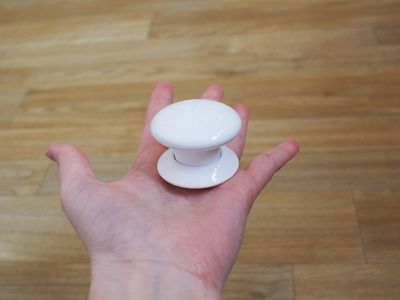
You can attach the button to a wall or a desk using included adhesive or by nailing the plastic mounting plate into the wall. You can also just use it sans adhesive or mounting plate if it's just sitting on a desk or nightstand, or if you want to be able to move it around.
thebuttonbottom
There is no light to indicate that The Button is turned on and has power, but you can enable an audio feedback option in the settings section of the Fibaro app to have it beep when a button press is activated.
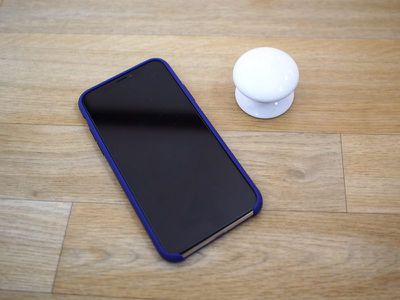
thebuttonsize
Setting up The Button is a little more involved than the setup process for some other HomeKit products. You need to press down and rotate The Button in a counterclockwise direction (like a childproof pill bottle) to open it up to remove the battery blocker.

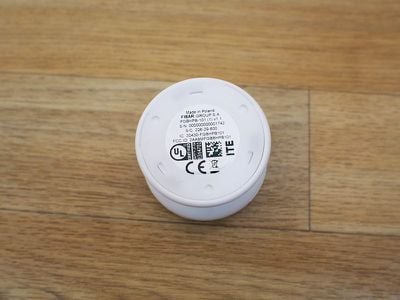
Once open, you need to take out the user-replaceable 1/2AA battery that powers the accessory to remove the small piece of paper before putting the battery back in place and closing it back up. From there, you can download the Fibaro app or the Home app and add it to a HomeKit setup using the QR code in the manual or on the bottom of The Button.

I thought the Fibaro app was one of the worst HomeKit apps I've ever used. It's cluttered, has an unintuitive UI, and uses a color scheme that makes text hard to read. It also has no real instructions on programming The Button, which is going to be confusing for those who are new to HomeKit and unfamiliar with automations.
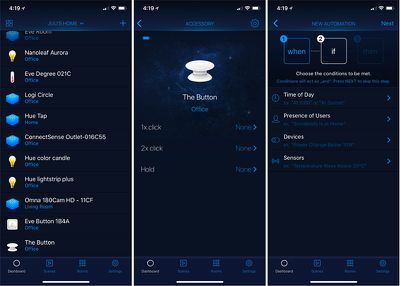
thebuttonapp
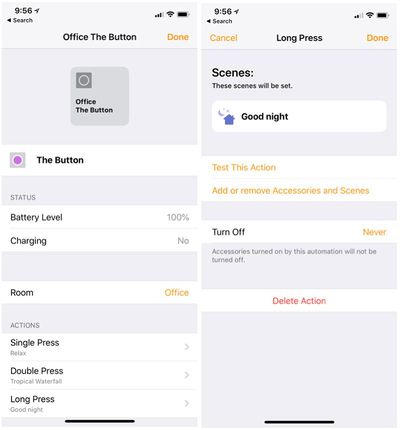
Most users will probably be better off controlling and programming The Button with the Apple Home app, where you can more easily assign Scenes and automations to each button press.

With The Button, you can do things like activate a specific scene to turn off all of the lights in the house at night, lock the door, and turn down the thermostat, or turn on all the lights in the morning and turn up the thermostat, all depending on which HomeKit devices you have installed and what you want The Button to do.
thebuttonhomeapp
I set a single press to turn off all of the lights in my office with the exception of my night lights, and a double press turns them all back on in the morning. A long press sets an evening scene that dims the lights. The Button can do a huge variety of things depending on the HomeKit products you own, but I've found it most useful for lighting. It can turn lights on and off, dim lights, change colors, and more.

The Button was always responsive during my testing over the past couple of weeks, with each of the three button presses clearly activating each scene assigned to it. I didn't run into any connectivity problems or other issues while using The Button, which is always a plus.

Bottom Line

When you just want to turn the lights on or execute a quick action, it can be a hassle to pull out your iPhone and open up the Home app or use Siri. Physical control products like The Button add a lot of convenience to a HomeKit setup, and they're a must have for guests who don't have access to your HomeKit devices but need to control something simple like a light.
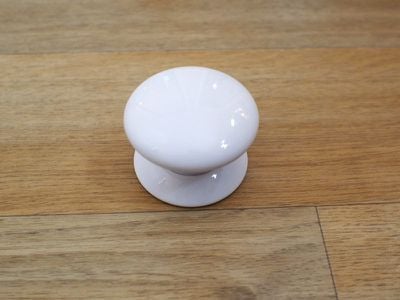
thebuttondesign2
At $60, The Button is more expensive than competing options like the Eve Button, or the Hue Tap, but it's on par with the Logitech Pop and it's arguably one of the more fun button devices you can purchase given its intuitive button design and the range of colors it's available in.

How to Buy

You can purchase Fibaro's The Button from Amazon or from the Apple Store for $59.99.
Top Rated Comments

twistedpixel8 Avatar
111 months ago
They cost *how much*?!
Score: 3 Votes (Like | Disagree)
Will.O.Bie Avatar
111 months ago
Reminds me of this...

Score: 3 Votes (Like | Disagree)
H3LL5P4WN Avatar
111 months ago
I kinda of dig the novelty of the button... but $60 is insane for a joke product.
Score: 2 Votes (Like | Disagree)
zantafio Avatar
111 months ago
the jokes keep writing themselves....
Score: 2 Votes (Like | Disagree)
dwaltwhit Avatar
111 months ago
I'm a buyer at $25 or $30 but $60? I'll pass unless it goes on a deep discount.
Score: 2 Votes (Like | Disagree)
Carlanga Avatar
111 months ago
While the pricing is certainly on the high side, given the state of all that technology at the moment, there's something to factor in there. And while we aren't talking about some sort of a computer per se there, it's not really something that would be "basic" either.
IDK, a pi zero W costs a cool $10 retail to the average joe and it is a mini computer, $5 if you get the non wifi version. Programming a command button like this should be fairly simple. This thing could easily cost $30 and still make money for them, but you know how it is with the apple tax. You know, this reminds me of the amazon dash buttons, just with a different programming.
Score: 1 Votes (Like | Disagree)

Popular Stories

Smart Thermostat Perspective Feature

First Look at LG's Smart Home Products Made With Apple

Wednesday October 7, 2026 6:26 am PDT by
FCC filings reveal the designs of three upcoming LG smart home accessories that Apple reportedly helped develop, including a thermostat, a temperature sensor, and a deadbolt lock. Yesterday, Bloomberg reported that Apple is working with LG Electronics on accessories for its upcoming home hub and other home products, citing regulatory documents without sharing the filings. FCC records MacRumor...
iOS 26 Home Feature

Apple Working to Expand HomeKit

Wednesday September 30, 2026 4:46 am PDT by
Apple is working to revamp HomeKit amid a new push into the smart home market, according to Bloomberg's Mark Gurman. In a report that detailed the impending launch of next-generation Apple TV and HomePod mini models, as well as Apple's all-new smart home hub, Gurman said that the company is developing broader smart-home ecosystem software for its devices. Apple apparently plans to expand ...
iOS 26 Home Feature

Leak Details iPhone Features for Apple's LG Home Accessories

Friday October 9, 2026 7:50 am PDT by
Smart home accessories that Apple reportedly helped LG develop could offer iPhone proximity controls and a way to begin setup before the devices have power, according to findings shared by the leaker known as "pdfu." The findings concern the upcoming LG-branded accessory range that Bloomberg revealed earlier this week. The lineup reportedly includes a thermostat, temperature sensor, deadbolt ...
Latest Stories
Apple's iWork Apps Get 'Intelligent Assistant' and iPhone Duo Support
8 minutes ago
Apple is Apparently Considering a Slightly Larger iPhone Duo
13 minutes ago
Giant iPhone Duo Displays Coming to Four Apple Stores
1 hour ago
Apple Pulls Keynote, Pages and Numbers From App Store [Update: Back]
2 hours ago
Apple Updates More Apps With iPhone Duo Support
3 hours ago
Apple Will Label Apps 'Made for iPhone Duo' in App Store
6 hours ago
Amazon Takes $49 Off iPad With Prices Starting at $399.99
6 hours ago
F1 on Apple TV Now Available in Dolby Atmos
7 hours ago
Apple Reveals More Than 50 Apps That Will Be Updated for iPhone Duo
7 hours ago
Apple Blocks Certificates That Could Help Attackers Fake Websites
8 hours ago
Giant iPhone Duo Installations Spotted at Apple Fifth Avenue
9 hours ago
iPhone Duo 2 Prototypes Include Under-Display Face ID
9 hours ago
Tesla App Gains iPad and iPhone Duo Support
13 hours ago
Apple Reportedly Boosts iPhone Duo Orders by 44%
14 hours ago
Fortnite Returning to Australian App Store After Court Ruling
14 hours ago
Apple Ordered to Open iPhone to Rival App Stores in Australia
14 hours ago
Apple Suppliers Face Hurdles Cutting Circuit Board Emissions
15 hours ago
Things Updated for iPhone Duo With Adaptive Layout
15 hours ago
Simplicity and Siri AI Are HomeView's Killer Features, Apple Says
16 hours ago
iPhone Duo Reviewers Really Miss Face ID
21 hours ago
Does the iPhone Duo Run Hot? Here's What Reviews Found
22 hours ago
Apple Music's New Look is Now Live on Apple's Website
23 hours ago
Anthropic Launches Claude Duet, a Proactive AI Agent
23 hours ago
What 32,000 Folds Did to the iPhone Duo's Hinge
1 day ago
iPhone Duo's Hidden FaceTime Camera Takes 'Trash' Photos
1 day ago
iPhone Duo Has 'Edge Light' Feature That Debuted on Macs Last Year
1 day ago
Apple Support App Updated for iPhone Duo's Larger Display
1 day ago
Amazon Sweetens the Deal on Entry-Level 16-Inch MacBook Pro With $570 Off
1 day ago
iPhone Duo Tips Over on MagSafe Stands When Unfolded
1 day ago
Apple Music's New Look Officially Announced
1 day ago









































