

Just prior to rebranding as Eve Systems to focus on HomeKit devices in late June, Elgato launched its Eve Aqua water controller, a HomeKit-enabled device that attaches to an outdoor water faucet to control and monitor water usage.
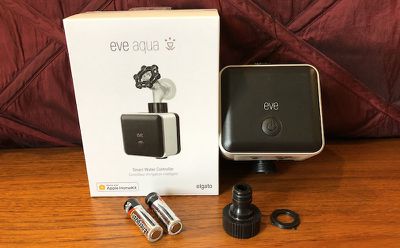
While Eve Aqua can be used with any hose connection, it's primarily intended for use with sprinklers, which can be set to run automatically on a schedule for optimal watering. I've been testing out an Eve Aqua at my home over the past few months, and I've found it to be a helpful automation tool to assist with irrigation needs.
Installation
Installation of Eve Aqua is simple, as it comes with two AA batteries needed for power and simply screws onto your existing exterior water faucet. The bottom of the Eve Aqua has a male connector that allows you to screw a hose with female connector directly on, or the Eve Aqua comes with an adapter that can be screwed on to support quick connections.
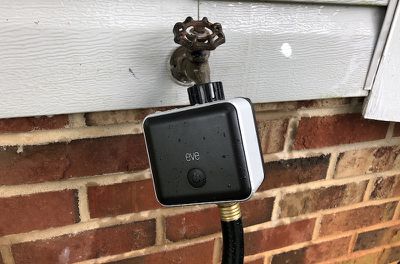
I did have initial issues with some water leaking around the top connection, but after several attempts and making sure things were screwed together quite tightly, I was able to mostly eliminate the problem. I've retightened it a couple of times over the past few months after slight drips have appeared, and that's kept things under control.
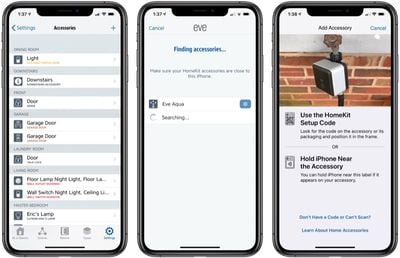
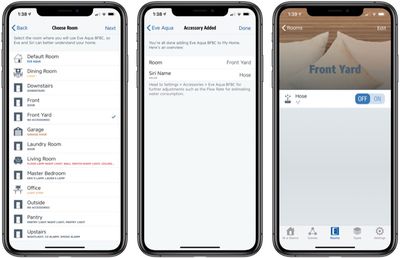
Once you have the Eve Aqua installed, the Eve app walks you through the rest of the setup process: scanning the HomeKit code, assigning it to a room, giving it a name, and configuring options such as schedules. If you need to change the unit settings such as liters to gallons, you'll find that in the Eve section within the iOS Settings app, which can be a bit tricky to discover.
Controls
With schedules, Eve Aqua can run your sprinkler automatically at the optimal watering times, but you can also control things on demand through a number of methods. The Eve app and Apple's Home app both offer manual control, while Siri lets you turn things on and off with just your voice. And if you prefer not to use a device or someone else needs to control things, there's a button on the Eve Aqua itself that will start and stop the water flow. A "child lock" option in the Eve app settings can disable the button to prevent kids or others from manually turning on the water.
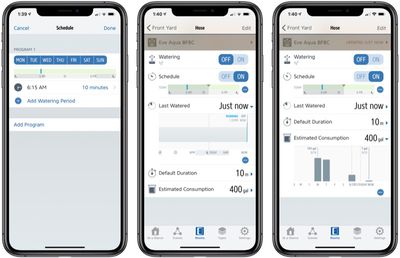
Schedules are stored locally on the Eve Aqua, so they will run automatically regardless of whether it has a wireless connection. A connection is of course required to add or modify schedules or to control Eve Aqua on demand. Notably, the schedules used for Eve Aqua are limited to the Eve app, so you won't be able to use the Home app to set them up.
Beyond controlling watering schedules, Eve Aqua is also able to estimate water usage, which can be handy if you want to keep tabs on how much water is going into maintaining your lawn or garden. Eve Aqua doesn't measure water flow directly, but if you use the Eve app to input the flow rate for your sprinkler attached to the Eve Aqua, the app will calculate your estimated usage based on the duration of your watering sessions. It does, of course, mean that you need to know the flow rate for your irrigation device.
Similar to how Scenes work in Apple's Home app, the Eve app also supports Scenes, and Eve Aqua can be used as either a trigger or as a part of a scene if you wish to automate multiple aspects of your home simultaneously.
Connectivity
Eve Aqua connects wirelessly over Bluetooth Low Energy, allowing you to control it via the Eve app, Apple's Home app, or Siri right from your iOS devices. If you have an Apple TV, iPad, or HomePod, you'll also be able to remotely access Eve Aqua.
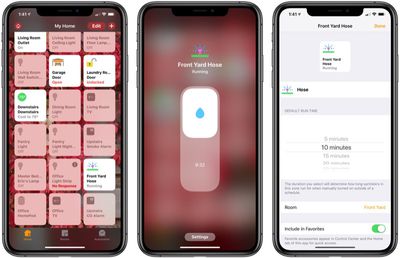
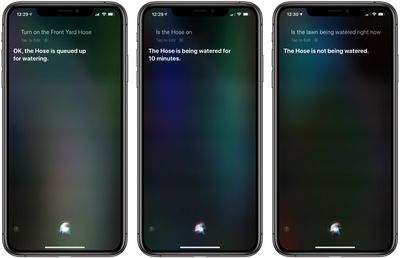
Siri and Home app controls generally work well, although I did have a couple of instances where it failed to connect to Eve Aqua. It wasn't a consistent problem, however, and most of the time the Eve Aqua responded to my Siri commands within a few seconds.
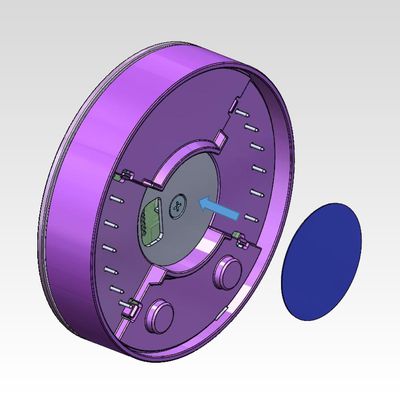
I'm not sure how long to expect the batteries in the Eve Aqua to last, as the Eve app is still reporting a 100 percent battery level even after three months of occasional use. Obviously the more often you access Eve Aqua wirelessly, the faster the batteries will run down. But once they do get low, it's a simple process to swap in new AA batteries, and it's a good idea to remove batteries anyway while storing it over the winter.
Weather resistance
As an accessory that will likely remain mounted on the outside of your home for weeks or months at a time, the Eve Aqua needs to stand up to the elements, and Eve Systems has done that, with the device carrying an IPX4 water resistance rating. That means the Eve Aqua can stand up to splashing water from any direction, which is what you'd expect with exposure to the elements. The rating doesn't cover exposure to forceful water jets or immersion, both of which your Eve Aqua is very unlikely to encounter in normal use.
Eve Aqua also has UV protection under an Australian certification program, assuring that the device will stand up to sun exposure for an extended period of time without being damaged. I've had mine attached to an external spigot for three months, and aside from some dirt and leaf matter it's picked up over time that can be easily cleaned off, it's still in great shape.
While Eve Aqua can stand up to sun and rain, it is not protected from frost or freeze exposure, so you will need to remove it and bring it indoors for the winter, depending on your location. That's to be expected, as any freezing of water inside the device could easily damage the internals, and homeowners in colder areas should generally be turning off water supplies to their exterior faucets for the coldest parts of winter anyway in order to avoid frozen faucets and potentially burst pipes.
Wrap-up
Eve Aqua is a handy accessory if you want to regularly schedule sprinkler watering sessions, and if you're a data geek you might appreciate the estimated water consumption graphs provided within the Eve app. The conveniences come with a price tag, however, and $100 is a bit of an outlay, so you'll need to consider whether the cost is worth it for your specific situation.
Connectivity can occasionally be spotty, but for the most part, the controls work well and even when connections aren't working, the issues seem to resolve fairly quickly and already-set schedules will continue to run thanks to the onboard memory. And hopefully, Eve will be able to address some of the connectivity issues in future firmware updates.
If this is the sort of accessory you're interested in, it's Eve or nothing, and the Eve Aqua is the only HomeKit product we've seen in this niche. Rachio's irrigation controller has recently gained HomeKit support, but that device is for controlling dedicated irrigation systems rather than traditional spigot-and-hose systems.
Eve Aqua is priced at $99.95 and is available from Amazon, Apple, and other select retailers.
Note: Eve Systems provided the Eve Aqua to GeekWebGuides free of charge for the purposes of this review. No other compensation was received. GeekWebGuides is an affiliate partner with Amazon and may earn commissions on purchases made through links in this article.















































Top Rated Comments
Rachio makes a wifi sprinkler timer that will do a rain skip. The newer V3 has Homekit suppport, or you can save some money on the V2 without Homekit. I've been using a Rachio device for a couple years and really like it.
Gardena by the way is from the same city where hochschule für gestaltung and designer otl aicher comes from. same school/ language of design and corporate identity etc.
bauhaus and hochschule heavily influenced apple and ios 7.