
How to Control Your HomeKit Devices When Away From Home - GeekWebGuides
Skip to Content

How to Control Your HomeKit Devices When Away From Home

by

ipad home hub homekitOne of the main benefits of using Apple's HomeKit framework is the ability to control your HomeKit-compatible devices when you're away from home.

For instance, if you are about to leave the office, you can use the Home app or ask Siri on your iPhone to increase the temperature of a connected thermostat at home so that it's nice and cozy when you arrive.

Before you can trigger actions when you're away from home, you need to designate a device as a home hub, which remains powered on and connected at your home when you're away. Click on one of the links below to learn how to set up an Apple device as a home hub.

Controlling HomeKit Accessories Remotely

Once you've set up your home hub, you'll need to enable two-factor authentication on your iCloud account, otherwise you won't be able to remotely access your ‌HomeKit‌ accessories.

Once you've done that, you're ready to start controlling your ‌HomeKit‌ accessories when you're away from home. You can do this wherever you've got a data connection on your iPhone. Siri can be used to remotely access your accessories, as can the Home app. You can also set particular HomeKit scenes and accessories as "Favorites" so that you can access them quickly and easily from the app's Home tab and in Control Center on your iPhone or iPad.

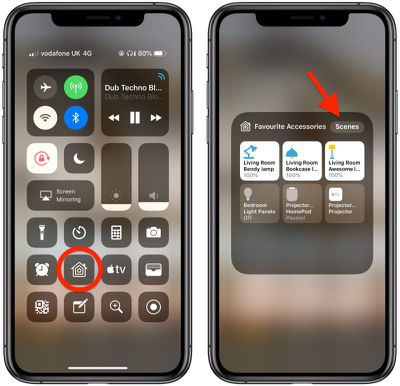
Once you've set up your favorites, you can access them from the Control Center like so.

  1. To open Control Center on an ‌iPad‌ with a Home button, double-tap the Home button; on iPhone 8 or earlier, swipe up from the bottom of the screen; and on a 2018 iPad Pro or iPhone X/XR/XS/XS Max, swipe down from the upper right of the screen.
    how to set homekit favorites 3

  2. Press and hold the Home icon.
  3. You can switch between Favorite Accessories and Favorite Scenes using the relevant button at the top of this panel.
When you have a lot of ‌HomeKit‌ products, the built-in Favorites option is a great way to put the devices that you need to access most right on the main page of the Home app, such as lights and smart plugs.

Popular Stories

Smart Thermostat Perspective Feature

First Look at LG's Smart Home Products Made With Apple

Wednesday October 7, 2026 6:26 am PDT by
FCC filings reveal the designs of three upcoming LG smart home accessories that Apple reportedly helped develop, including a thermostat, a temperature sensor, and a deadbolt lock. Yesterday, Bloomberg reported that Apple is working with LG Electronics on accessories for its upcoming home hub and other home products, citing regulatory documents without sharing the filings. FCC records MacRumor...
iOS 26 Home Feature

Apple Working to Expand HomeKit

Wednesday September 30, 2026 4:46 am PDT by
Apple is working to revamp HomeKit amid a new push into the smart home market, according to Bloomberg's Mark Gurman. In a report that detailed the impending launch of next-generation Apple TV and HomePod mini models, as well as Apple's all-new smart home hub, Gurman said that the company is developing broader smart-home ecosystem software for its devices. Apple apparently plans to expand ...
iOS 26 Home Feature

Leak Details iPhone Features for Apple's LG Home Accessories

Friday October 9, 2026 7:50 am PDT by
Smart home accessories that Apple reportedly helped LG develop could offer iPhone proximity controls and a way to begin setup before the devices have power, according to findings shared by the leaker known as "pdfu." The findings concern the upcoming LG-branded accessory range that Bloomberg revealed earlier this week. The lineup reportedly includes a thermostat, temperature sensor, deadbolt ...
Latest Stories
Happy 25th Anniversary, iPod
24 minutes ago
iPhone Duo Demand Reportedly Exceeds Apple's Expectations
3 hours ago
iPhone Duo Launch Begins as First Orders Reach Customers
9 hours ago
1Password for Agents Keeps Your Passwords Hidden From AI
10 hours ago
iPhone Duo 24 Hours Later: Your Questions Answered
10 hours ago
Apple's iWork Apps Get 'Intelligent Assistant' and iPhone Duo Support
11 hours ago
Apple is Apparently Considering a Slightly Larger iPhone Duo
11 hours ago
Giant iPhone Duo Displays Coming to Four Apple Stores
13 hours ago
Apple Pulls Keynote, Pages and Numbers From App Store [Update: Back]
13 hours ago
Apple Updates More Apps With iPhone Duo Support
14 hours ago
Apple Will Label Apps 'Made for iPhone Duo' in App Store
17 hours ago
Amazon Takes $49 Off iPad With Prices Starting at $399.99
17 hours ago
F1 on Apple TV Now Available in Dolby Atmos
18 hours ago
Apple Reveals More Than 50 Apps That Will Be Updated for iPhone Duo
18 hours ago
Apple Blocks Certificates That Could Help Attackers Fake Websites
20 hours ago
Giant iPhone Duo Installations Spotted at Apple Fifth Avenue
20 hours ago
iPhone Duo 2 Prototypes Include Under-Display Face ID
21 hours ago
Tesla App Gains iPad and iPhone Duo Support
1 day ago
Apple Reportedly Boosts iPhone Duo Orders by 44%
1 day ago
Fortnite Returning to Australian App Store After Court Ruling
1 day ago
Apple Ordered to Open iPhone to Rival App Stores in Australia
1 day ago
Apple Suppliers Face Hurdles Cutting Circuit Board Emissions
1 day ago
Things Updated for iPhone Duo With Adaptive Layout
1 day ago
Simplicity and Siri AI Are HomeView's Killer Features, Apple Says
1 day ago
iPhone Duo Reviewers Really Miss Face ID
1 day ago
Does the iPhone Duo Run Hot? Here's What Reviews Found
1 day ago
Apple Music's New Look is Now Live on Apple's Website
1 day ago
Anthropic Launches Claude Duet, a Proactive AI Agent
1 day ago
What 32,000 Folds Did to the iPhone Duo's Hinge
1 day ago
iPhone Duo's Hidden FaceTime Camera Takes 'Trash' Photos
2 days ago







































