How to Secure Your Apple ID Using Two-Factor Authentication - GeekWebGuides
Skip to Content

How to Secure Your Apple ID Using Two-Factor Authentication

by

Apple introduced two-factor authentication (2FA) in 2015 to provide an enhanced level of security when accessing Apple ID accounts. With 2FA enabled, you'll be the only person who can access your account, regardless of whether someone learns your password – as the result of a hack or a phishing scam, for example – so it's well worth taking the time to enable the feature. In this article, we'll show you how.

How Two-Factor Authentication Works

2FA offers hardened security during login attempts by requesting that the user provides an extra piece of information only they would know.
2fa verification on ios
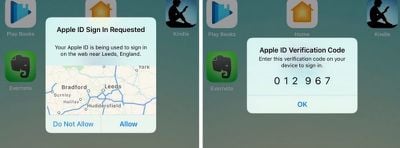
With 2FA enabled on your Apple ID account, the next time you try to log in you will be automatically sent a six-digit verification code to all the Apple devices you have registered to that Apple ID. If you try to access the account from an unknown device or on the web, 2FA also displays a map on all registered devices with an approximate location of where the Apple ID login attempt occurred.

In basic terms, this is an improved version of Apple's older two-step verification method, which prompted users to send a four-digit code to a registered SMS-capable device. Apple automatically upgraded most two-step verification users to 2FA as of iOS 11 and macOS High Sierra, but if you're still on two-step verification for some reason, follow the steps below to manually upgrade to 2FA.

How to Turn Off Two-Step Verification

  1. Open a browser and go to appleid.apple.com
  2. Enter your Apple ID and password in the login fields.
  3. In the Security section of your account page, click the Edit button on the right.
  4. Check to make sure two-step verification is enabled rather than two-factor authentication, and click Turn off two-step verification.

How to Turn On Two-Factor Authentication in iOS

To turn on 2FA using an iPhone or iPad, it needs to be running iOS 9 or later. Note that if you're running iOS 10 or later and you have any other, older devices tied to your Apple ID that aren't compatible with 2FA, you'll receive a compatibility warning during the setup process.

On top of that, you'll also be asked to append a six-digit code to the end of your password whenever you authenticate a login on your older devices in future. You can potentially avoid this hassle by updating those devices to the latest version of iOS or macOS where possible.

With that in mind, perform the following steps on your iOS device:

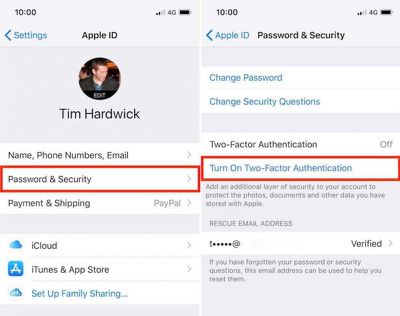
  1. Open the Settings app and tap your Apple ID banner at the top of screen.
  2. Tap Password & Security.
  3. Tap Turn On Two-Factor Authentication, and then tap Continue on the next screen.
  4. Tap Turn On Anyway if you see a compatibility warning about older devices.
  5. Check your phone number is correct. (If it isn't, tap Use a Different Number at the bottom of the screen and input a new number.)
  6. Select Text message or Phone call for verification, and then tap Next.
  7. Enter your Passcode.

2fa ios e1517490695102

How to Turn On Two-Factor Authentication on a Mac

If it's a Mac you're using to enable two-factor authentication then make sure it's running OS X El Capitan or later. To turn on 2FA on Mac, follow these steps:

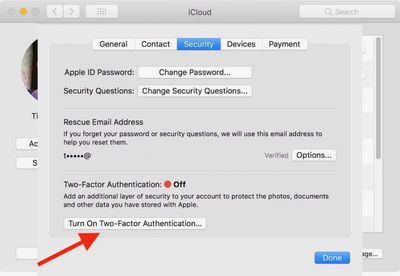
  1. Click the Apple () symbol in the menu bar at the top left of the desktop, and select System Preferences.
  2. Click the iCloud preferences pane.
  3. Click the Account Details button and select the Security tab.
  4. Click Turn on Two-Factor Authentication, and then click Continue in the drop-down pane.
  5. Check your phone number is correct and click Continue.
2fa mac 2

Verification Codes

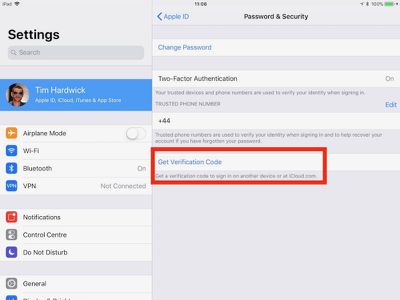
With 2FA enabled, you'll be prompted to enter a new verification code every time you log in to your Apple ID account using iCloud.com or another Mac or iOS device. These codes will automatically appear on devices that are already logged into your Apple ID, but you can also request them manually using an iPhone or iPad, like so:

  1. Open the Settings app and tap on your Apple ID banner at the top of the screen.
  2. Tap Password & Security.
  3. Tap Get Verification Code.

2fa codes

Top Rated Comments

114 months ago
User BEWARE!!
There's currently no way to recover your account using two factor authentication if you lose or forget your password and or the recovery key.
Without the recovery key the account and all its contents will be lost completely (all purchases)
The recovery key must be store in a "safe deposit box" outside the residence in case your house burns down i.e. Cal Wild Fires, floods, etc. and your recovery key was stored at home in a "safe" place.
DO NOT USE TWO FACTOR AUTHENTICATION if you do not store your password and recovery key outside the residence or in another cloud account where it can be readily accessed.
Yes there is. With the old way (2 step verification) you needed a recovery key. This way they are doing now, you don’t. I’m actually helped a person recover their data and they got a phone call in 12 days and got their account unlocked.

Personally, I rather have it so I need a recovery key.
Score: 4 Votes (Like | Disagree)
Weaselboy Avatar
114 months ago
You can set up more than 1 trusted phone number.
Yep... you can even add your home phone and Apple will robo call you with the six digit code.
Score: 3 Votes (Like | Disagree)
Apple_Robert Avatar
114 months ago
No way to recover if you lose your phone while travelling. Apple should allow two factor with a secondary email rather than phone number.
You can set up more than 1 trusted phone number.
Score: 3 Votes (Like | Disagree)
114 months ago
User BEWARE!!
There's currently no way to recover your account using two factor authentication if you lose or forget your password and or the recovery key.
Without the recovery key the account and all its contents will be lost completely (all purchases)
The recovery key must be store in a "safe deposit box" outside the residence in case your house burns down i.e. Cal Wild Fires, floods, etc. and your recovery key was stored at home in a "safe" place.
DO NOT USE TWO FACTOR AUTHENTICATION if you do not store your password and recovery key outside the residence or in another cloud account where it can be readily accessed.
This is obviously by design for security reasons.
Score: 3 Votes (Like | Disagree)
Weaselboy Avatar
114 months ago
If you set someone up as a "trusted" number, do they get notified every single time you get an access code to get into an iCloud setting or whatever?

For whatever reason, every single time -- for example -- that I open iCloud.com in a browser I'm prompted for a code from a trusted device... even though I've checked "remember me" over and over.
No it defaults to the main iCloud account. You would need to manually tell it to use one of the other numbers for the other person to get the code.
Score: 2 Votes (Like | Disagree)
Apple_Robert Avatar
114 months ago
Glad to see MR posting a much needed tutorial for those who may not know all that is involved.
Score: 2 Votes (Like | Disagree)

Popular Stories

iPhone Duo Trio

Here's What Apple's Apps Look Like on the iPhone Duo

Tuesday October 20, 2026 11:12 am PDT by
With just three days to go until the iPhone Duo is released, Apple is getting ready for the launch. Behind the scenes, the App Store now has screenshots of Apple's built-in apps running on the Duo. We've seen some apps in marketing materials, but images of the ones we haven't seen give us an idea of what it will be like using the iPhone Duo day to day. Many apps are shown in landscape...
Apple Creator Studio iWork suite

Apple Pulls Keynote, Pages and Numbers From App Store [Update: Back]

Thursday October 22, 2026 11:01 am PDT by
Apple has temporarily removed Keynote, Pages, and Numbers from the App Store, just after releasing an update that added iPhone Duo support and a new Intelligent Assistant. It is not clear if the apps were removed intentionally, or if it is a bug. Apple has not said when the apps will be reinstated, but if it was in error, they should return soon. Update: The Mac versions are back without...
M5 MacBook Pro

RIP, MacBook Ultra

Monday October 19, 2026 9:37 am PDT by
Apple today sent out invites for an experience in Los Angeles on Wednesday, October 28, and the "Pro and tell" tagline on the invitation likely means that the rumored MacBook models with touch-enabled OLED displays will stick with MacBook Pro branding instead of the once-rumored "MacBook Ultra" name. The long-rumored "iPhone Ultra" ended up being named iPhone Duo, so speculation that Apple...
Latest Stories
MacBook Neo Helps Apple Outpace Rivals as Market Declines
3 hours ago
Happy 25th Anniversary, iPod
3 hours ago
iPhone Duo Demand Reportedly Exceeds Apple's Expectations
6 hours ago
iPhone Duo Launch Begins as First Orders Reach Customers
12 hours ago
1Password for Agents Keeps Your Passwords Hidden From AI
13 hours ago
iPhone Duo 24 Hours Later: Your Questions Answered
13 hours ago
Apple's iWork Apps Get 'Intelligent Assistant' and iPhone Duo Support
14 hours ago
Apple is Apparently Considering a Slightly Larger iPhone Duo
14 hours ago
Giant iPhone Duo Displays Coming to Four Apple Stores
15 hours ago
Apple Pulls Keynote, Pages and Numbers From App Store [Update: Back]
16 hours ago
Apple Updates More Apps With iPhone Duo Support
17 hours ago
Apple Will Label Apps 'Made for iPhone Duo' in App Store
19 hours ago
Amazon Takes $49 Off iPad With Prices Starting at $399.99
20 hours ago
F1 on Apple TV Now Available in Dolby Atmos
20 hours ago
Apple Reveals More Than 50 Apps That Will Be Updated for iPhone Duo
21 hours ago
Apple Blocks Certificates That Could Help Attackers Fake Websites
22 hours ago
Giant iPhone Duo Installations Spotted at Apple Fifth Avenue
23 hours ago
iPhone Duo 2 Prototypes Include Under-Display Face ID
23 hours ago
Tesla App Gains iPad and iPhone Duo Support
1 day ago
Apple Reportedly Boosts iPhone Duo Orders by 44%
1 day ago
Fortnite Returning to Australian App Store After Court Ruling
1 day ago
Apple Ordered to Open iPhone to Rival App Stores in Australia
1 day ago
Apple Suppliers Face Hurdles Cutting Circuit Board Emissions
1 day ago
Things Updated for iPhone Duo With Adaptive Layout
1 day ago
Simplicity and Siri AI Are HomeView's Killer Features, Apple Says
1 day ago
iPhone Duo Reviewers Really Miss Face ID
1 day ago
Does the iPhone Duo Run Hot? Here's What Reviews Found
2 days ago
Apple Music's New Look is Now Live on Apple's Website
2 days ago
Anthropic Launches Claude Duet, a Proactive AI Agent
2 days ago
What 32,000 Folds Did to the iPhone Duo's Hinge
2 days ago