How to Add an Accessory to Your HomeKit Setup - MacRumors
Skip to Content

How to Add an Accessory to Your HomeKit Setup

by

Adding an accessory to your smart home setup is fairly straightforward, though there are a few areas where it's not entirely intuitive. Before you get started, it's helpful to locate the HomeKit Setup Code for the accessory you're adding.

This is usually in 2 places: printed on an included user guide or the package, and on a sticker somewhere on the device itself. It will have a ‌HomeKit‌ icon next to a series of numbers framed in a box or a QR code. Also, you'll need to plug in the device and power it on. Then you can move on to adding it. Here are the steps on an iPhone:

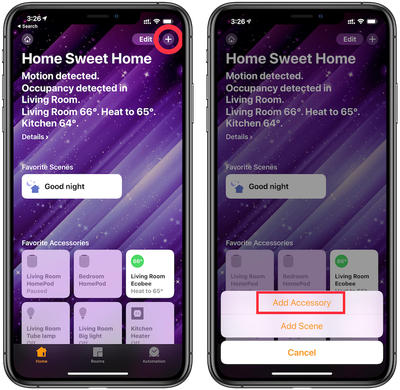
  1. Open the Home app and tap on the '+' in the top right corner.1 add homekit device 1
  2. Choose "Add Accessory" in the resulting pop-up menu
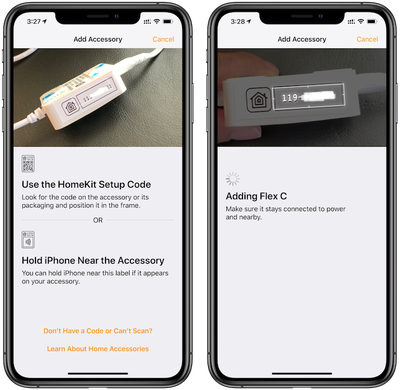
  3. Scan the ‌HomeKit‌ Setup Code with the camera as prompted on the next screen.2 add homekit device 1
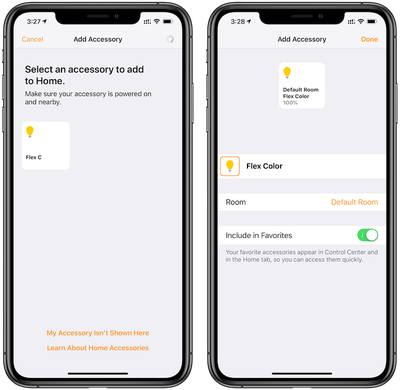
  4. Tap on the square with the accessory's name to confirm that you want to add it to ‌HomeKit‌.3 add homekit device

For accessories where the code won't scan with the camera due to poor lighting or another reason, the ‌HomeKit‌ code can also be entered manually. When using the iPhone 7 or later to add a device, some ‌HomeKit‌ accessories will allow you to add them without needing to scan the code using the camera. In this situation, you can just hold your iPhone near the accessory and then follow the steps Apple provides.

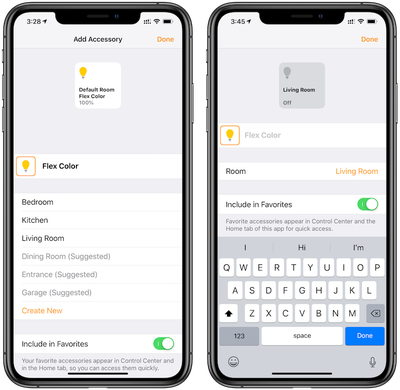
Once an accessory has been added to ‌HomeKit‌, you'll see the details about it in the Home app and will have the option to choose what room it's in. Assigning a ‌HomeKit‌ accessory a room allows you to more easily control it along with other devices in the same room.
4 add homekit device
The device we set up for this guide shown in the screenshots is in the Living Room and we changed it accordingly. This allows us to ask Siri to turn off all the lights in the living room, for example, and this device will be switched off along with all the other lights in the room.
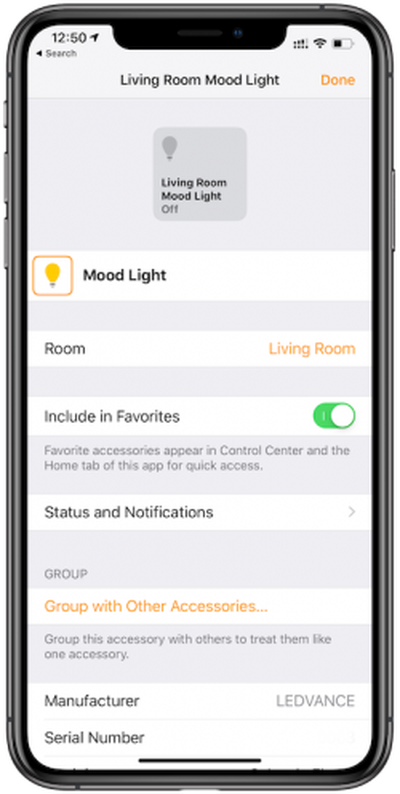
5 add homekit device 2
Devices are set up with a default name determined by the manufacturer, and you'll probably want to change it to make it more memorable so it's easier for you to ask ‌Siri‌ to control it. In this example, we added a Sylvania light strip and its default name is Flex Color. Tapping on the name in this screen allows for the name to be changed, and we renamed it Mood Light.

Some devices may come with instructions prompting you to set them up in the manufacturer's own app. Though this isn't necessary to complete the above steps and control the device through the Home app and ‌Siri‌, the manufacturer's app may offer you other features and status details that aren't available through the Home app.

Popular Stories

Smart Thermostat Perspective Feature

First Look at LG's Smart Home Products Made With Apple

Wednesday October 7, 2026 6:26 am PDT by
FCC filings reveal the designs of three upcoming LG smart home accessories that Apple reportedly helped develop, including a thermostat, a temperature sensor, and a deadbolt lock. Yesterday, Bloomberg reported that Apple is working with LG Electronics on accessories for its upcoming home hub and other home products, citing regulatory documents without sharing the filings. FCC records MacRumor...

iOS 26 Home Feature

Apple Working to Expand HomeKit

Wednesday September 30, 2026 4:46 am PDT by
Apple is working to revamp HomeKit amid a new push into the smart home market, according to Bloomberg's Mark Gurman. In a report that detailed the impending launch of next-generation Apple TV and HomePod mini models, as well as Apple's all-new smart home hub, Gurman said that the company is developing broader smart-home ecosystem software for its devices. Apple apparently plans to expand ...
iOS 26 Home Feature

Leak Details iPhone Features for Apple's LG Home Accessories

Friday October 9, 2026 7:50 am PDT by
Smart home accessories that Apple reportedly helped LG develop could offer iPhone proximity controls and a way to begin setup before the devices have power, according to findings shared by the leaker known as "pdfu." The findings concern the upcoming LG-branded accessory range that Bloomberg revealed earlier this week. The lineup reportedly includes a thermostat, temperature sensor, deadbolt ...
Latest Stories
Giant iPhone Duo Displays Coming to Four Apple Stores
1 hour ago
Apple Pulls Keynote, Pages and Numbers From App Store
2 hours ago
Apple Updates More Apps With iPhone Duo Support
2 hours ago
Apple Will Label Apps 'Made for iPhone Duo' in App Store
5 hours ago
Amazon Takes $49 Off iPad With Prices Starting at $399.99
6 hours ago
F1 on Apple TV Now Available in Dolby Atmos
6 hours ago
Apple Reveals More Than 50 Apps That Will Be Updated for iPhone Duo
7 hours ago
Apple Blocks Certificates That Could Help Attackers Fake Websites
8 hours ago
Giant iPhone Duo Installations Spotted at Apple Fifth Avenue
9 hours ago
iPhone Duo 2 Prototypes Include Under-Display Face ID
9 hours ago
Tesla App Gains iPad and iPhone Duo Support
13 hours ago
Apple Reportedly Boosts iPhone Duo Orders by 44%
14 hours ago
Fortnite Returning to Australian App Store After Court Ruling
14 hours ago
Apple Ordered to Open iPhone to Rival App Stores in Australia
14 hours ago
Apple Suppliers Face Hurdles Cutting Circuit Board Emissions
15 hours ago
Things Updated for iPhone Duo With Adaptive Layout
15 hours ago
Simplicity and Siri AI Are HomeView's Killer Features, Apple Says
15 hours ago
iPhone Duo Reviewers Really Miss Face ID
20 hours ago
Does the iPhone Duo Run Hot? Here's What Reviews Found
22 hours ago
Apple Music's New Look is Now Live on Apple's Website
23 hours ago
Anthropic Launches Claude Duet, a Proactive AI Agent
23 hours ago
What 32,000 Folds Did to the iPhone Duo's Hinge
1 day ago
iPhone Duo's Hidden FaceTime Camera Takes 'Trash' Photos
1 day ago
iPhone Duo Has 'Edge Light' Feature That Debuted on Macs Last Year
1 day ago
Apple Support App Updated for iPhone Duo's Larger Display
1 day ago
Amazon Sweetens the Deal on Entry-Level 16-Inch MacBook Pro With $570 Off
1 day ago
iPhone Duo Tips Over on MagSafe Stands When Unfolded
1 day ago
Apple Music's New Look Officially Announced
1 day ago
iPhone Duo Supports Apple Pencil Starting With iOS 27.2
1 day ago
iPhone Duo Accessories Roundup: Cases and Screen Protectors From OtterBox, ZAGG, and More
1 day ago