
Yoink for Mac Updated With Clipboard Support - MacRumors
Skip to Content

Yoink for Mac Updated With Clipboard Support

by

Eternal Storms Software today updated its popular drag and drop Mac app Yoink with several improvements, including clipboard support.

yoink mac app
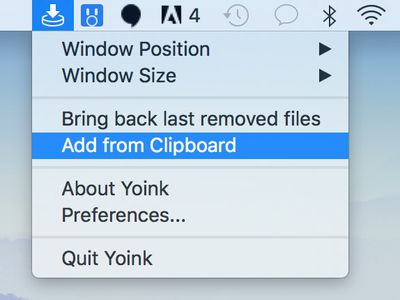
Mac users can now add the contents of their clipboard to Yoink by opening the app's dropdown menu from the menu bar and clicking "Add from Clipboard." If you copy an image from a website, for example, you can essentially paste it into Yoink and it will appear as a TIFF file that can be dragged and dropped.
yoink clipboard
Alongside clipboard support, PopClip can now be integrated with Yoink after installing a plugin in the app's advanced preferences.

Yoink 3.4 has improved compatibility with several apps, including Messages and Mail on macOS High Sierra, Parallels, ForkLift, Keka, Horos, and JPEGmini. The update also fixes a bug in macOS High Sierra where performing a dragging gesture would sometimes result in files being selected in Yoink.

Yoink, first released in 2011, is a popular drag and drop helper for Mac. When you drag a file, the app pops open along the edge of the screen as a convenient place to drop the file. Yoink will hold on to the files you drag into it until you drag them out again, freeing up your mouse to navigate more easily.

Yoink 3.1

Yoink 3.4 is available now on the Mac App Store [Direct Link] as a free update for existing users. The app costs $6.99 for new users.


Top Rated Comments

macs4nw Avatar
111 months ago
I love it! One of the kings of the Mac App Store! Highly recommended!
I love this app so much!
This is a great example of an app I wish I could try for free before buying. It looks useful, but I'm not sure I'll integrate it into my workflow.
Hadn't heard of it before, but based upon your positive feedback, I'm curious to try this out.
Score: 3 Votes (Like | Disagree)
111 months ago
I love it! One of the kings of the Mac App Store! Highly recommended!
Score: 2 Votes (Like | Disagree)
111 months ago
It was added in Lion. Cmd+opt+v moves a copied file. Pretty basic.
I knew you could copy/paste files but did not know about the Cmd+opt+v combo.
Score: 1 Votes (Like | Disagree)
philosopherdog Avatar
111 months ago
Yoink would be absolutely useless if Apple adhered to universal standards with CMD+X and CMD+V commands to move files.

But then again, Apple has either the incompetent people working for them if not at least the most stubborn.
It was added in Lion. Cmd+opt+v moves a copied file. Pretty basic.
Score: 1 Votes (Like | Disagree)
Jessica Lares Avatar
111 months ago
FYI: You need to log out then back in before the new PopClip extension will work. ;)
Score: 1 Votes (Like | Disagree)
macsplusmacs Avatar
111 months ago
I love this app so much!
Score: 1 Votes (Like | Disagree)

Popular Stories

iOS 26

iOS 26.4 Adds Two New Features to CarPlay

Tuesday March 24, 2026 1:55 pm PDT by
iOS 26.4 was released today, and it includes a couple of new features for CarPlay: an Ambient Music widget and support for voice-based chatbot apps. To update your iPhone 11 or newer to iOS 26.4, open the Settings app and tap on General → Software Update. CarPlay will automatically offer the new features so long as the iPhone connected to your vehicle is running iOS 26.4 or later....
Apple Business hero

Apple Unveils 'Apple Business' All-in-One Platform

Tuesday March 24, 2026 8:53 am PDT by
Apple today announced Apple Business, a new all-in-one platform that unifies device management, productivity tools, and customer outreach features. The service is designed to be a consolidated replacement for several of Apple's existing business-focused offerings, including Apple Business Essentials, Apple Business Manager, and Apple Business Connect. It provides organizations with a single...
AirPods Pro Firmware Feature

Apple Releases New Firmware for AirPods Pro 3, AirPods Pro 2 and AirPods 4

Tuesday March 24, 2026 12:31 pm PDT by
Apple today released new firmware for the AirPods Pro 2, AirPods Pro 3, and the AirPods 4. The firmware has a version number of 8B39, up from 8B34 on the AirPods Pro 3, 8B28 on the AirPods Pro 2, and 8B21 on the AirPods 4. There is no word on what's included in the firmware, but Apple has a support document with limited notes. Most updates are limited to bug fixes and performance...















