

After raising over $100,000 on Kickstarter earlier this year, The Iconfactory today has released an all-new, completely reimagined version of Twitterrific for Mac priced at $19.99 on the Mac App Store [Direct Link] in the United States.
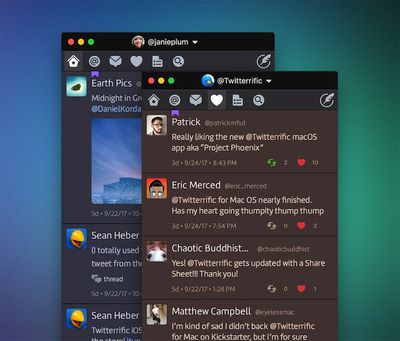
The Iconfactory said its goal was to deliver a minimal Twitter client, like the original Twitterrific for Mac, but with a feature set that caters to how people use Twitter in 2017, as opposed to 2007.
Only eight months have passed since the crowdfunding campaign began, so some key features are still missing at launch, but The Iconfactory promises they will be added in subsequent updates to the app.
I was provided with an advanced preview of the brand new Twitterrific for Mac over the weekend to try out, and I've gathered some of my first impressions as a longtime Tweetbot for Mac user herein.
Design and Functionality
Twitterrific has a simple but fairly customizable design.
In the top navigation bar, there are six menus: Timeline, Replies, Direct Messages, Likes, Lists, and Searches.
Twitterrific supports multiple accounts at once. Accounts can be added in Preferences → Accounts, and there is a dropdown menu above the timeline for switching between them. Multiple timelines can be opened in separate windows, but unlike Tweetbot, the columns have less of a compact appearance.
By default, tweets in any timeline appear in reverse chronological order against a white background, with photos, videos, and quoted tweets from other users displayed in line. In the Preferences menu, users can easily switch between light and dark themes, the latter of which looks like Twitter's newer Night Mode.
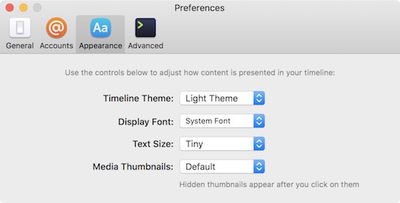
You can also adjust the size and type of font, while media thumbnails can be set to appear smaller or be hidden entirely.
The timeline supports streaming, meaning that new tweets are shown automatically. However, the app currently lacks Tweetbot's pinned timeline functionality, so scrolling to the top to read new tweets is required for now. Double click the house icon in the top bar to automatically scroll up to the latest tweet.
Like Tweetbot, you can optionally sync your current reading position in the timeline with your other Apple devices using iCloud.
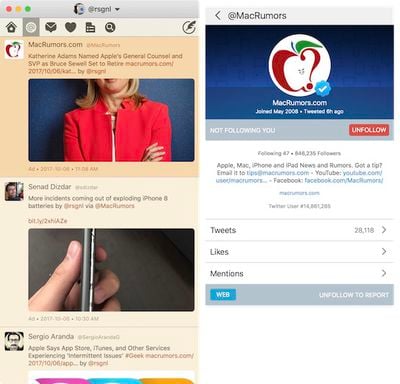
Tweets are color coded: standard tweets are white, replies are orange, your own tweets are green, and direct messages are blue. Unread tweets are denoted with tiny purple circles, with a counter in the top-right corner. Chained tweets and so-called "tweet storms" are grouped together in threads.
In comparison to Tweetbot, fewer tweets typically appear in an equally sized Twitterrific window due to taller quote tweets.
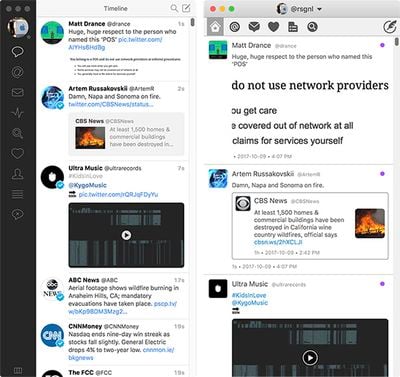
Clicking on the compose button opens a small window to type a new tweet, but several features still need to be added, including video uploading, geolocation, and the ability to save drafts. There is, however, a smile face icon that brings up Apple's system tool for inserting emoji and other special characters into tweets.
As for direct messages, there is currently no "Mark All as Read" option or the ability to attach photos and other media types. The latter feature is "high priority," according to The Iconfactory.
When you click on a photo or video thumbnail, it opens in higher resolution in a built-in media browser. Unlike with Tweetbot, the preview windows don't need to be manually closed by clicking the "X" button. Instead, they disappear once you click anywhere within the timeline or minimize the app.
Clicking on an account's profile picture brings up a user profile containing the person's bio, join date, previous tweets, and other details, with block and spam buttons as well. Twitterrific doesn't currently display badges for verified accounts within the timeline, but they can be seen in user profiles where applicable.
The Iconfactory has acknowledged some intermittent reports of row height and font weight bugs, which it says will be fixed in future updates, but I never experienced these issues in my own testing.
Twitterrific has full support for system notifications, including Notification Center. Notifications can be configured in System Preferences.
Twitterrific also has full support for Apple's VoiceOver. The blind and visually impaired can navigate timelines, compose tweets, and even attach image descriptions quickly and easily using the accessibility feature.
Other features include the ability to quickly delete, edit, and re-compose a tweet in which you made a typo, muffle syncing with Twitterrific for iOS, saved searches, full-screen view, keyboard shortcuts, trending topics, and more.
Profile editing and the ability to add, edit, or delete lists will be added in future releases. Meanwhile, Twitter's API doesn't currently support Moments, polls, or 280-character tweets in third-party clients.
Final Words
The Iconfactory shared a truth: building software takes time. In the long run, the team would like to bring Twitterrific for Mac to feature-parity with the iOS app. First, it needed a solid foundation to build upon.
The @Twitterrific for Mac icon evolution. Congrats to the team on completing the Kickstarter! @Iconfactory @gedeon pic.twitter.com/vRBd1phQSj — Eli Schiff (@eli_schiff) October 6, 2017
Even most Mac users without a third-party Twitter client should consider Tweetbot first, given it has many of the same features, if not more, for only $9.99, which is half the cost of Twitterrific for Mac.
Twitterrific's team includes software engineers Sean Heber and Craig Hockenberry, and graphic designers Gedeon Maheux and Anthony Piraino.





















Top Rated Comments
The current exchange rate would only be $24.97, so to be charging an extra $4, when there's zero extra cost to the development team, doesn't sit right with me. I will not purchasing it simply out of principle.