
iOS 11 Predictive Text Bug Automatically Changes 'I' to 'A[?]' for Some Users [Updated] - MacRumors
Skip to Content

iOS 11 Predictive Text Bug Automatically Changes 'I' to 'A[?]' for Some Users [Updated]

by

A growing number of iOS 11 users have been encountering a strange predictive text bug over the course of the last few days, with the problem outlined on the MacRumors forums.

It seems some users are seeing "A[?]" as the first recommended predictive text word when using the iOS keyboard, and whenever "I" is typed, it autocorrects to A[?].
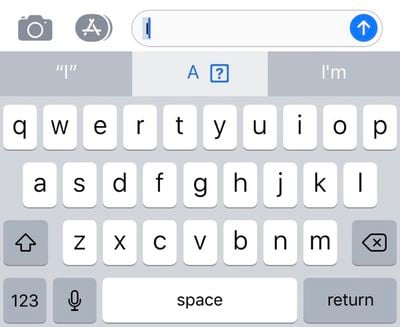
ios11predictivetextbug
It's not clear what's causing the bug, but a fair number of MacRumors readers and Twitter users seem to be experiencing the problem. Not everyone is affected, though, and we have been unable to replicate the issue on our own devices.

It may potentially be linked to emoji, as a strange "I" character also appears under the frequently used emoji for some customers who are affected.
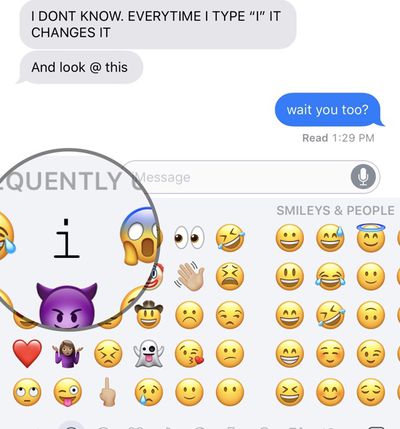
ios11predictivetextbug2
The problem seems to be affecting devices running both iOS 11.0.3 and iOS 11.1, and some users are also seeing the odd predictive text show up on Macs, too, as predictive text is available on all devices via iCloud.

Turning off predictive text is a reliable way of putting an end to the issue, as is using a third-party keyboard, but neither of these options are long term solutions for customers who want to use the full-featured built-in keyboard.

Resetting the keyboard dictionary does not appear to fix the issue, nor does a device restart or reset. One MacRumors reader who got in touch with Apple Support about the issue was told that Apple is aware of the problem and working on a fix.

Update: Apple's support staff is recommending customers affected by this bug use text replacement as a temporary workaround.

To do this, go to Settings > General > Keyboard > Text Replacement. Type in an uppercase "I" for the phrase, and a lowercase "i" as the replacement.


Related Forum: iOS 11

Top Rated Comments

iPhysicist Avatar
110 months ago
A[?] don’t have this bug!
Score: 34 Votes (Like | Disagree)
zorinlynx Avatar
110 months ago
You should try punching the [?] as there might be a coin or maybe even a 1-Up in it.
Score: 22 Votes (Like | Disagree)
DarrenC4 Avatar
110 months ago
I have the issue on my phone. I added “I” as a keyboard short cut, problem solved for the time being.
Score: 3 Votes (Like | Disagree)
marioguarneros Avatar
110 months ago
iOS 11 pretty much bricked my iPhone 6 (unresponsive screen), I am waiting for my new iPhone X but I am certainly worried about how the experience will actually be.

I’ve been on iPhones since the 3G, upgraded every year until I stopped on the 6, now going for the X as mentioned, I am genuinely concerned about this operating system release.

I don’t subscribe to conspiracy theories about Apple slowing down devices and all that which makes it worse because I definitely believe this is just poor quality programming or poor quality control.

iPhone and Apple was always about the best experience, not about specs that meant nothing, these days I’m not feeling it.

Let’s hope it was just a bump in the road.

Rooting for you Apple, I don’t want to change ecosystems, plus I believe in perpetuating and honouring Steve Jobs’ legacy with amazing experiences through Apple products.
Score: 3 Votes (Like | Disagree)
RuffyYoshi Avatar
110 months ago
Seems the quality control team has been fired since Cook took over. At least when it comes to iOS.
Score: 3 Votes (Like | Disagree)
AronDraws Avatar
110 months ago
Im not kidding you, ever since iOS 11 came out, Siri understands me far less than she did before. I have a lisp, but Siri used to do so well, and understood me. Now, she transcribes text correctly, and then "autocorrects" it to be very wrong. Same for when I type. Stuff autocorrects to incorrect things and i'm often trying 3-4 times to just type a simple sentence because everything gets changed even when I have typed it out correctly.

I absolutely hate iOS 11 and regret updating my devices. I hope this gets fixed soon.
Score: 2 Votes (Like | Disagree)

Popular Stories

iOS 26

iOS 26.4 Adds Two New Features to CarPlay

Tuesday March 24, 2026 1:55 pm PDT by
iOS 26.4 was released today, and it includes a couple of new features for CarPlay: an Ambient Music widget and support for voice-based chatbot apps. To update your iPhone 11 or newer to iOS 26.4, open the Settings app and tap on General → Software Update. CarPlay will automatically offer the new features so long as the iPhone connected to your vehicle is running iOS 26.4 or later....
Apple Business hero

Apple Unveils 'Apple Business' All-in-One Platform

Tuesday March 24, 2026 8:53 am PDT by
Apple today announced Apple Business, a new all-in-one platform that unifies device management, productivity tools, and customer outreach features. The service is designed to be a consolidated replacement for several of Apple's existing business-focused offerings, including Apple Business Essentials, Apple Business Manager, and Apple Business Connect. It provides organizations with a single...
AirPods Pro Firmware Feature

Apple Releases New Firmware for AirPods Pro 3, AirPods Pro 2 and AirPods 4

Tuesday March 24, 2026 12:31 pm PDT by
Apple today released new firmware for the AirPods Pro 2, AirPods Pro 3, and the AirPods 4. The firmware has a version number of 8B39, up from 8B34 on the AirPods Pro 3, 8B28 on the AirPods Pro 2, and 8B21 on the AirPods 4. There is no word on what's included in the firmware, but Apple has a support document with limited notes. Most updates are limited to bug fixes and performance...















