
Official Wikipedia App Introduces Black Reading Theme for iPhone X OLED Screens - MacRumors
Skip to Content

Official Wikipedia App Introduces Black Reading Theme for iPhone X OLED Screens

by

An update to the official Wikipedia app for iOS is currently rolling out with an all-new "Black" reading theme for iPhone X. The new display feature, which accompanies the existing dark mode, has been developed specifically with OLED devices in mind, according to the developers.

Not only does the true black theme look good on the new iPhone's 5.8-inch display, it also potentially offers energy-saving benefits, since black pixels in an OLED panel basically switch off and consume far less power, giving avid Wikipedia readers another reason to use the official app over the website.
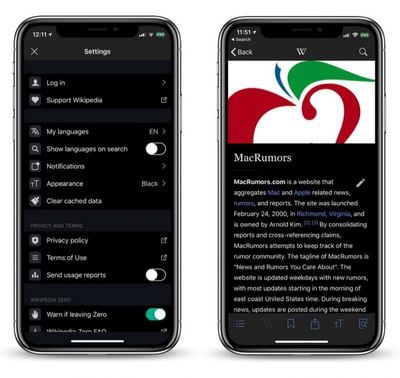
Screen Shot 8
In addition to the new theme, the Wikipedia app update promises faster article loading and less data use. The speed improvements are mostly down to the fact that images are no longer pre-loaded and now only download when they're about to be displayed or saved.

Wikipedia is just the latest app to add a true black theme to its display options, with other popular apps like Twitterrific and Bear Notes also having included similar features in the last few weeks.

A native Dark or "Night" mode for iOS is one of the most popular long-running user requests, but Apple has yet to officially add support for such a feature, despite the added technological rationale for one on iPhone X.

The closest option for iOS 11 users is the "Smart Invert" accessibility feature, which is basically a tweaked version of the classic "Invert Colors" that aims to avoid inverting colors in images, although it's pretty inconsistent in this regard. The option can be found in the Settings app in General -> Accessibility -> Display Accommodations -> Invert Colors.

The official Wikipedia app is a free download for iPhone and iPad from the App Store. [Direct Link]


Top Rated Comments

108 months ago
Pretty soon all apps with have a dark mode except Apple’s!

They really need to create a system-wide dark mode. Maybe with DarkKit so that app developers can have their dark modes automatically enables when the system-wide one is turned on.
Score: 7 Votes (Like | Disagree)
FelixDerKater Avatar
108 months ago
iBooks needs this.
Score: 5 Votes (Like | Disagree)
NightFox Avatar
108 months ago
I just don't get what the big thing about 'dark mode' is. Sure, I understand for some people it improves readability and others like the look, but I really don't understand why it's seen as such a massive newsworthy step every time an app developer spends five minutes of his lunch break changing the colours? (ok, maybe not 5 minutes, but you get my point) :confused:

Why is it so significant, what am I missing?
Score: 3 Votes (Like | Disagree)
FelixDerKater Avatar
108 months ago
Ibooks does have a night theme. I've read this way on my ipad for years in bed
Dark grey doesn’t count. Dark colors don’t save battery like OLED black.
Score: 1 Votes (Like | Disagree)
Killa Aaron Avatar
108 months ago
iBooks needs this.
Macrumors needs this.
Score: 1 Votes (Like | Disagree)
108 months ago
I just don't get what the big thing about 'dark mode' is. Sure, I understand for some people it improves readability and others like the look, but I really don't understand why it's seen as such a massive newsworthy step every time an app developer spends five minutes of his lunch break changing the colours? (ok, maybe not 5 minutes, but you get my point) :confused:

Why is it so significant, what am I missing?
Why Dark mode: Reading after sundown (currently sundown before 4pm here) and better sleep hygiene when reading/using app in evening as there is a lot less light hitting the eyeballs.
Score: 1 Votes (Like | Disagree)

Popular Stories

iOS 26

iOS 26.4 Adds Two New Features to CarPlay

Tuesday March 24, 2026 1:55 pm PDT by
iOS 26.4 was released today, and it includes a couple of new features for CarPlay: an Ambient Music widget and support for voice-based chatbot apps. To update your iPhone 11 or newer to iOS 26.4, open the Settings app and tap on General → Software Update. CarPlay will automatically offer the new features so long as the iPhone connected to your vehicle is running iOS 26.4 or later....
Apple Business hero

Apple Unveils 'Apple Business' All-in-One Platform

Tuesday March 24, 2026 8:53 am PDT by
Apple today announced Apple Business, a new all-in-one platform that unifies device management, productivity tools, and customer outreach features. The service is designed to be a consolidated replacement for several of Apple's existing business-focused offerings, including Apple Business Essentials, Apple Business Manager, and Apple Business Connect. It provides organizations with a single...
AirPods Pro Firmware Feature

Apple Releases New Firmware for AirPods Pro 3, AirPods Pro 2 and AirPods 4

Tuesday March 24, 2026 12:31 pm PDT by
Apple today released new firmware for the AirPods Pro 2, AirPods Pro 3, and the AirPods 4. The firmware has a version number of 8B39, up from 8B34 on the AirPods Pro 3, 8B28 on the AirPods Pro 2, and 8B21 on the AirPods 4. There is no word on what's included in the firmware, but Apple has a support document with limited notes. Most updates are limited to bug fixes and performance...















