

By now, you've probably seen headlines about Apple slowing down your iPhone, but it's not nearly as simple or corrupt as it sounds. In this Q&A, we've taken the time to explain exactly what's going on.
Why is Apple slowing down some older iPhone models?
iPhones, like many other consumer electronics, are powered by lithium-ion batteries, which have a limited lifespan. As the battery in your iPhone ages, its ability to hold a charge slowly diminishes.
A chemically aging battery can also have increased impedance, reducing its ability to provide a sudden burst of power when demanded by other components in an iPhone, such as the CPU and GPU. A battery's impedance will also temporarily increase when it has a low charge and/or in cold temperatures.
A battery with a high enough impedance may be unable to provide power quickly enough to the iPhone when needed, and Apple safeguards components against the drop in voltage by shutting down the device.
Apple recognized that iPhones unexpectedly shutting down on users is not a good experience, and starting with iOS 10.2.1, it quietly implemented a power management feature to prevent these shutdowns. The update was released in January 2017, and a month later, Apple said it saw a major reduction in shutdowns.
How does Apple's power management feature work?
Apple says it looks at a combination of an iPhone's internal temperature, battery percentage, and battery impedance, and only if a certain criteria is met, iOS will dynamically manage the maximum performance of some system components, such as the CPU and GPU, in order to prevent unexpected shutdowns.
Does my iPhone have this feature if needed?
Apple said the power management feature applies to iPhone 6, iPhone 6 Plus, iPhone 6s, iPhone 6s Plus, and iPhone SE models running iOS 10.2.1 or any newer software version. The feature was also expanded to iPhone 7 and iPhone 7 Plus models running iOS 11.2 or any newer software version.
Any older iPhone models are currently not affected, including the iPhone 5s, iPhone 5c, iPhone 5, iPhone 4s, iPhone 4, iPhone 3Gs, iPhone 3G, and the original iPhone, even though some of those models have also experienced shutdowns. The latest iPhone 8, iPhone 8 Plus, and iPhone X are also currently not affected.
How do I know if my iPhone is being slowed down?
There are a few different ways in which you can determine if your iPhone is being slowed down temporarily:
- Benchmark your iPhone: Download the Geekbench 4 app from the App Store and benchmark your iPhone. Each CPU workload models a real-world task or application. If your iPhone has noticeably lower scores compared to the averages, it could be due to Apple's power management feature artificially kicking in.
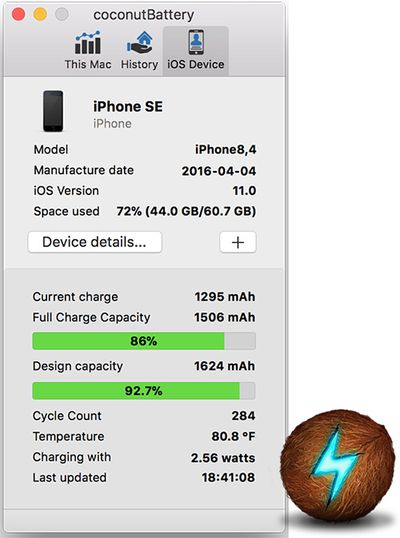
- Use coconutBattery: Download, install, and open coconutBattery for Mac, connect your iPhone to your Mac with a Lightning to USB cable, and click on the iOS Device tab in the app. Here, you can view your iPhone's battery capacity, which if low suggests your device may be slowed down only when necessary.
- Wait for battery-related iOS update: Early in 2018, Apple has promised to release an iOS update with new features that give users more visibility into the health of their iPhone's battery, so they can see for themselves if its condition is affecting performance. This will likely be the easiest solution.
Will the iPhone 8 and iPhone X eventually be affected?
In a statement issued December 20, Apple said it "plans to add support for other products in the future," and by that definition, the iPhone 8, iPhone 8 Plus, and iPhone X could eventually be affected.
In a support article titled iPhone Battery and Performance, published December 28, Apple toned down that language a bit and simply said "we will continue improving our power management feature in the future," so it's unclear if the iPhone 8, iPhone 8 Plus, and iPhone X may be eventually affected.
Apple expanded the feature to iPhone 7 and iPhone 7 Plus models when iOS 11.2 was publicly released in December 2017, nearly one year after implementing the changes in the iPhone 6, iPhone 6 Plus, iPhone 6s, iPhone 6s Plus, and iPhone SE when iOS 10.2.1 was publicly released in January 2017.
Is my iPhone slowed down all the time?
Apple is not permanently or persistently slowing down older iPhones. Even if your iPhone is affected, the performance limitations only happen intermittently, when the device is completing demanding tasks.
The power management only occurs in spurts, when needed, and ensures a smoother distribution of system tasks, rather than larger, quick spikes of performance all at once, which was the root cause of shutdowns.
A recent analysis of Geekbench 4 scores for iPhone 6s and iPhone 7 models running iOS 10.2, iOS 10.2.1, and iOS 11.2 visualized an apparent link between lower performance and aging batteries, but this is to be expected since iPhones are artificially pushed to their maximum performance in benchmark tests.
How much is Apple slowing down my iPhone if and when it is?
Apple hasn't specified exactly how much it is slowing down older iPhones when necessary, but in extreme cases, it said users may notice effects such as longer app launch times, lower frame rates while scrolling, and slightly lower speaker volume. Cellular, GPS, and location services are always unaffected.
An excerpt from Apple's iPhone and Battery Performance document:
In some cases, a user may not notice any differences in daily device performance. The level of perceived change depends on how much power management is required for a particular device.
In cases that require more extreme forms of this power management, the user may notice effects such as:
- Longer app launch times
- Lower frame rates while scrolling
- Backlight dimming (which can be overridden in Control Center)
- Lower speaker volume by up to -3dB
- Gradual frame rate reductions in some apps
- During the most extreme cases, the camera flash will be disabled as visible in the camera UI
- Apps refreshing in background may require reloading upon launchMany key areas are not impacted by this power management feature. Some of these include:
- Cellular call quality and networking throughput performance
- Captured photo and video quality
- GPS performance
- Location accuracy
- Sensors like gyroscope, accelerometer, barometer
- Apple Pay
Is there a way to disable the power management feature on my iPhone?
Not currently. The only way to avoid Apple's power management feature is to avoid installing iOS 10.2.1 or iOS 11.2 depending on which iPhone you have, although many customers have already updated by now, and it is no longer possible to downgrade to software versions earlier than iOS 11.2.
Is Apple purposefully slowing down my older iPhone?
For several years, there has been a conspiracy theory that Apple artificially slows down older iPhone models to incentivize a customer to upgrade to a newer, faster iPhone, and a wealth of misinformation and some sensational reporting about Apple's power management feature has only fueled that fire.
In a letter to customers, Apple said its power management feature is actually designed to extend the life of an older iPhone as much as possible, rather than having the device frustratingly shut down unexpectedly. In other words, Apple's intentions are actually quite the opposite of what some are accusing.
Apple denied any kind of planned obsolescence by flat out stating that it never has and never would do anything to intentionally shorten the life of any Apple product, or degrade the user experience, to drive customer upgrades.
We have never — and would never — do anything to intentionally shorten the life of any Apple product, or degrade the user experience to drive customer upgrades. Our goal has always been to create products that our customers love, and making iPhones last as long as possible is an important part of that.
Whether a customer chooses to believe Apple is his or her choice, but there is no evidence to suggest that Apple's power management feature is designed for any other purpose than to prevent iPhones from unexpectedly shutting down.
Why did Apple apologize then?
Apple apologized because it could have been much more transparent about the power management changes introduced in iOS 10.12.1. The feature was not mentioned in the update's release notes, and in a statement issued in February 2017, Apple vaguely mentioned "improvements" made to prevent unexpected shutdowns.
From its letter to customers:
We've been hearing feedback from our customers about the way we handle performance for iPhones with older batteries and how we have communicated that process. We know that some of you feel Apple has let you down. We apologize.
Given it didn't fully communicate the changes, some iPhone users with a suddenly slower device may not have realized that they could have simply replaced the battery to regain maximum performance consistently. As a result, some customers may have even unnecessarily purchased a brand new iPhone.
Are other Apple products affected: iPad, Mac, Apple TV?
Apple said the power management feature only applies to select iPhone models listed above. There is currently no evidence to suggest the feature extends to other Apple devices, including any iPad, iPod, Mac, Apple Watch, or Apple TV.
Why is Apple in the headlines now when iOS 10.2.1 was released nearly a year ago?
When iOS 10.2.1 was publicly released, the release notes vaguely mentioned that the software update contained general bug fixes and improvements.
Likewise, when Apple released a statement claiming iOS 10.2.1 had resulted in a significant reduction of iPhone 6 and iPhone 6s shutdowns, it still only mentioned "improvements" were made to reduce occurrences of shutdowns.
Apple's statement in February 2017:
With iOS 10.2.1, Apple made improvements to reduce occurrences of unexpected shutdowns that a small number of users were experiencing with their iPhone. iOS 10.2.1 already has over 50% of active iOS devices upgraded and the diagnostic data we've received from upgraders shows that for this small percentage of users experiencing the issue, we're seeing a more than 80% reduction in iPhone 6s and over 70% reduction on iPhone 6 of devices unexpectedly shutting down.
It wasn't until December 2017, nearly one year after iOS 10.2.1 was released, that Apple revealed the software update includes a power management to "smooth out the instantaneous peaks only when needed" to prevent older iPhone models from unexpectedly shutting down.
Apple's statement in December 2017:
Our goal is to deliver the best experience for customers, which includes overall performance and prolonging the life of their devices. Lithium-ion batteries become less capable of supplying peak current demands when in cold conditions, have a low battery charge or as they age over time, which can result in the device unexpectedly shutting down to protect its electronic components.
Last year we released a feature for iPhone 6, iPhone 6s and iPhone SE to smooth out the instantaneous peaks only when needed to prevent the device from unexpectedly shutting down during these conditions. We've now extended that feature to iPhone 7 with iOS 11.2, and plan to add support for other products in the future.
Apple's admission came a few weeks after a Reddit user claimed his own iPhone 6s' performance significantly increased after replacing the device's battery, which reignited the conspiracy theory about the company intentionally slowing down older iPhone models. Apple didn't help itself by remaining quiet.
What are Apple's next steps?
In its apology letter for its lack of communication, Apple outlined three steps it is taking to address customer concerns and to regain the trust of anyone who may have doubted the company's intentions.
First, Apple has reduced the price of out-of-warranty iPhone battery replacements by $50 (from $79 to $29 in the United States) for any customer with an iPhone 6 or newer. The discount is available worldwide between now and the end of 2018, with prices varying based on local currencies.
Next, early in 2018, Apple has promised to release an iOS update with new features that give users more visibility into the health of their iPhone's battery, so they can see for themselves if its condition is affecting performance.
How do I get my iPhone battery replaced?
Depending on your location, you can receive a battery replacement by sending in your iPhone or scheduling a Genius Bar appointment.
To get started, visit the Contact Apple Support page, click on See Your Products, sign in to your Apple ID account, select which iPhone, and click on Battery, Power, and Charging and then Battery Replacement.
After completing the above steps, you should have options available to you to bring in your iPhone to an Apple Store or Apple Authorized Service Provider, mail the device to an Apple Repair Center, or both.
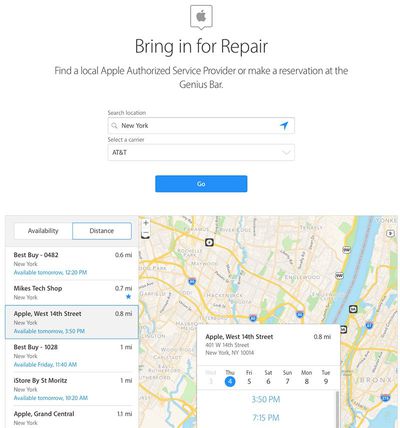
If you choose to bring it in, you will be prompted to schedule an appointment at a nearby Apple Store or Apple Authorized Service Provider. If the store or service center you visit has replacement batteries in stock, the repair could take just a matter of hours, but otherwise it could take up to 3-5 business days.
If you choose to mail it in, you will be asked to fill in your shipping address and billing information to pay for the $29 battery replacement fee, plus shipping costs and local taxes. Shortly after, Apple will send a postage paid box to the address you provide to send your iPhone to an Apple Repair Center.
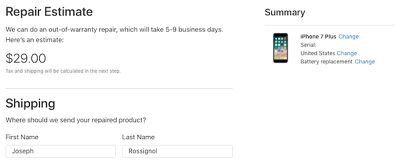
Apple says the mailed-in battery replacement process takes approximately 5-9 business days, although your mileage may vary. Be prepared to possibly be without your iPhone for awhile if you choose this option.
Does my iPhone battery have to fail a diagnostic test to qualify for a reduced-price battery replacement?
Apple distributed a memo to Apple Stores and Apple Authorized Service Providers, obtained by GeekWebGuides, that states customers with an iPhone 6 or newer can request a $29 replacement battery "regardless of diagnostic result."
If a customer is requesting a free battery replacement under the terms of Apple's limited one-year warranty, however, the battery must fail the diagnostic test, meaning it has lower than 80 percent capacity with fewer than 500 full charge cycles.
I already paid to have my iPhone battery replaced recently. Am I eligible for a partial refund?
Apple distributed a memo to Apple Stores and Apple Authorized Service Providers, obtained by GeekWebGuides, that states customers may be eligible for a refund if they paid for a battery repair or replacement at a higher price.
In other words, if you paid Apple's standard $79 out-of-warranty fee to replace the battery in your iPhone 6 or newer, you should contact Apple Support to inquire about a partial refund.
We've heard that Apple may only honor refunds for full-price battery replacements initiated on or after December 14, and there may be other requirements, so your mileage may vary. We recommend contacting Apple Support for more details.
How do I contact Apple Support?
Visit the Contact Apple Support page to reach a specialist by phone, online chat, or email, or to schedule a Genius Bar appointment at an Apple Store. Apple also operates a support account on Twitter.


















































