
AT&T Launches $35 Smart Wi-Fi Extender to Boost Coverage by Up To 1,000 Square Feet - MacRumors
Skip to Content

AT&T Launches $35 Smart Wi-Fi Extender to Boost Coverage by Up To 1,000 Square Feet

by

AT&T has launched the "AT&T Smart Wi-Fi Extender," a device built to enable a stronger and more consistent Wi-Fi signal throughout your home. AT&T's product is one box that keeps devices connected to the internet as you move from one room to another, and customers can purchase additional boxes for bigger homes.

The Smart Wi-Fi Extender is designed for customers with an AT&T internet subscription who have Wi-Fi gateways 5268AC or BGW210, boosting coverage by up to 1,000 square feet and reducing network congestion. The company said that it automatically selects the "best and fastest available connection" for every device that you connect to the internet within your home. AT&T created the extender in partnership with AirTies.
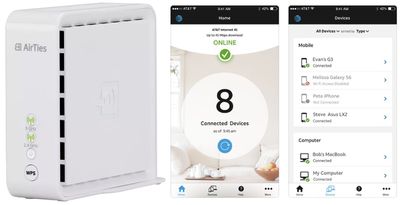
att smart wi fi extender
The company priced the Smart Wi-Fi Extender at $34.99, and said it offers the same Wi-Fi boosting abilities of competitive mesh systems "that cost hundreds of dollars." It appears that the Wi-Fi Extender was available for some AT&T customers to purchase ahead of the wider launch this week.

That’s why we are introducing the new AT&T Smart Wi-Fi Extender – a state-of-the-art device that gives you the strongest Wi-Fi signal throughout your entire home. Its mesh technology keeps your devices connected as you move around, so you experience a seamless connection everywhere. Now you can stream, download, surf, and work on your devices anywhere, worry free. No dropped connection as you step into the backyard. No more interruptions or watching the football freeze in mid-air.

The 4-inch box is a 1600Mbps dual-band concurrent wireless access point and includes a port for 2 Gigabit Ethernet LAN and a power cable. AT&T also noted that it is compliant with 802.11ac and 802.11n standards, as well as being backwards compatible with 802.11a/b/g wireless standards.

The Smart Wi-Fi Extender will connect to an established AT&T Wi-Fi network, which can be managed via the Smart Home Manager iOS app. The company announced the app last summer and refers to it as a customer's "Wi-Fi concierge." With the app, users can change their network name and password, check who is connected to the network, invite guests to join with a text or email, and contact customer service in a chatroom.


Tag: AT&T

Top Rated Comments

107 months ago
Knowing AT&T surprised this isn't $35/month
Score: 4 Votes (Like | Disagree)
justperry Avatar
107 months ago
1000 square feet isn't even 100 square meters, my Uniquiti Unifi AC Pro has a lot more coverage and can probably have many more clients on one single device.
Price seems to be good though.
Score: 2 Votes (Like | Disagree)
palmerc Avatar
103 months ago
1000 square feet isn't even 100 square meters, my Uniquiti Unifi AC Pro has a lot more coverage and can probably have many more clients on one single device.
Price seems to be good though.
AirTies is a mesh device and as such provides a better experience than a classic WiFi router and/or dumb repeater, but will never match up to a properly deployed system based on Ubiquiti's Unifi ('https://unifi-sdn.ubnt.com')line of products.

If you care about consistent performance throughout the house and getting the best performance you can from WiFi, you'll want to do a bit of planning and use an Ethernet backbone, look for .11ac, .11r, pushing devices to wider (80MHz) 5GHz channels, planning out your 2.4GHz channels (1, 6, 11). The future is products like AC SHD that have real-time continuous spectrum monitoring.

So, the current mesh networking fad is an improvement for most people over the single router model, but it still leaves a lot to be desired.
Score: 1 Votes (Like | Disagree)
boshii Avatar
107 months ago
This has been getting good reviews on dslreports so I may pick one up.
Score: 1 Votes (Like | Disagree)
107 months ago
I’m going to try out 2 of them. We have 2,700 sq ft with our router at the far end (I know bad planning). I currently use an airport express and a time capsule and have spotty service at the far end of the house. I blame the 2 brick walls the signal has to go through. I will set these up a little different and see if they help. Then sell my Apple products if this works better.
Score: 1 Votes (Like | Disagree)
107 months ago
I have experience with this device and it is absolute crap, goes out all the time and is no better than a poor repeater. Frontier already uses this and the company who makes them just changes the name such as Airties, Frontier Secure etc.
Any extender/mesh point placed to far from the access point or without extenders/mesh point between the extender and the access point most likely will drop the channel.
Score: 1 Votes (Like | Disagree)

Popular Stories

iOS 26

iOS 26.4 Adds Two New Features to CarPlay

Tuesday March 24, 2026 1:55 pm PDT by
iOS 26.4 was released today, and it includes a couple of new features for CarPlay: an Ambient Music widget and support for voice-based chatbot apps. To update your iPhone 11 or newer to iOS 26.4, open the Settings app and tap on General → Software Update. CarPlay will automatically offer the new features so long as the iPhone connected to your vehicle is running iOS 26.4 or later....
Apple Business hero

Apple Unveils 'Apple Business' All-in-One Platform

Tuesday March 24, 2026 8:53 am PDT by
Apple today announced Apple Business, a new all-in-one platform that unifies device management, productivity tools, and customer outreach features. The service is designed to be a consolidated replacement for several of Apple's existing business-focused offerings, including Apple Business Essentials, Apple Business Manager, and Apple Business Connect. It provides organizations with a single...
AirPods Pro Firmware Feature

Apple Releases New Firmware for AirPods Pro 3, AirPods Pro 2 and AirPods 4

Tuesday March 24, 2026 12:31 pm PDT by
Apple today released new firmware for the AirPods Pro 2, AirPods Pro 3, and the AirPods 4. The firmware has a version number of 8B39, up from 8B34 on the AirPods Pro 3, 8B28 on the AirPods Pro 2, and 8B21 on the AirPods 4. There is no word on what's included in the firmware, but Apple has a support document with limited notes. Most updates are limited to bug fixes and performance...














