

Apple this morning officially released the iOS 11.2.5 update to the public, introducing support for the upcoming HomePod smart speaker, which is set to be released on February 9.
In addition to adding support for HomePod, the update also introduces several HomePod-related features such as Siri podcast-based audio news reports and a new music interface, along with bug fixes and security improvements. Check the video and post below for everything that's new in iOS 11.2.5.
Today's update introduces official support for podcast-based audio Siri news reports, a feature that first began rolling out on all devices last week.
When you ask Siri about the news of the day via Hey Siri or another hands-free method, the new feature allows the personal assistant to provide Podcast news from sources like NPR, Fox News, CNN, or The Washington Post.
While asking Siri about the news of the day will provide generic news updates from the aforementioned sources, you can also ask for more specific news about topics like sports, business, and music. Sports news provides podcasts from ESPN or NBC, business news offers podcasts from Bloomberg or CNBC, while music news offers Apple Music Beats 1 content.
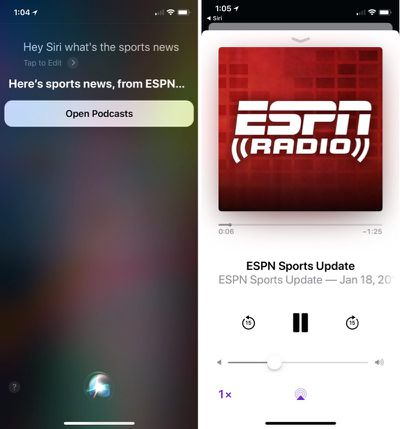
Siri podcast news is available in the United States, Australia, and the UK, the three countries where the HomePod is launching in February. Siri news can be accessed on devices in other countries according to Apple's release notes for the iOS 11.2.5 update, but content will only be provided in English and the feature appears to be incomplete in unsupported countries.
The only significant outward-facing change introduced in iOS 11.2.5 brings a new layout for audio controls. When accessing the music widget on an iPhone or iPad, when you 3D Touch or press on the icon in the upper right hand side, all available audio playback sources are now listed as separate tiles.
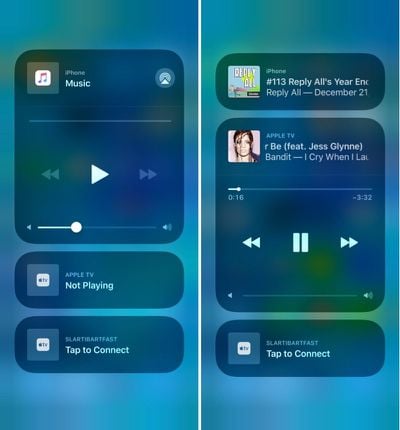
Tapping on one of the audio sources, such as an Apple TV, allows audio to be played on the device and controlled separately from the iPhone. Using this feature, you can listen to music on one device, like the Apple TV, without interfering with audio playing on the iPhone.
Today's update introduces new functionality for the VoiceOver accessibility feature in iOS devices, allowing it to announce playback destinations and AirPod battery level.
Other, smaller improvements and bug fixes were also included in iOS 11.2.5, addressing issues in Mail, Messages, and CarPlay. From Apple's official release notes:
- Addresses an issue that could cause the Phone app to display incomplete information in the call list
- Fixes an issue that caused Mail notifications from some Exchange accounts to disappear from the Lock screen when unlocking iPhone X with Face ID
- Addresses an issue that could cause Messages conversations to temporarily be listed out of order
- Fixes an issue in CarPlay where Now Playing controls become unresponsive after multiple track changes
The iOS 11.2.5 update can be downloaded for free on all eligible devices over-the-air using the Settings app. To access the update, go to Settings --> General --> Software update.






















