
HomePod Music Streams Don't Count Toward Apple Music and iTunes Device Limits - MacRumors
Skip to Content

HomePod Music Streams Don't Count Toward Apple Music and iTunes Device Limits

Yesterday, reviews for the HomePod launched online and with them new details about Apple's smart speaker began emerging ahead of its release date on February 9. One new tidbit of information came from Rene Ritchie's review of the speaker on iMore, which confirmed that any music streamed via HomePod does not count toward an Apple Music subscription's device streaming limit. Additionally, HomePod does not count toward the 10 device limit placed on devices associated with an Apple ID.
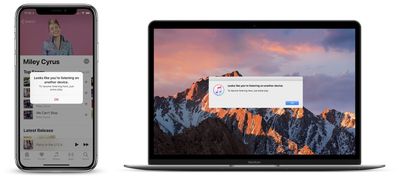
apple music streaming error
This means that subscribers with single memberships to Apple Music will be able to ask Siri to play a song on HomePod while listening to music on another iPhone, iPad, or Mac. Prior to HomePod, if single membership users streamed Apple Music on an iPhone and then began listening to music on a Mac, for example, the iPhone would disconnect from the music and serve up a warning about the new stream.

When users get their HomePods this weekend, it appears that they won't have to worry about the speaker taking up similar streaming limits on their Apple Music accounts. Apple Music family plans already support simultaneous streaming across multiple devices, but the HomePod feature should work the same for those users as well.

That includes HomePod not counting against any Apple Music device or concurrent stream limit — set it up one or more HomePods with your iPhone or iPad, leave the house with that device, and anyone who stays or comes home can still listen to Apple Music on any or all the HomePods you've set up.

Another small tidbit relates to how HomePod affects each user's music recommendations within the "For You" tab of Apple Music. According to The Loop's Jim Dalrymple, there's a toggle in the HomePod section of the Home app (where the speaker will be controlled on iOS devices), and turning it off allows users to prevent the HomePod's streams from impacting how Apple Music's algorithms recommend new music.

When using the feature, no music streamed via HomePod will count towards the subscriber's overall taste profile, but if users want HomePod streams to affect recommendations they can ignore the setting.

One thing about having multiple people access the HomePod that bothered me was that it would affect my “For You” section in Apple Music.

When you love songs, play songs and add songs to your library, Apple Music will suggest similar music, assuming that is what you want. If someone else, or a group of people come over and start playing genres you don’t like, it would screw everything up.

Well, it turns out I didn’t have to worry about that after all. There is a setting in the Home app that allows you to prevent the music played on HomePod from affecting the “For You” section of Apple Music.

This way, when users know a lot of people will be around the HomePod -- at a party, for example -- they can toggle the setting off. Then, if other people begin asking HomePod to play music that doesn't particularly align with the tastes of the main account, that Apple Music subscriber's New Music Mix and other song/artist recommendations won't be thrown off.

The same setting will also control the albums and playlists that appear on an Apple Music profile. In leaked screenshots posted by iGen in January, it was confirmed that turning off this one setting will prevent both music recommendations from being affected as well as "Listening To" history from being updated. It also synchronizes the playback status of podcasts on all devices connected to the same Apple ID.

If you're interested in reading up on everything else we know about the HomePod so far, be sure to check out our full HomePod Roundup.


Related Roundup: HomePod
Buyer's Guide: HomePod (Neutral)

Popular Stories

iOS 26

iOS 26.4 Adds Two New Features to CarPlay

Tuesday March 24, 2026 1:55 pm PDT by
iOS 26.4 was released today, and it includes a couple of new features for CarPlay: an Ambient Music widget and support for voice-based chatbot apps. To update your iPhone 11 or newer to iOS 26.4, open the Settings app and tap on General → Software Update. CarPlay will automatically offer the new features so long as the iPhone connected to your vehicle is running iOS 26.4 or later....
Apple Business hero

Apple Unveils 'Apple Business' All-in-One Platform

Tuesday March 24, 2026 8:53 am PDT by
Apple today announced Apple Business, a new all-in-one platform that unifies device management, productivity tools, and customer outreach features. The service is designed to be a consolidated replacement for several of Apple's existing business-focused offerings, including Apple Business Essentials, Apple Business Manager, and Apple Business Connect. It provides organizations with a single...
AirPods Pro Firmware Feature

Apple Releases New Firmware for AirPods Pro 3, AirPods Pro 2 and AirPods 4

Tuesday March 24, 2026 12:31 pm PDT by
Apple today released new firmware for the AirPods Pro 2, AirPods Pro 3, and the AirPods 4. The firmware has a version number of 8B39, up from 8B34 on the AirPods Pro 3, 8B28 on the AirPods Pro 2, and 8B21 on the AirPods 4. There is no word on what's included in the firmware, but Apple has a support document with limited notes. Most updates are limited to bug fixes and performance...

Top Rated Comments

106 months ago
Can't wait to see how commentors on here manage to turn this into bad news.
Score: 14 Votes (Like | Disagree)
OllyW Avatar
106 months ago
This means that subscribers with single memberships to Apple Music will be able to ask Siri to play a song on HomePod while listening to music on another iPhone, iPad, or Mac. Prior to HomePod, if single membership users streamed Apple Music on an iPhone and then began listening to music on a Mac, for example, the iPhone would disconnect from the music and serve up a warning about the new stream.
Makes sense really, you wouldn't want your music in the car to be cut off if your partner or your kids start playing music on your HomePod.
Score: 10 Votes (Like | Disagree)
BornAgainMac Avatar
106 months ago
I didn't even know about the Streaming Limits.
Score: 8 Votes (Like | Disagree)
CausticSoda Avatar
106 months ago
Well, I should think not!
Score: 4 Votes (Like | Disagree)
106 months ago
Device limits are arbitrary and ridiculous. Devices don’t count.... or do they? It’s kinda confusing.... but computers do. And if you’re like me with multiple computers you’ve got to pick which machines to work with Apple Music and which don’t get music on them at all. I have 3 machines; 1 iMac and 2 MBP’s that are all used for very different reasons and each of those dualboots into windows for software compatibility purposes. So even though I’ve given Apple more money than others I still can’t use all my devices equally. I don’t expect the opposite.... to be treated better.... equally would be nice!

When I worked at Sony I used to fight against their decisions to limit the amount of PlayStations one could install software onto per account. All the excuses were laughable.
Generally they have to do with whatever deal was worked out with the record companies for licensing. It’s a bargaining chip for both sides.
Score: 2 Votes (Like | Disagree)
itsmilo Avatar
106 months ago
Why do you want to “control” the HomePod from another device?
It doesn’t need controlling. It’s self-sufficient! :)
I hate talking to things and can never recall the names of my playlists
Score: 2 Votes (Like | Disagree)















