Apple Releases Minor watchOS 4.2.3 Update With Bug Fixes - MacRumors
Skip to Content

Apple Releases Minor watchOS 4.2.3 Update With Bug Fixes

Apple today released a minor software update for the Apple Watch, upgrading watchOS 4.2.2 to watchOS 4.2.3. The watchOS 4.2.3 update comes one month after the release of watchOS 4.2.2, a minor update focusing on bug fixes.

watchOS 4.2.3 can be downloaded through the dedicated Apple Watch app on the iPhone by going to General --> Software Update. To install the update, the Apple Watch must have 50 percent battery, it must be placed on the charger, and it must be in range of the iPhone.
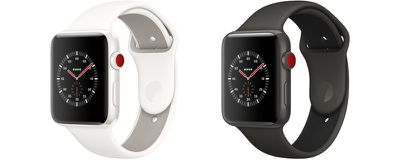
applewatchedition 3
Today's update addresses minor bugs discovered since the release of watchOS 4.2.2, and it includes a fix for a bug that causes device crashes when a specific character in the Indian language Telugu is sent, received or input into an app. Similar fixes have also been released for macOS High Sierra and iOS 11.

watchOS 4.2.3 will be succeeded by watchOS 4.3, an update that's currently in beta testing and slated for release in the spring. watchOS 4.3 introduces portrait orientation support for Night Stand mode, and it reintroduces support for controlling music played on the iPhone with the Apple Watch.

Related Roundup: Apple Watch 11
Buyer's Guide: Apple Watch (Neutral)

Popular Stories

iOS 26

iOS 26.4 Adds Two New Features to CarPlay

Tuesday March 24, 2026 1:55 pm PDT by
iOS 26.4 was released today, and it includes a couple of new features for CarPlay: an Ambient Music widget and support for voice-based chatbot apps. To update your iPhone 11 or newer to iOS 26.4, open the Settings app and tap on General → Software Update. CarPlay will automatically offer the new features so long as the iPhone connected to your vehicle is running iOS 26.4 or later....
Apple Business hero

Apple Unveils 'Apple Business' All-in-One Platform

Tuesday March 24, 2026 8:53 am PDT by
Apple today announced Apple Business, a new all-in-one platform that unifies device management, productivity tools, and customer outreach features. The service is designed to be a consolidated replacement for several of Apple's existing business-focused offerings, including Apple Business Essentials, Apple Business Manager, and Apple Business Connect. It provides organizations with a single...
AirPods Pro Firmware Feature

Apple Releases New Firmware for AirPods Pro 3, AirPods Pro 2 and AirPods 4

Tuesday March 24, 2026 12:31 pm PDT by
Apple today released new firmware for the AirPods Pro 2, AirPods Pro 3, and the AirPods 4. The firmware has a version number of 8B39, up from 8B34 on the AirPods Pro 3, 8B28 on the AirPods Pro 2, and 8B21 on the AirPods 4. There is no word on what's included in the firmware, but Apple has a support document with limited notes. Most updates are limited to bug fixes and performance...


Top Rated Comments

Truckondo Avatar
106 months ago
I won’t call it a minor update when they take as long as they do.
Score: 12 Votes (Like | Disagree)
Westside guy Avatar
106 months ago
The update doesn’t take long something wrong with your watch then
His watch - and just about everyone else's watch other than yours, apparently. :D
Score: 6 Votes (Like | Disagree)
Apple_Robert Avatar
106 months ago
I hope that Apple gets to the point where updates can be done directly from the watch, without having to go through the phone. Good thing I don't have anything pressing for the next 20 - 30 mins. :)
Score: 6 Votes (Like | Disagree)
Radeon85 Avatar
106 months ago
And stop the requirement of it being at 50% whilst needing to be on the charger. I always just put it on the charger for a second to start the update then wear it again while it's doing the update. Have done this since the very first watch update on S0, S2 and S3, never had an issue.

Being placed on a charger should not be a requirement unless under 50%.
Score: 5 Votes (Like | Disagree)
Benjwri Avatar
106 months ago
And stop the requirement of it being at 50% whilst needing to be on the charger. I always just put it on the charger for a second to start the update then wear it again while it's doing the update. Have done this since the very first watch update on S0, S2 and S3, never had an issue.

Being placed on a charger should not be a requirement unless under 50%.
You realise if your watch runs out of battery while updating you could kill it right? It’s better for Apple to be safe because if they weren’t you can imagine the lawsuits if someone’s watch was killed by an update.
Score: 2 Votes (Like | Disagree)
Strelok Avatar
106 months ago
not being Indian I could care less about some Indian character bug for something my watch will never see. def don't need an hour long update for it
So start the update when you go to bed or aren't using the watch.
Score: 2 Votes (Like | Disagree)

















