
Google Search App Now Available for iMessage - MacRumors
Skip to Content

Google Search App Now Available for iMessage

by

Google today announced the launch of a new Google Search app extension for Messages, which can be accessed through the dedicated Messages App Store available within the Messages app on the iPhone and iPad.

When having a conversation with someone in the Messages app, you can tap on the new Google Search icon to bring up an interface that allows you to conduct Google searches without the need to exit the Messages app.
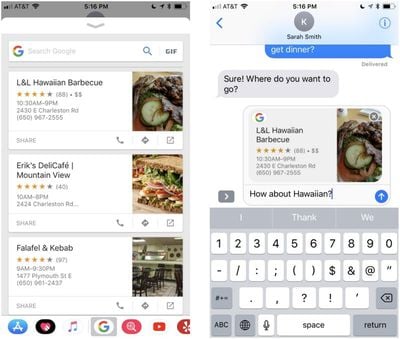
googleimessages
There are quick buttons to access the weather, restaurants located nearby, attractions in the area like parks and museums, trending news stories, and trending videos. You'll also see a search bar at the top of the interface for traditional searches, and there's a GIF button for quickly searching for GIFs to share. This functionality is limited to the United States at the current time.

The Google app for iOS now supports an iMessage extension to help you search and share GIFs, restaurants and videos, whenever you're messaging a friend. You can tap on the icon for "Food" or "Nearby" to share your favorite locations, or perform a search and share a card directly into the conversation. Want to research a new restaurant before sharing it with friends? Just tap on the restaurant card, and we'll take you to the Google Search page, where you can look up the busiest times, as well as menus and reviews. Switch to GIF Search mode, and you can find and share a "happy birthday" GIF.

Google's new iMessage extension is available today, with no need to update the app or install anything to get the new feature. It's automatically available in Messages through the iMessage apps drawer.

In addition to the new iMessage extension, Google today also announced a new related suggestions option in Safari. When you share a webpage with Google using the Share extension on an iOS device, Google will show suggestions for related content so you can learn more about a particular topic without the need to type a new query into the search box.

You can bring up this new option by visiting a webpage, selecting the Share icon, and then choosing the "Search Google" shortcut.

The final feature Google added to the Google iOS app today is support for drag and drop on the iPad. With drag and drop, you can move text, images, links, and more to and from the Google app.

Google for iOS can be downloaded from the App Store for free. [Direct Link]

Tag: Google

Top Rated Comments

105 months ago
As cool as this is, do you guys use iMessage apps like this a lot?

I'd just hop over to the Google app, get what I need, and copy/paste it into the conversation.

But maybe I'm just old...
Score: 4 Votes (Like | Disagree)
JRobinsonJr Avatar
105 months ago
As cool as this is, do you guys use iMessage apps like this a lot?

I'd just hop over to the Google app, get what I need, and copy/paste it into the conversation.

But maybe I'm just old...
I'm with you on this. Integration is a great concept, but IMO iMessages is not the top-dog app for integration. If I need to do a search, I'll use the browser. If I want to send a message, I'll open iMessages. I'm OK with using "send-to" type options to move data between apps (and indeed believe that is best approach). Companies, including Apple, are just opening themselves to more security flaws with this low-level stuff.
Score: 3 Votes (Like | Disagree)
Mike MA Avatar
105 months ago
While using regular Google Search I‘m trying to avoid their products everywhere else if possible. iMessage app will be added to that list.
Score: 3 Votes (Like | Disagree)
RightMACatU Avatar
105 months ago
I stay away from all Google apps and functions, so no thanks.
Score: 1 Votes (Like | Disagree)
105 months ago
You do sound pretty old. I bet you used Windows 3.1 :p
I was about 6 years old when it came out, but yeah, I did. :D
Score: 1 Votes (Like | Disagree)
Apple_Robert Avatar
105 months ago
I use Apple maps. I don't want Google sniffing around my personal ongoings.
[doublepost=1520287910][/doublepost]
As cool as this is, do you guys use iMessage apps like this a lot?

I'd just hop over to the Google app, get what I need, and copy/paste it into the conversation.

But maybe I'm just old...
You do sound pretty old. I bet you used Windows 3.1 :p
Score: 1 Votes (Like | Disagree)

Popular Stories

iOS 26

iOS 26.4 Adds Two New Features to CarPlay

Tuesday March 24, 2026 1:55 pm PDT by
iOS 26.4 was released today, and it includes a couple of new features for CarPlay: an Ambient Music widget and support for voice-based chatbot apps. To update your iPhone 11 or newer to iOS 26.4, open the Settings app and tap on General → Software Update. CarPlay will automatically offer the new features so long as the iPhone connected to your vehicle is running iOS 26.4 or later....
Apple Business hero

Apple Unveils 'Apple Business' All-in-One Platform

Tuesday March 24, 2026 8:53 am PDT by
Apple today announced Apple Business, a new all-in-one platform that unifies device management, productivity tools, and customer outreach features. The service is designed to be a consolidated replacement for several of Apple's existing business-focused offerings, including Apple Business Essentials, Apple Business Manager, and Apple Business Connect. It provides organizations with a single...
AirPods Pro Firmware Feature

Apple Releases New Firmware for AirPods Pro 3, AirPods Pro 2 and AirPods 4

Tuesday March 24, 2026 12:31 pm PDT by
Apple today released new firmware for the AirPods Pro 2, AirPods Pro 3, and the AirPods 4. The firmware has a version number of 8B39, up from 8B34 on the AirPods Pro 3, 8B28 on the AirPods Pro 2, and 8B21 on the AirPods 4. There is no word on what's included in the firmware, but Apple has a support document with limited notes. Most updates are limited to bug fixes and performance...
















