
Netflix to Debut New Vertical Preview Feature on Mobile Next Month - MacRumors
Skip to Content

Netflix to Debut New Vertical Preview Feature on Mobile Next Month

by

Netflix is set to introduce a new movie and show preview mode to its iOS app next month (via Variety). Announced on Wednesday at the company's Lab Days press event in California, the upcoming feature will mean Netflix subscribers can watch 30-second previews displayed as vertical video on mobile devices.
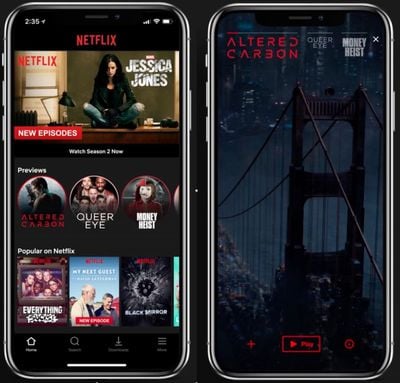
netflix previews
The previews will appear as round icons on the home screen below a carousel showcasing the latest Netflix content available. Users tap on the icons to watch the previews and can swipe across them to see more. Netflix will debut up to 75 of its custom-crop previews for both original and licensed content when the feature goes live in April.

A similar preview feature has been part of Netflix's TV interface for a few years now, but this will be the first time the company has used a vertical viewing format within its mobile apps. Some subscribers who signed up to the "Test Participation" feature in their Netflix.com account settings may already see the previews in the iPhone app.

Netflix said approximately 20 percent of all viewing happens on a mobile device, which is why the company has been working on several improvements to its mobile offering, including the recent launch of mobile downloads and codec optimization to enable higher-resolution viewing over as little as 200kbps bandwidth.


Tag: Netflix

Top Rated Comments

Loge Avatar
105 months ago
When did people become too lazy to rotate their device? :rolleyes:
Score: 8 Votes (Like | Disagree)
105 months ago
The auto-previews in Netflix apps is the single most maddening feature of any app I use regularly, with no way to disable it... now they're forcing it even further down our throats. I absolutely can't stand trying to browse for something to watch when every time I move from show to show it starts blasting spoilers at me that I don't want to see.
Score: 5 Votes (Like | Disagree)
105 months ago
When did people become too lazy to rotate their device? :rolleyes:
I don't think this update is for the convenience of the users. I think it's about making sure we see the trailers no matter how we hold the device. After all, these trailers are ads and they are there to keep us interested in Netflix and its content.
Score: 4 Votes (Like | Disagree)
topmounter Avatar
105 months ago
The auto-previews in Netflix apps is the single most maddening feature of any app I use regularly, with no way to disable it... now they're forcing it even further down our throats. I absolutely can't stand trying to browse for something to watch when every time I move from show to show it starts blasting spoilers at me that I don't want to see.
I wholeheartedly agree. This is so infuriatingly annoying that I no longer browse Netflix on OTT devices. Amazon Prime Video is my go to now.
Score: 3 Votes (Like | Disagree)
105 months ago
Who cares? Options is why. I assume the normal horizontal 16:9 preview is there too. Maybe you're standing on a train with one hand full of bags and the other with your phone. Are you awkwardly going to hold your phone landscape with one hand while previewing some new show?
This is exactly what it’s for.

That some are annoyed over this is beyond comical.
Score: 3 Votes (Like | Disagree)
imronburgundy Avatar
105 months ago
Who asked for this? I’d rather rotate my device to get the full picture. This is a step backwards, like going back to 4:3 (but worse) all over again.

Plus everyone complains when something is filmed vertically. Why would we want to watch previews that way?
Who cares? Options is why. I assume the normal horizontal 16:9 preview is there too. Maybe you're standing on a train with one hand full of bags and the other with your phone. Are you awkwardly going to hold your phone landscape with one hand while previewing some new show?
Score: 3 Votes (Like | Disagree)

Popular Stories

iOS 26

iOS 26.4 Adds Two New Features to CarPlay

Tuesday March 24, 2026 1:55 pm PDT by
iOS 26.4 was released today, and it includes a couple of new features for CarPlay: an Ambient Music widget and support for voice-based chatbot apps. To update your iPhone 11 or newer to iOS 26.4, open the Settings app and tap on General → Software Update. CarPlay will automatically offer the new features so long as the iPhone connected to your vehicle is running iOS 26.4 or later....
Apple Business hero

Apple Unveils 'Apple Business' All-in-One Platform

Tuesday March 24, 2026 8:53 am PDT by
Apple today announced Apple Business, a new all-in-one platform that unifies device management, productivity tools, and customer outreach features. The service is designed to be a consolidated replacement for several of Apple's existing business-focused offerings, including Apple Business Essentials, Apple Business Manager, and Apple Business Connect. It provides organizations with a single...
AirPods Pro Firmware Feature

Apple Releases New Firmware for AirPods Pro 3, AirPods Pro 2 and AirPods 4

Tuesday March 24, 2026 12:31 pm PDT by
Apple today released new firmware for the AirPods Pro 2, AirPods Pro 3, and the AirPods 4. The firmware has a version number of 8B39, up from 8B34 on the AirPods Pro 3, 8B28 on the AirPods Pro 2, and 8B21 on the AirPods 4. There is no word on what's included in the firmware, but Apple has a support document with limited notes. Most updates are limited to bug fixes and performance...















