
Google Lens Currently Rolling Out to iOS via Google Photos App - MacRumors
Skip to Content

Google Lens Currently Rolling Out to iOS via Google Photos App

by

Google has announced that its previously Android-only Google Lens feature is now rolling out to iOS users who have the Google Photos app installed.

First unveiled last year at the Google I/O 2017 conference, Google Lens uses the company's image recognition and machine learning algorithms to identify the subjects of photos and videos and present additional helpful actions and information to the user.
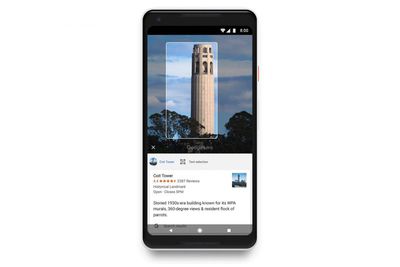
google lens
For example, if you take a picture of a business card, Google Lens will offer to save the phone number or address to one of your contacts. Similarly, taking a photo of a book, landmark, building, painting, plant or animal can throw up an option to view more details about the picture's subject.

A few things to note: Currently Google Lens only works if your device's language is set to English, and you're running the latest version (3.15) of Google Photos. You can check what version you're running in the app's settings – tap the cog icon and select "About Google Photos" in the menu. Also note that your Google Lens activity is saved to your Google Account if you have Web & App Activity turned on.


If you still don't see the Google Lens icon when viewing individual photos or videos, it's likely the feature hasn't reached your region yet. Google says the update is being released in batches and all devices should receive it soon.

Google Photos is a free download for iPhone and iPad available on the App Store. [Direct Link]

Top Rated Comments

105 months ago
OR I can avoid dealing the issue and not use Google.
or you can avoid using the Internet all-together... since your are basically "the product" everywhere you go.
Score: 5 Votes (Like | Disagree)
69Mustang Avatar
105 months ago
that's not what the TOS you quoted states, its not a boilerplate release to allow them to archive or make copies. Your quote states very plainly that you give google complete and full rights to your image to do anything and use your image without any further consent or notification.


[doublepost=1521207835][/doublepost]Its my images and I choose to not let google use, alter, copy, adapt, publish or display my images. Others do, and that's their choice but for me, I prefer protecting my rights and my images.
Respectfully, please re-read my comment. The archiving was an example, just as the displaying in different formats was an example. So was displaying on different devices. None were meant to be all encompassing.

More importantly, did you not read where I stated the language was not even from Google. It's from Apple. I even included the link. My point is you're not protecting anything. You're giving Apple the exact same permissions. If you use FB, you're giving those permissions to them. Pretty much any photo service you use has that exact same language.
Score: 4 Votes (Like | Disagree)
105 months ago
that's not what the TOS you quoted states, its not a boilerplate release to allow them to archive or make copies. Your quote states very plainly that you give google complete and full rights to your image to do anything and use your image without any further consent or notification.


[doublepost=1521207835][/doublepost]Its my images and I choose to not let google use, alter, copy, adapt, publish or display my images. Others do, and that's their choice but for me, I prefer protecting my rights and my images.
Whoa, I think @69Mustang just said he actually got that quote from Apple. :eek:

Edit to add that I just clicked the link provided and yes it’s right there where he said it is.
Score: 3 Votes (Like | Disagree)
maflynn Avatar
105 months ago
You can always fix that issue by paying for GSuite ('https://gsuite.google.com/pricing.html?tab_activeEl=tabset-companies'). Then you're protected by their business license which is a lot more restricted than their personal license.

If you don't want to be the product, Google lets you pay.
OR I can avoid dealing the issue and not use Google.
Score: 3 Votes (Like | Disagree)
maflynn Avatar
105 months ago
I'm still not a fan of Google's services. You give them the right to use your images as they see fit, and that's something I'm not willing to accept.

Again, when the service is free, you are the product.
Score: 3 Votes (Like | Disagree)
Madmic23 Avatar
105 months ago
Fair enough, I admit, I was mistaken, when you mentioned you referenced the google TOS but used Apple's.
I always chuckle a little when people think Google’s terms of service allow them to use your photos for whatever they feel like. They don’t do that. Your photos and your documents are yours and yours alone.

Google makes this statement to clarify things:

How do the Terms of Service affect me?
“As our Terms of Service ('https://www.google.com/intl/en/policies/terms/') state, "You retain ownership of any intellectual property rights that you hold in that content. In short, what belongs to you stays yours."

“We do not claim ownership in any of your content, including any text, data, information, and files that you upload, share, or store in your Drive account. What our Terms of Service do is enable us to give you the services you want — so if you decide to share a document with someone, or want to open it on a different device, we can provide that functionality.”


Sounds pretty reasonable, right?

Now read this one from Apple about what they’re allowed to do with your iCloud Drive files:

Removal of Content
“You acknowledge that Apple is not responsible or liable in any way for any Content provided by others and has no duty to pre-screen such Content. However, Apple reserves the right at all times to determine whether Content is appropriate and in compliance with this Agreement, and may pre-screen, move, refuse, modify and/or remove Content at any time, without prior notice and in its sole discretion, if such Content is found to be in violation of this Agreement or is otherwise objectionable.”

So even though Apple loves talking about privacy, they have the right to examine your files and delete anything they don’t like without telling you.
Score: 1 Votes (Like | Disagree)

Popular Stories

iOS 26

iOS 26.4 Adds Two New Features to CarPlay

Tuesday March 24, 2026 1:55 pm PDT by
iOS 26.4 was released today, and it includes a couple of new features for CarPlay: an Ambient Music widget and support for voice-based chatbot apps. To update your iPhone 11 or newer to iOS 26.4, open the Settings app and tap on General → Software Update. CarPlay will automatically offer the new features so long as the iPhone connected to your vehicle is running iOS 26.4 or later....
Apple Business hero

Apple Unveils 'Apple Business' All-in-One Platform

Tuesday March 24, 2026 8:53 am PDT by
Apple today announced Apple Business, a new all-in-one platform that unifies device management, productivity tools, and customer outreach features. The service is designed to be a consolidated replacement for several of Apple's existing business-focused offerings, including Apple Business Essentials, Apple Business Manager, and Apple Business Connect. It provides organizations with a single...
AirPods Pro Firmware Feature

Apple Releases New Firmware for AirPods Pro 3, AirPods Pro 2 and AirPods 4

Tuesday March 24, 2026 12:31 pm PDT by
Apple today released new firmware for the AirPods Pro 2, AirPods Pro 3, and the AirPods 4. The firmware has a version number of 8B39, up from 8B34 on the AirPods Pro 3, 8B28 on the AirPods Pro 2, and 8B21 on the AirPods 4. There is no word on what's included in the firmware, but Apple has a support document with limited notes. Most updates are limited to bug fixes and performance...
















