

Twitter is testing a new "Data saver" toggle on iOS devices, as one user shared on the social media platform this morning. For users in the test, the data saver setting is housed at the very bottom of the left-handed profile menu, which you can access by swiping left-to-right on your main Twitter timeline in the iOS app.
When toggled on, the mode prevents videos from autoplaying when scrolling through tweets, and lower-quality images load instead of automatically choosing high-quality images. The toggle affects all accounts linked within the iOS app on an iPhone or iPad, helping to reduce data usage on cellular connections and in turn preventing you from going over the allotted monthly data cap on your phone bill.
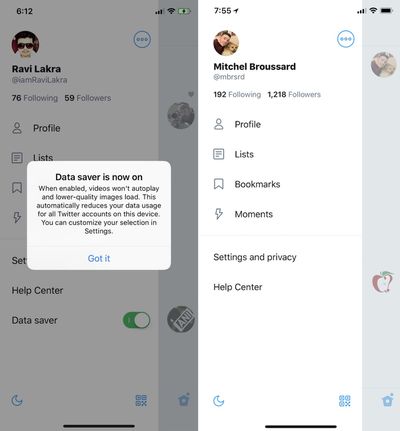
@Twitter Data Saver mode coming to iOS @MacRumors @iDownloadBlog @verge pic.twitter.com/tHAPNyySfQ — Ravi Lakra (@iamRaviLakra) May 25, 2018
Twitter's iOS app currently lets you toggle off video autoplay and high-quality videos, or set them to load only on Wi-Fi, but the settings are stored in "Settings and privacy" > "Data usage." It appears that the social media company is testing out a way for data saver functionality to be more at-hand and quicker to access with one toggle on the app's frontend menu.
Twitter users also have the option of using Twitter Lite on iOS, Android, and other smartphones. Lite loads Twitter on the mobile web, outside of a dedicated app, and provides all of the main features of Twitter while reducing data usage and speeding up load times.
Some of the big social media apps offer similar data reduction settings in their iOS apps. In Facebook's "Videos and Photos" settings on the iPhone app, you can set videos to "Never Autoplay" and reduce the upload quality of photos and videos as well. Instagram has a "Use Less Data" toggle found within the gear icon on your user profile.
The mode has also extended to music streaming apps like Spotify, and on-demand video apps like Netflix. Streaming TV services are also beginning to allow users to download their favorite shows and movies to watch offline and avoid using their data to binge shows while traveling. Platforms that support this feature include Netflix, Showtime, Amazon, Starz, Epix, and soon Hulu.
For now, Twitter's data saver toggle is just a test, so it's unclear when or if the feature will launch for all users.
(Thanks, Ravi!)





















Top Rated Comments