
The New iOS 11.4 Update Fixes Three Irritating Bugs

In addition to introducing support for Messages in iCloud, AirPlay 2, and stereo pairing for the HomePod, the new iOS 11.4 update, released this morning, introduces fixes for several high-profile bugs that have been plaguing iOS 11 users for months now.

First and foremost, the update addresses the "Black Dot" unicode bug that could crash apps on iOS devices with a specific character sequence involving certain emojis. Following the release of iOS 11.4, this particular sequence of characters will no longer cause apps like Messages to crash.
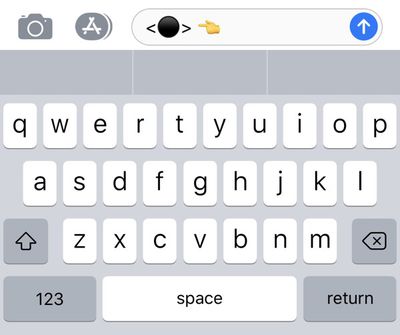
blackdotbug
Apple says the update also successfully fixes an issue that caused iMessages to appear out of order on some devices, a frustrating bug that's been around for quite some time and has been the subject of many complaints.

The third major bug addressed in today's update is one that caused an app on the Home screen to appear in the wrong location, often hovering out of place above other apps. This is another bug that received widespread attention given the high number of users who saw the problem occur.
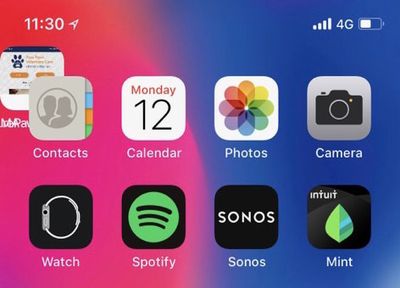
homescreenoutoforder

Image from MacRumors reader Paulold

There are several additional bug fixes included in iOS 11.4, as outlined below in Apple's release notes:

- Addresses an issue that could prevent logging in or accessing files on Google Drive, Google Docs and Gmail in Safari
- Fixes an issue that could prevent data syncing in Health
- Fixes an issue that could prevent users from changing what apps can access Health data
- Fixes an issue where CarPlay audio could become distorted
- Fixes an issue where selecting music from your iPhone could fail when playing music over Bluetooth or when connected to USB on some vehicles

The iOS 11.4 update is available for download on all devices capable of running iOS 11, which includes the iPhone 5s and later, the iPad mini 2 and later, the iPad Air and later, and the 6th-generation iPod touch. You can download the update by going to Settings --> General --> Software Update. All of the new features in iOS 11.4 are outlined in our video below.


We expect iOS 11.4 to be one of the last updates to the iOS 11 operating system as Apple is preparing to introduce iOS 12 at the Worldwide Developers Conference next Monday. iOS 12 will be available in a beta capacity for developers and public beta testers ahead of a public launch in the fall.


Related Forum: iOS 11

Popular Stories

maxresdefault

Apple Shows Off a Key Reason to Upgrade to the iPhone 17

Saturday February 7, 2026 9:26 am PST by
Apple today shared an ad that shows how the upgraded Center Stage front camera on the latest iPhones improves the process of taking a group selfie. "Watch how the new front facing camera on iPhone 17 Pro takes group selfies that automatically expand and rotate as more people come into frame," says Apple. While the ad is focused on the iPhone 17 Pro and iPhone 17 Pro Max, the regular iPhone...
wwdc sans text feature

Apple Rumored to Announce New Product on February 19

Thursday February 5, 2026 12:22 pm PST by
Apple plans to announce the iPhone 17e on Thursday, February 19, according to Macwelt, the German equivalent of Macworld. The report, citing industry sources, is available in English on Macworld. Apple announced the iPhone 16e on Wednesday, February 19 last year, so the iPhone 17e would be unveiled exactly one year later if this rumor is accurate. It is quite uncommon for Apple to unveil...
Apple Logo Zoomed

Tim Cook Teases Plans for Apple's Upcoming 50th Anniversary

Thursday February 5, 2026 12:54 pm PST by
Apple turns 50 this year, and its CEO Tim Cook has promised to celebrate the milestone. The big day falls on April 1, 2026. "I've been unusually reflective lately about Apple because we have been working on what do we do to mark this moment," Cook told employees today, according to Bloomberg's Mark Gurman. "When you really stop and pause and think about the last 50 years, it makes your heart ...
Finder Siri Feature

Why Apple's iOS 26.4 Siri Upgrade Will Be Bigger Than Originally Promised

Friday February 6, 2026 3:06 pm PST by
In the iOS 26.4 update that's coming this spring, Apple will introduce a new version of Siri that's going to overhaul how we interact with the personal assistant and what it's able to do. The iOS 26.4 version of Siri won't work like ChatGPT or Claude, but it will rely on large language models (LLMs) and has been updated from the ground up. Upgraded Architecture The next-generation...
iOS 26

iOS 26.3 and iOS 26.4 Will Add These New Features to Your iPhone

Tuesday February 3, 2026 7:47 am PST by
While the iOS 26.3 Release Candidate is now available ahead of a public release, the first iOS 26.4 beta is likely still at least a week away. Following beta testing, iOS 26.4 will likely be released to the general public in March or April. Below, we have recapped known or rumored iOS 26.3 and iOS 26.4 features so far. iOS 26.3 iPhone to Android Transfer Tool iOS 26.3 makes it easier...

Top Rated Comments

ignatius345 Avatar
101 months ago
iMessage in the cloud is all well and good, but doesn't really solve anything for me since it's not yet supported on the Mac.
Score: 18 Votes (Like | Disagree)
No. 44 Avatar
101 months ago
Does it fix the issue where Siri doesn't understand anything?
Score: 16 Votes (Like | Disagree)
KoolAid-Drink Avatar
101 months ago
iMessage in the cloud is all well and good, but doesn't really solve anything for me since it's not yet supported on the Mac.
Same here. The bulk of my messages (since 2014) are on my Mac. I hope 10.13.5 is released today!
Score: 7 Votes (Like | Disagree)
JackieTreehorn Avatar
101 months ago
I updated, but I am still seeing those ‘Safari feels snappier’ posts.

One bug still remaining...
Score: 7 Votes (Like | Disagree)
itsmilo Avatar
101 months ago
7 or so iOS versions later and they still have not fixed this super annoying bug in iMessage where you delete a bunch of attached images at once. Go back inside and some of those pics you just deleted are still present which means you have to do the same thing all over multiple times. It even happens on the Mac

Also give me a freaking delete all button

It is also stupid that attached images do not sync with iCloud Message ... it’s what i was looking for, like why can I not delete images on Messages and they r gone on each device? Nope in fact they added another step. Now I have to load the images from the cloud to my device first before I can delete them, why not let me delete them straight from the cloud like iCloud Photos??? Stupid
Score: 6 Votes (Like | Disagree)
DipDog3 Avatar
101 months ago
FYI,

iCloud for iMessage wasn't turned on by default, had to go into settings to turn it on.
Score: 3 Votes (Like | Disagree)















