
Camera+ 2 was released for iPhone and iPad today, a complete rewrite of the popular photography app of the same name that appeared almost eight years ago and sold over 14 million copies in that time. The successor app features a completely redesigned interface for accessing manual controls, raw shooting and editing, depth capture, and more.

As a universal app, Camera+ 2 promises a consistent experience across iPhone and iPad, with multitasking support for the latter baked in. Unlike its predecessor, the app also comes with all features, one-touch filters, and tools included as-is – no in-app purchases required.
camera 2
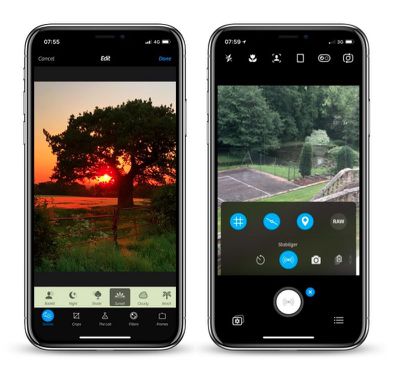
In shooting modes, the manual onscreen wheels and controls include traditional settings like shutter speed, ISO, White Balance, and Macro, with wide-angle and telephoto options available on dual-lens devices. These functions can also be hidden during casual shooting.

With depth capture enabled in Camera+ 2, the depth information is saved alongside the image, and the adjustments in The Lab section of the editor can be selectively applied to distant or close subjects. A collection of filters are also available, with options to adjust their strength and layer them to customize the aesthetic.
camera 2 1
A new Smile mode enables Camera+ 2 to detect smiles and shoot automatically, while a Stabilizer mode shoots only when the iPhone is steady enough to produce a sharp picture. The Slow Shutter mode meanwhile brings the ability to take long exposures, even in daylight, with additional Burst and Timer modes also included.

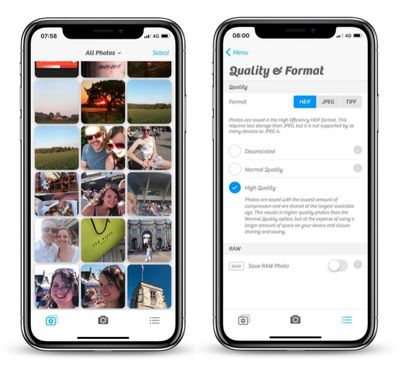
Elsewhere, in a much-requested change, Camera+ now has full Photo Library integration with editing support, with the added ability to switch between the Photo Library and the Lightbox with the tap of a button. Drag and drop gestures on the iPad are supported for copying or sharing photos, while Files and iTunes integration are also available for transferring pictures to a computer or other apps.

Camera+ 2 is available to download on the App Store for $2.99 and requires iOS 11 or later. [Direct Link]


Top Rated Comments

urtules Avatar
101 months ago
Really what I miss most from traditional cameras is the option to have the date and time stamp automatically applied to images in the proper bottom corner location. Without having to manually add it later.

That’s the feature I want. Otherwise, the built in camera seems adequate for me.
You mean like water mark, why you want to do this unless for print? Image file contains metadata already. Do you add label with GPS coordinates and time zone as well?
Score: 3 Votes (Like | Disagree)
gaanee Avatar
101 months ago
Is this new app related to the original Camera+ app? This not just upgrade for Camera+ app. and looks like they formed a new company with a similar name to that of the original Camera+: both sellers are different but have LateNiteSoft in the name.
If indeed it's the same developers, I wonder why they chose to list this app as from a separate developer and not just alongside the original Camera+.. possibly to avoid backlash from customers since this is a paid app and not a free upgrade
Score: 2 Votes (Like | Disagree)
Mic'sBook Avatar
101 months ago
Really what I miss most from traditional cameras is the option to have the date and time stamp automatically applied to images in the proper bottom corner location. Without having to manually add it later.

That’s the feature I want. Otherwise, the built in camera seems adequate for me.
To me, the most wanted feature is the ability to take photos at lower resolution. Sometimes there's no need to take photos at full resolution for receipts, etc. Camera+ (and this Camera+ 2) can do exactly that.

To the best of my knowledge ProCam 5 is another camera app that enables the user to manually control the camera settings though I'm not sure if date stamps are available.

Camera+ is the must-have app and it was the most well-spent HKD $8. I guess I bought it since the iPhone 4 (2010).
Score: 1 Votes (Like | Disagree)
H3LL5P4WN Avatar
101 months ago
Really what I miss most from traditional cameras is the option to have the date and time stamp automatically applied to images in the proper bottom corner location. Without having to manually add it later.

That’s the feature I want. Otherwise, the built in camera seems adequate for me.
Mom, what did I tell you about posting on the internet?

(Seriously, that's what metadata is for. Having anything on the picture, ruins the picture. Any time I'm around her, I turn that off on her camera.)
[doublepost=1527685122][/doublepost]
Halide? Obscura 2? Camera+ 2?

Which one am I supposed to know is best for me?!
Only way to find out is to use them all.
He's pretty much right. I love Halide's GUI, haven't used Obscura 2, and just got Camera+ 2 for nostalgia's sake. It all depends on what you want.

The two camera apps on my main homescreen are Camera.app and Pro HDR X, if for no reason other than I still can't reliably denoise RAW files (and that's what I have Halide for, shooting RAW) on my phone. There's no "one touch" denoise app that I know of.

*goes and looks up Obscura 2*
Score: 1 Votes (Like | Disagree)
flyinmac Avatar
101 months ago
You mean like water mark, why you want to do this unless for print? Image file contains metadata already. Do you add label with GPS coordinates and time zone as well?
For documentation purposes. I cannot legally edit a photo that is taken for documentation purposes.

As soon as I alter the image manually, it loses all value.

And metadata is useless legally.

For other purposes, it is also nicer to look at a photo and have that date and time in the image for easy reference. I don’t have to go and find the original and look at metadata.

And so many actions alter metadata as well.
Score: 1 Votes (Like | Disagree)
daniellidio Avatar
101 months ago
Really what I miss most from traditional cameras is the option to have the date and time stamp automatically applied to images in the proper bottom corner location. Without having to manually add it later.

That’s the feature I want. Otherwise, the built in camera seems adequate for me.
I sometimes need this as well, found a camera app a while a go called Procamera, it's by Cocologics. It adds Date, Time and Timezone. I will upload a file of mine so you can look how it works.

Also it is a really good camera app.

Attachment Image
Score: 1 Votes (Like | Disagree)

Popular Stories

Apple Logo Zoomed

Tim Cook Teases Plans for Apple's Upcoming 50th Anniversary

Thursday February 5, 2026 12:54 pm PST by
Apple turns 50 this year, and its CEO Tim Cook has promised to celebrate the milestone. The big day falls on April 1, 2026. "I've been unusually reflective lately about Apple because we have been working on what do we do to mark this moment," Cook told employees today, according to Bloomberg's Mark Gurman. "When you really stop and pause and think about the last 50 years, it makes your heart ...
wwdc sans text feature

Apple Rumored to Announce New Product on February 19

Thursday February 5, 2026 12:22 pm PST by
Apple plans to announce the iPhone 17e on Thursday, February 19, according to Macwelt, the German equivalent of Macworld. The report, citing industry sources, is available in English on Macworld. Apple announced the iPhone 16e on Wednesday, February 19 last year, so the iPhone 17e would be unveiled exactly one year later if this rumor is accurate. It is quite uncommon for Apple to unveil...
Finder Siri Feature

Why Apple's iOS 26.4 Siri Upgrade Will Be Bigger Than Originally Promised

Friday February 6, 2026 3:06 pm PST by
In the iOS 26.4 update that's coming this spring, Apple will introduce a new version of Siri that's going to overhaul how we interact with the personal assistant and what it's able to do. The iOS 26.4 version of Siri won't work like ChatGPT or Claude, but it will rely on large language models (LLMs) and has been updated from the ground up. Upgraded Architecture The next-generation...
iOS 26

iOS 26.3 and iOS 26.4 Will Add These New Features to Your iPhone

Tuesday February 3, 2026 7:47 am PST by
While the iOS 26.3 Release Candidate is now available ahead of a public release, the first iOS 26.4 beta is likely still at least a week away. Following beta testing, iOS 26.4 will likely be released to the general public in March or April. Below, we have recapped known or rumored iOS 26.3 and iOS 26.4 features so far. iOS 26.3 iPhone to Android Transfer Tool iOS 26.3 makes it easier...
iphone 17 pro dark blue 1

iPhone 18 Pro Max Rumored to Deliver Next-Level Battery Life

Friday February 6, 2026 5:14 am PST by
The iPhone 18 Pro Max will feature a bigger battery for continued best-in-class battery life, according to a known Weibo leaker. Citing supply chain information, the Weibo user known as "Digital Chat Station" said that the iPhone 18 Pro Max will have a battery capacity of 5,100 to 5,200 mAh. Combined with the efficiency improvements of the A20 Pro chip, made with TSMC's 2nm process, the...















